

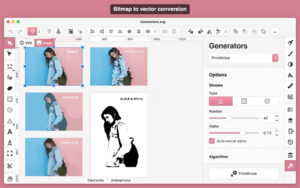
Boxy SVG for Mac v4.112.0 Chinese Activation Version Download
Boxy SVG is a professional vector graphics editor designed for designers and front-end developers, focusing on the creation, editing, and optimization of SVG files. The interface is clean and intuitive, covering the entire workflow from basic drawing to advanced code-level adjustments, catering to both beginners and professionals.
## Core Vector Editing Capabilities
– Comprehensive drawing tools: Offers standard shape tools such as rectangles, circles, straight lines, and polygons, as well as freeform drawing tools like the pen and pencil. It also supports the quick generation of custom shapes such as rings, pies, stars, and teeth, enabling the creation of various icons, illustrations, and vector graphics with precision.
– Path Boolean Operations: Supports operations such as union, intersection, subtraction, exclusion, closure, and inversion, allowing the creation of complex shapes by combining basic graphics, significantly enhancing design efficiency.
– Layer and Arrangement Management: Fully supports multi-layered editing, allowing for free adjustment of layer order, locking, or hiding specific layers. It also supports grouping objects, alignment, rotation, flipping, and layer sorting, making complex project structures clear and controllable.
## Style and Visual Effects
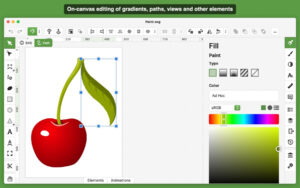
– Fill and Stroke Customization: Supports various fill modes such as solid color, linear gradients, and radial gradients. The stroke can be freely adjusted in terms of width, dotted styles, endpoint shapes, and corner types, adapting to different design styles.
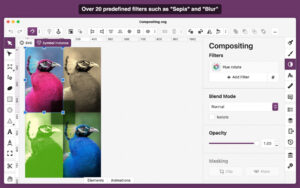
– Visual Effects Support: Allows adding shadows, inner shadows, Gaussian blur, and other effects, enabling the creation of depth and texture, enriching visual expression.
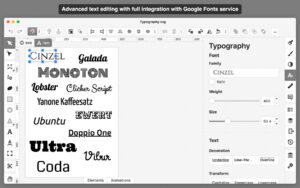
– Professional Text Editing: Supports both regular text and path text editing, with built-in Google Fonts offering over 100 free fonts, allowing flexible adjustment of font, size, and spacing attributes, meeting diverse layout needs.
## Asset Resources and Format Export
– Built-in asset resource library: Integrates Pixabay and other million-level free image and vector libraries, allowing direct access to images and vector elements within the software, without the need to switch to resource sites.
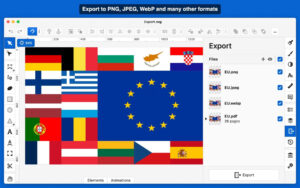
– Multiple Format Compatibility: Native support for saving as SVG and SVGZ formats, with the ability to export to PNG, JPG, WebP, PDF, and HTML5 formats, covering various design delivery, web embedding, and print output scenarios.
## Front-End Developer-Specific Features
– Code-Level Editing and Debugging: Based on the Chromium rendering engine, it includes a built-in SVG/CSS code checker similar to Chrome Dev Tools, allowing direct viewing and editing of the graphic’s underlying code for precise detail control.
– Clean Code Output: Exported SVG code is clean and standardized, retaining ID, class names, and title metadata; it also supports SVG sprite editing, seamlessly integrating with the front-end development workflow.
## Efficient Operation Experience
– Smart Alignment Assistance: Supports manual reference lines, smart snap alignment lines, and grid systems, helping to precisely position graphic elements, ensuring design consistency and standardization.
– Customized Shortcuts: Supports over 100 command shortcuts, adapting to different user habits, significantly enhancing work efficiency.
– Lightweight and Smooth Performance: The software is lightweight, responding quickly, even when handling complex vector files, providing a smooth and stable editing experience.
Version 4.112.0 Update Content:
– New: “File → New from Preset” dialog box
– Fixed: Issues with the font series selection control not displaying ellipsis for long font names
– Fixed: Issues with the color, gradient, pattern, and font series selection controls not displaying dropdown arrow icons
– Fixed: Issues with the “Geometry Panel → SVG → Preset” pop-up panel not opening in extreme scenarios
Software Screenshots:
This resource requires login to download
Log in
Amarramac 4.0.237 Music Enthusiast Sound Enhancer Repair Software Activation Version Download
Downloads:275 | 2026-10-24

MediaInfo for Mac v25.03 Chinese Activation Download
Downloads:3456 | 2026-10-20

SimpleMind for Mac v2.0.2 Chinese Activation Edition Download
Downloads:2219 | 2026-10-19

SnippetsLab for Mac v1.9.3 Code Snippet Manager Chinese Activated Version Download
Downloads:2682 | 2026-10-17


Ratings & reviews
No rating
Let’s rate it.