
Warning: Attempt to read property "slug" on null in /www/wwwroot/www_23mac_com/wp-includes/taxonomy.php on line 4763

Powerful Image Editor Software: Pixelmator Pro for Mac v3.5.8 Chinese Activation Download

  • Introduction
Download
Download now
Join VIP Free download

Description

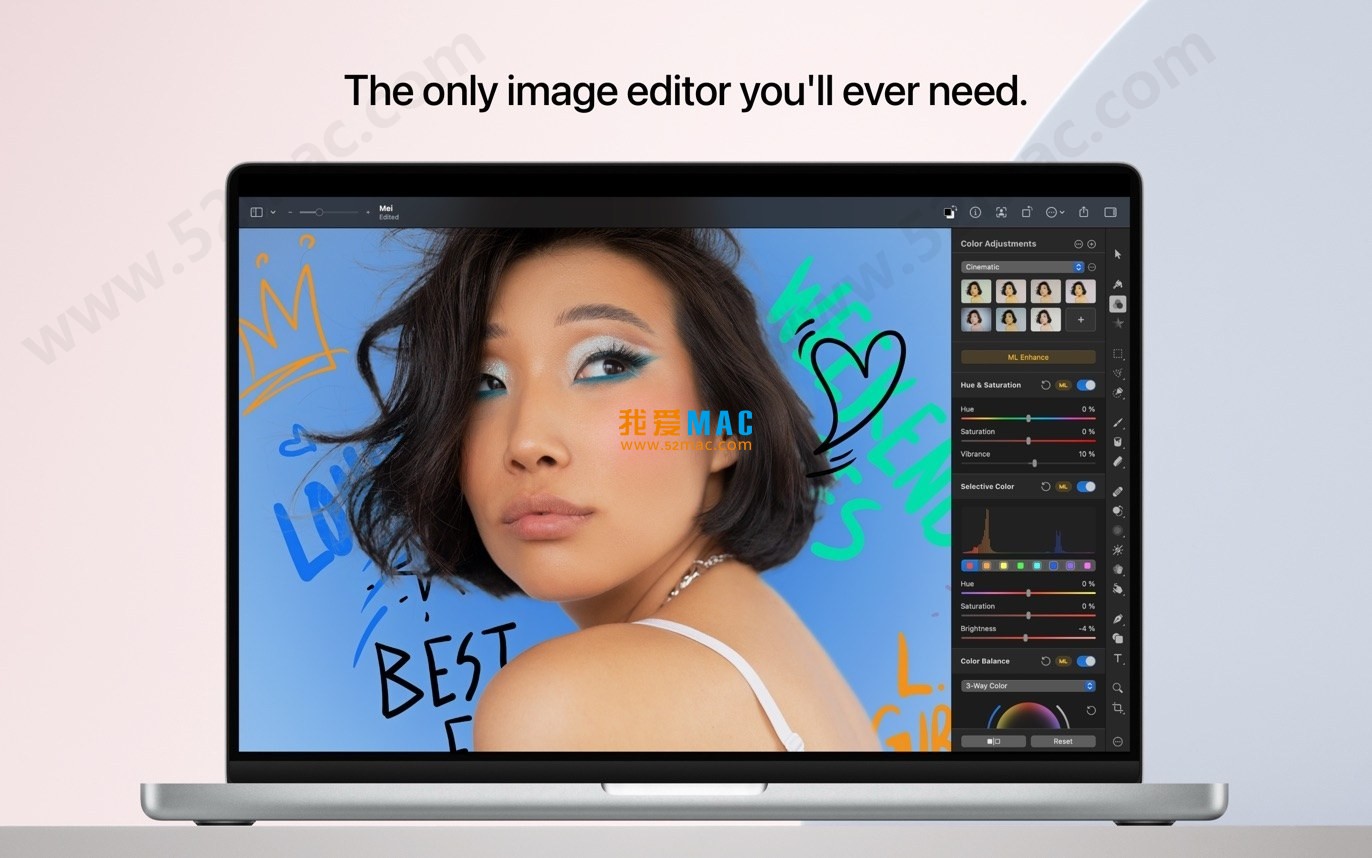
Pixelmator Pro for Mac is a professional-grade image editing software that combines powerful image processing capabilities with an intuitive user interface, aiming to provide a professional-level image editing, graphic design, and photo retouching experience for all users. The software’s outstanding performance and ease of use have made it a favorite among Mac users.

一、核心功能与专业工具

Pixelmator Pro offers a comprehensive suite of advanced image editing tools covering all aspects from basic adjustments to advanced creation:

  • Comprehensive image editing tools: Provides a complete set of editing tools, supporting image enhancement and new image creation.
  • No-destructive editing: Allows for adjustments or reversals of individual editing steps, preserving the original image intact.
  • Object operations and composition: Easily moves, resizes, and arranges objects, creating complex visual compositions.
  • Advanced color adjustment: Uses no-loss color adjustment tools for precise control over image colors.
  • Machine learning enhancements: Machine learning-enhanced features based on Core ML, automatically optimizing photos to the best state.
  • RAW file support: High-level support for RAW formats, allowing direct editing within the software without additional conversion.
  • Digital painting: Offers a series of handmade, customizable dual-texture brushes, fully supporting digital painting tablets.
  • Effects and styles: Includes a rich array of artistic and effects, supporting the saving and sharing of custom adjustments, effects, and layer styles.
  • Removal and repair: Uses removal tools to seamlessly remove defects or objects, cloning image regions, and utilizing a suite of tools for local brightness adjustments.
  • Shape transformation: Flexibly adjusts the shape of objects or regions using transformation tools, suitable for artistic creation or portrait micro-adjustments.
  • Vector graphics: Includes high-quality, customizable vector graphics, supporting the creation of custom vector graphics using the “pen” tool.
  • Layout design: Provides a full suite of layout tools for designing aesthetically pleasing text content.
  • Web optimization: Supports web-optimized image creation, employing advanced compression algorithms to极致减小文件尺寸.
  • Bulk processing: Includes five Automator programs for bulk image processing.

二、机器学习增强的图像编辑

Pixelmator Pro leverages machine learning technology to implement several intelligent editing features:

  • Smart photo enhancement: Algorithms trained on millions of professional photos automatically optimize photos.
  • Automatic layer naming: Automatically generates descriptive names for new layers.
  • Smart cropping: Cropping tool features horizontal line detection, enabling smart straightening of images.
  • Object removal: Uses removal tools for high-fidelity object removal from images.
  • Quick selection tool: Quickly and accurately completes image region selection.

三、兼容性与集成

Pixelmator Pro boasts extensive format support and system integration capabilities:

  • Multi-format support: Supports opening and editing JPEG, TIFF, PNG, PSD, HEIF, SVG, PDF, GIF, BMP, TGA, JPEG-2000, and other mainstream image formats.
  • Photoshop compatibility: Supports opening and editing PSD files with layers.
  • Vector graphics editing: Supports opening and editing SVG vector graphics.
  • Integration with “Photos” application: Can start from the macOS “Photos” application and save edited results back to the original photo library.
  • Convenient sharing: Supports sharing images directly to photos, email, AirDrop, and other applications.

四、版本 3.5.8 更新内容

Pixelmator Pro 3.5.8版本带来了多项功能增强与新特性:

1. 在 PDF 中编辑文本

  • 可将矢量 PDF 中的文本元素作为常规文本图层导入并进行编辑。
  • 使用 Pixelmator Pro 工具对导入文本进行替换、格式化和样式设置。
  • 通过先进的文本数据恢复技术,保留原始文本内容、字体及格式。
  • 即使 Mac 未安装文档中的字体,仍可导入为可编辑文本层,并用可用字体替换。

2. 对 Apple PDF 的扩展支持

  • 支持编辑由 Keynote、Safari 或 Pages 创建的 PDF 中的文本图层,开启新的工作流程。
  • 从网页创建的 PDF 在安装了 SF Pro 字体的情况下,可保持其原始外观与字体。

3. 自定义文字笔画

  • 可为文字图层添加完全自定义的描边(笔画),提供更多排版设计自由度。
  • 在样式工具设置中,可选择笔画位置(内侧、中心、外侧)、端点样式、边角样式,并可创建虚线笔画。
  • 支持组合多个不同风格的笔画,并可随时重新排列,同时保持文字可编辑。

4. 便当网格模板

  • 新增 12 个可定制的便当网格模板,适用于展示产品、应用功能,尤其适合网络及社交媒体。
  • 提供多种调色板选项,以便匹配产品风格或特定主题。

五、软件截图

以下是 Pixelmator Pro for Mac v3.5.8 的运行界面截图:
Pixelmator Pro 软件界面截图 1
Pixelmator Pro 软件界面截图 2
Pixelmator Pro 软件界面截图 3
Pixelmator Pro 软件界面截图 4
Pixelmator Pro 软件界面截图 5

Download info

This resource requires login to download

Log in
Note: This resource is for informational purposes. By using this resource, you agree that you accept full responsibility to the copyright holder. For questions, please contact us.

Ratings & reviews

4.9

(Maximum 5 ratings, total 30 user reviews)

Let’s rate it.

  • 5 stars
    93.3%
  • 4 stars
    6.7%
  • 3 stars
    0%
  • 2 stars
    0%
  • 1 stars
    0%

You may also like

More
×
Powerful Image Editor Software: Pixelmator Pro for Mac v3.5.8 Chinese Activation Download
iMac — One-stop Mac Software Download Platform
Social login
captcha
Social login