

Snagit 2026 for Mac v2026.4.2 Screen Capture and Recording Software Activated Version Download
Snagit is a professional-grade screen capture and visual content creation tool launched by TechSmith, part of the Camtasia product suite. It integrates the entire workflow of screenshot capture, screen recording, annotation and editing, content generation, and multi-channel sharing. It replaces basic screenshot tools with limited functionality and, through intelligent capture capabilities, rich annotation materials, and lightweight editing features, helps users quickly create operation tutorials, product demos, work documents, communication materials, and more, greatly improving the efficiency of visual communication and information delivery. It is a mainstream productivity tool for scenarios such as office work, education and training, and product design.
Features:
**Full-scenario screen capture capabilities**
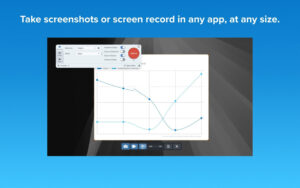
– Supports multiple screenshot modes such as full-screen capture, custom area capture, automatic window capture, and fixed-size capture, precisely matching screenshot needs in different scenarios.
– Features scrolling long screenshot functionality, capturing complete web pages, long documents, data tables, chat records, and other content beyond the screen range with one click, automatically stitching them into a complete long image without manual processing.
– Built-in AI step-by-step recording function automatically generates numbered step-by-step screenshots based on operation clicks, quickly creating operation guides and SOP documents.
– Equipped with OCR text recognition capability, intelligently extracting text content from screenshots, supporting direct editing and copying, eliminating the hassle of manual transcription.
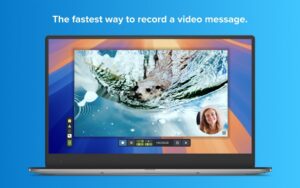
– Supports video recording of the full screen or any area with no time limit, and can simultaneously record camera footage, microphone audio, and system audio.
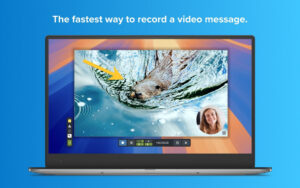
– During recording, you can directly draw arrows, shapes, and step numbers on the screen to highlight key content in real time without post-editing.
– Supports scheduled recording with customizable auto-stop duration, eliminating the need to manually monitor and end the recording.
**Image editing and intelligent annotation**
– Built-in rich annotation materials such as arrows, speech bubbles, geometric shapes, highlight blocks, magnifiers, text, step numbers, and stamps, with customizable styles, colors, and properties to clearly mark key information.
– Features intelligent element editing, automatically recognizing UI elements in screenshots, supporting free movement, resizing, or direct deletion of elements with automatic background filling, so screenshots can be modified without retaking them.
– Supports intelligent masking and manual blurring to quickly hide private data, account information, and confidential content, ensuring sharing security.
– Provides basic image adjustment tools such as cropping, scaling, and rotation with simple and intuitive operations.
– Supports one-click background removal to generate transparent background materials, which can be used for avatars, product images, and presentation materials without complex retouching.
– Built-in spotlight effect weakens surrounding areas and guides the viewer’s focus to specified content.
– Supports simplified graphics functionality, converting complex screenshots into concise diagrams to improve content readability.
– Built-in multiple professional layout templates quickly apply screenshots to templates, generating standardized visual content such as operation tutorials, training documents, and announcement explanations with one click.
**Lightweight video production capabilities**
– Comes with basic video editing features, supporting cropping and deleting redundant clips to quickly trim video content without professional editing software.
– When recording camera footage, supports background blur or custom virtual backgrounds to keep the image clean and professional.
– Features one-click audio noise reduction, removing background noise from recorded audio to improve sound clarity.
– Can export recorded short videos as GIF, APNG, and other animated formats with customizable quality and frame rate, suitable for social sharing and document embedding.
– Supports combining a series of screenshots in order and adding voiceover audio to quickly generate operation demonstration videos, ideal for creating lightweight tutorials.
– Supports extracting a single frame from a video and saving it as an image, making it easy to capture key moments.
**Asset management and multi-channel sharing**
– Unified management of all captured images, videos, and template materials, supporting categorized search and batch processing.
– The recent captures tray provides quick access to all recently captured materials, supporting pinning frequently used materials and drag-and-drop sorting to improve retrieval efficiency.
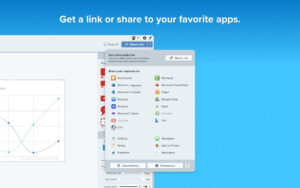
– Can generate exclusive sharing links to share content without uploading attachments; recipients can view directly through a browser.
– Supports direct sharing to office collaboration platforms such as Slack, Box, OneDrive, and Google Drive, and can also be inserted directly into Word, Pages, PowerPoint, and other documents.
– Supports sending recorded videos directly to Camtasia Editor for advanced professional editing, or exporting to Camtasia Online for online collaborative editing.
**Efficiency optimization and enterprise-level support**
– Can save commonly used capture parameters as presets, configure global shortcuts, and launch corresponding capture modes with one click.
– Supports batch annotation and batch export of multiple materials, improving the efficiency of batch content production.
– Provides dedicated enterprise deployment configuration tools, supporting batch deployment, feature permission control, and security policy configuration.
– Supports over ten output formats including PNG, JPG, TIFF, BMP, PDF, MP4, MOV, and GIF, adapting to various usage scenarios.
Version 2026.4.2 Update Details:
New Features
– Record to Camtasia Online
Added the ability to record videos directly to Camtasia Online (our web-based video editor), providing you with richer editing options and convenient collaboration experience.
– Offers hundreds of layouts, effects, dynamic backgrounds, and more to help you customize your video style.
– Invite team members to collaborate and add their own video clips to video projects.
– In the “Video” tab of the Snagit capture interface, select “Open with: Camtasia Online” to use it.
Feature Updates
– Added an update frequency option in Snagit settings: you can choose to receive “Standard Updates” (get them first) or “Delayed Updates” (receive after a longer rollout period).
– Added a notification to inform users when their media files will be sent to Camtasia Online for subsequent editing or collaboration.
– You can now set automatic stop for video capture. In the recording toolbar, click the “Timer” button to set the recording duration in hours, minutes, and seconds.
– Updated the sharing target options for Microsoft Word and Pages: you can now choose to insert images into a new document or select from an open document. Open “Sharing Settings” and select Microsoft Word or Pages to set the default behavior.
– Improved pagination when saving scrolling captures as PDF.
IT Administrator Updates
– Added a deployment tool to make enterprise-level Snagit configuration easier. For details, please refer to the “Snagit for macOS Enterprise Installation Guide.”
– Updated cpp-httplib to version 0.51.0 to fix CVE-2026-54919.
– Updated the Snagit third-party license agreement file to cover newly added libraries.
– Improved security when loading files from disk.
Bug Fixes
– Fixed a crash that could occur when removing the Google Drive sharing target.
– Fixed a crash that could occur during Step Capture in certain situations.
– Fixed an issue where the feedback survey option remained in the Snagit menu account options after being disabled.
– Fixed an issue where hovering over the “Share” dropdown menu item might not highlight as expected.
– Fixed an issue where Snagit could not open after deployment in certain situations.
– Fixed an issue where the “Reduce Retina video recording resolution” setting was not applied during single-window capture.
– Fixed an issue where capture data could not be retained and recovered if a rare crash occurred during step capture.
– Fixed an issue where applied effects were missing from copied images.
– Fixed an issue where sharing .snagx files saved outside the Snagit library to Camtasia Editor did not include unsaved changes.
– Fixed an issue where step captures could not be exported from the library view.
– Fixed an issue where Snagit might display a “Unable to verify license” error and ask the user to retry.
– Fixed an issue where the order of images shared consecutively to Microsoft Word was scrambled.
– Fixed an issue on macOS 27 where the picture-in-picture camera could not automatically snap to the corner of the recording area.
– Other bug fixes and stability improvements.
Software Screenshots:
This resource requires login to download
Log in
MacDroid for Mac v1.1 Android Device File Transfer Chinese Activated Version Download | Love MAC
Downloads:455 | 2026-10-30

Acorn for Mac v8.7 Lightweight Image Editor Activated Version Download
Downloads:2836 | 2026-10-24

Shottr for Mac v1.7.2 – Small and Fast Screenshot Tool Activated Version Download
Downloads:658 | 2026-10-18

Snagit 2024 for Mac v2024.3.1 Screen Capture Software Activated Version Download
Downloads:1411 | 2026-10-18


Ratings & reviews
4.6
(Maximum 5 ratings, total 31 user reviews)
Let’s rate it.