

Efficient File Sharing Tool: Dropshare for Mac v6.14 Activation Download
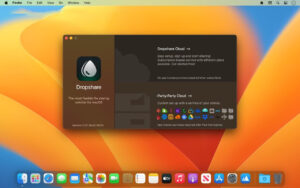
Dropshare is a highly efficient file sharing and screenshot uploading tool designed specifically for macOS. It runs in the menu bar and allows users to quickly upload files, screenshots, screen recordings, and text content to their chosen cloud storage or private servers, generating shareable download links. The software emphasizes private storage and high customization, directly transmitting data to the user’s designated storage destination without passing through third-party intermediaries, ensuring data ownership and security. Dropshare is particularly suitable for designers, developers, content creators, and other professionals who frequently share files and screenshots, making it a benchmark tool in the Mac file sharing sector.
### Features:
#### One. Multi-Mode Convenient Upload
– **Drag-and-Upload**: Files or folders can be dragged directly to the menu bar icon or upload area to start the upload process, making the operation intuitive and efficient.
– **Keyboard Shortcuts**: Supports custom global shortcuts to trigger upload, screenshot, screen recording, and other operations with a single keystroke.
– **Shared Menu Extension**: Integrates with macOS system sharing extensions, allowing users to call Dropshare from any application.
– **Shortcut Integration**: Supports Apple Shortcuts for deep integration with automation workflows.
– **Clipboard Upload**: Supports uploading images or text content directly from the clipboard.
– **Finder Selection Upload**: Supports uploading files selected in Finder via a keyboard shortcut.
#### Two. Screen Capture and Annotation Editing
– **Automatic Screenshot Upload**: Screenshots are automatically uploaded and generate shareable links, similar to native system features.
– **Built-in Annotation Tools**: Supports adding arrows, text, boxes, and blurred mosaic annotations, meeting quick annotation needs.
– **Automatic De-Identification**: Automatically identifies and hides sensitive information such as credit card numbers and email addresses from screenshots.
– **Layer Management**: Annotation elements are managed in layers, supporting undo/redo operations for more flexible editing.
– **Watermark Function**: Allows adding custom text or image watermarks to screenshots, with adjustable transparency.
– **Compatibility with External Annotation Apps**: Supports using external annotation tools like Preview or Skitch for editing.
#### Three. Screen Recording Functionality
– **Multiple Format Output**: Supports recording in high-definition video formats (24/60 FPS) or dynamic GIF animations.
– **Region Selection**: Allows recording full screen or specific regions, adapting to various scenarios.
– **Multi-Mic Recording**: Supports recording both microphone audio and system internal audio simultaneously.
– **Camera Overlay**: Overlay camera footage during recording, suitable for creating tutorial and demonstration videos.
– **Key Display**: Displays keyboard key presses during recording for teaching and demonstration purposes.
– **Pause/Resume**: Supports pausing and resuming recording during the process to improve efficiency.
#### Four. AI Smart Assistance
– **Smart File Name Generation**: Based on the OpenAI visual model, automatically generates semantic file names for screenshots.
– **Daily Free Usage**: Includes a limited number of daily AI usage, which can be unlocked with a custom API key for unlimited use.
#### Five. Wide Storage Service Support
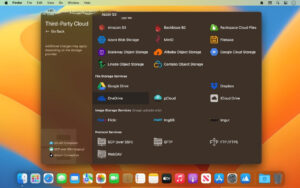
Supports **36+ types** of cloud storage and protocols, categorized into four types:
**Object Storage**
– Amazon S3 and all S3 API-compatible services (Cloudflare R2, DigitalOcean Spaces, Backblaze B2, MinIO, Google Cloud Storage, etc.)
– Microsoft Azure Blob Storage, Rackspace Cloud Files, Scaleway, Linode Object Storage, etc.
**File Storage**
– Google Drive, Dropbox, OneDrive, Box, pCloud, Nextcloud, iCloud Drive, Zoho WorkDrive, kDrive, etc.
**Image Hosting**
– Imgur, ImgBB, Flickr, vgy.me, Lensdump, etc.
**Protocol**
– SCP over SSH, FTP/FTPS, SFTP, WebDAV, supports connecting to self-hosted servers.
#### Six. Security and Privacy Protection
– **End-to-End Encryption**: Files are encrypted locally before uploading, ensuring protection throughout the transmission and storage process.
– **Password Protected Links**: Users can set access passwords for shareable links, allowing only authorized users to view them.
– **Link Expiry**: Supports setting expiration times for links, automatically deleting remote files after expiration.
– **Random File Names**: Generates random file names during upload to avoid path leaks.
– **Direct Transfer**: Files are directly transferred from the Mac to the storage provider, bypassing Dropshare’s server for secure transmission.
#### Seven. Custom Landing Pages
– **Multiple Elegant Templates**: Includes multiple professionally designed landing page styles, allowing for quick switching.
– **Complete Customization**: Supports customizing landing pages using HTML, CSS, and JavaScript, creating a branded sharing experience.
– **File Preview**: Landing pages support online previews of images and documents.
#### Eight. Multi-Device Synchronization and Management
– **Upload History Sync**: Syncs upload history across Mac, iPhone, and iPad through iCloud.
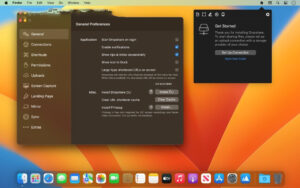
– **Configuration Sync**: Preferences and storage connection configurations can be synchronized across devices.
– **Multiple Connection Management**: Supports configuring multiple upload targets, allowing quick switching via keyboard shortcuts for personal and work purposes.
– **History Management**: Maintains complete upload history, supporting search, copy links, and deletion of remote files.
Version 6.14 Update Highlights:
New Features:
– **Storage Providers**: Supports Bunny object storage.
– **Screen Recording**: Fixes issues with white and darkened colors on Mac devices with wide color gamut (P3) displays. Also fixes recording anomalies when using external displays (including AirPlay mirroring).
Software Screenshots:
This resource requires login to download
Log in-for-Mac-迷幻平台动作游戏.png)
Mystic Platform Action Game: Ultros for Mac – Download and Activation Version
Downloads:1711 | 2026-10-23

OmniReader Pro for Mac v2.9.10 Chinese Activation Download
Downloads:2747 | 2026-10-20

OmniGraffle Pro for Mac v7.22.4 Chinese Activation Version Download
Downloads:1734 | 2026-10-19

TotalFinder for Mac v1.14.0: Finder Assistant Plugin and Companion for Mac Download – Chinese Activation Version
Downloads:1016 | 2026-10-19


Ratings & reviews
No rating
Let’s rate it.