



WonderPen for Mac v2.3.4 – Professional Writing Software (Chinese Activated Version) Download
This page provides WonderPen for Mac v2.3.4 – Professional Writing Software (Chinese Activated Version) Download | LoveMac. Tested and working. If you encounter a dead link or cannot install after downloading, please leave a comment to contact us.
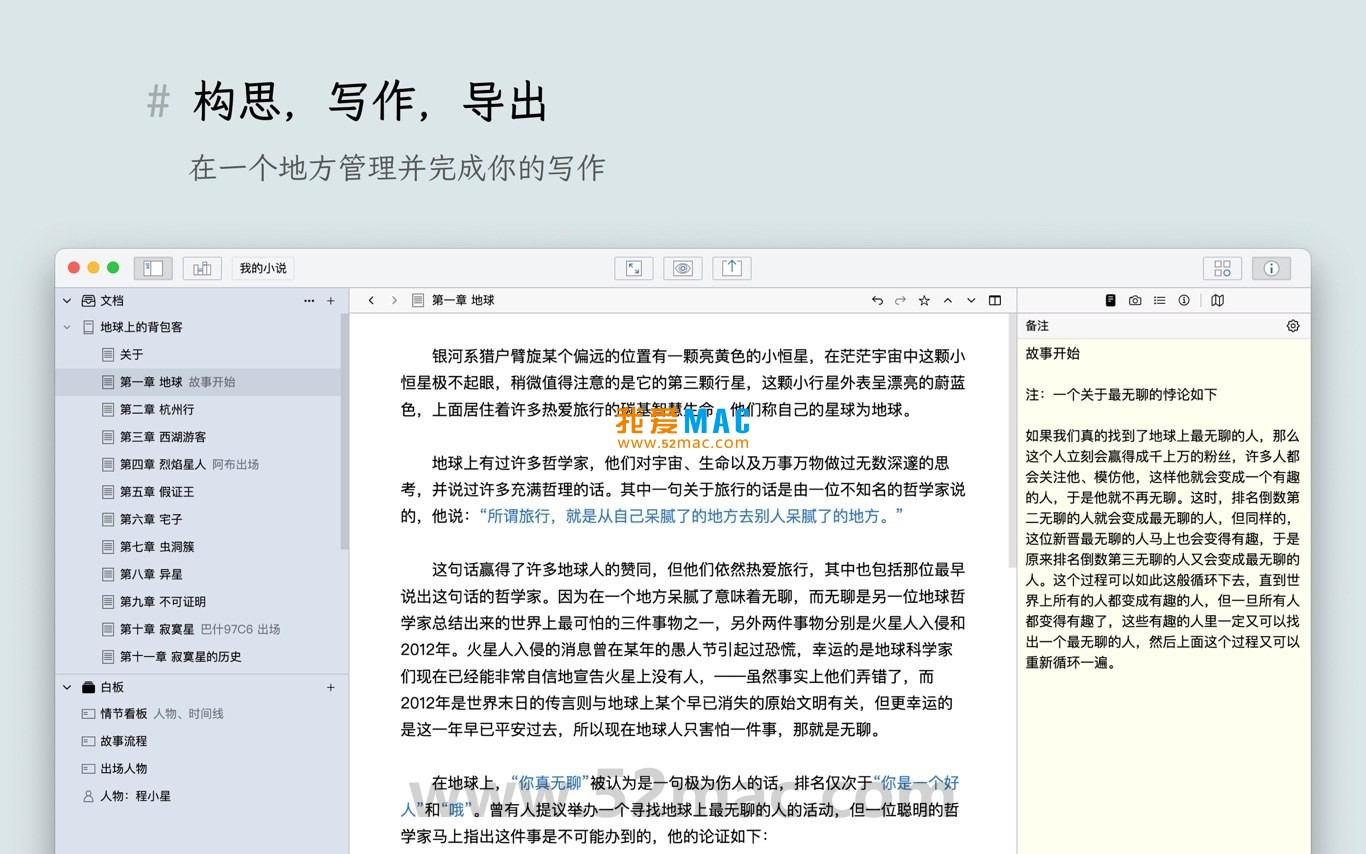
WonderPen for Mac is an intuitive and powerful professional writing software designed for writers, students, content creators, and writing enthusiasts. It provides an efficient and focused creative environment to help users easily complete the entire process from brainstorming to final draft.
This software integrates multiple practical features to enhance writing efficiency and experience:
This update mainly optimizes the user experience and enhances stability. Specific contents include:
Below are actual interface screenshots of WonderPen for Mac:
To help you use WonderPen for Mac smoothly, we have prepared a detailed installation guide. Please follow the steps strictly to avoid missing files or permission issues.
First, download the WonderPen for Mac v2.3.4 Chinese Activated Version installer from the link we provide. The file is usually in .dmg format. After downloading, it is recommended to verify file integrity to ensure it was not corrupted during transfer.
Open “System Preferences” -> “Security & Privacy” -> “General” and make sure “App Store and identified developers” is selected under “Allow apps downloaded from”. If you see a “damaged” prompt during installation, check Gatekeeper settings first.
Double-click the downloaded .dmg file, and the system will mount a virtual disk. In the window that appears, you will see the “WonderPen” app icon and a shortcut to the “Applications” folder. Drag the “WonderPen” icon to the “Applications” folder on the right to complete installation. This process usually requires your Mac login password for authorization.
After installation, you can find the WonderPen icon in Launchpad or the “Applications” folder. When opening it for the first time, the system may prompt “WonderPen is an application downloaded from the Internet. Are you sure you want to open it?” Click “Open”.
After opening WonderPen, you will enter the main interface. If it is the activated version, it usually recognizes the activation information automatically; if an activation window pops up, copy and paste the serial number or activation code we provide. After successful activation, it is recommended to immediately set the auto-backup path to prevent accidental data loss: click “WonderPen” in the menu bar -> “Preferences” -> “Backup”, check “Auto backup on quit” and select a backup directory.
Based on user feedback, we have compiled the following 5-10 high-frequency questions to help you quickly resolve common issues.
A: This is caused by macOS security mechanisms. Open “Terminal” (in “Applications/Utilities”), enter the command: sudo spctl --master-disable, then press Enter and enter your password. This allows apps from any source to run. If the problem persists, check whether the file was downloaded completely.
A: Open the document you want to export in WonderPen, click “File” in the menu bar -> “Export” -> “Word Document”. The software will generate a .docx file. If the layout is messed up after export, check whether the Markdown syntax is standard, especially the code for images and tables.
A: After entering focus mode, click the settings icon (gear-shaped) in the upper right corner of the screen. In the panel that appears, you can adjust the background color or image, font size, line spacing, and typewriter mode (cursor centered). These settings take effect in real time, allowing you to find the most comfortable writing state.
A: Yes. Whiteboard mode is mainly used for brainstorming and organizing thoughts. You can add sticky notes and draw mind maps on the whiteboard. After completing your brainstorming, select all elements, right-click and choose “Copy as Text”, then paste into the main document. Alternatively, you can save the whiteboard content as a separate document.
A: WonderPen itself does not have a built-in cloud sync server. However, it supports storing document libraries in third-party cloud drive directories such as iCloud Drive, Dropbox, or OneDrive. Simply select a cloud drive folder when creating or moving a document library to achieve multi-device sync. Note: before syncing, make sure WonderPen is closed on all devices to avoid file conflicts.
A: WonderPen has a recycle bin feature by default. In the document library directory on the left, find and click the “Trash” folder. Recently deleted documents will be listed there. Right-click the document you want to recover and select “Restore”. If the trash has been emptied, check the backup folder you previously set.
A: The default save shortcut in WonderPen is Command + S. If you prefer another combination, you can customize it in “Preferences” -> “Shortcuts”. Make sure it does not conflict with system or other software shortcuts. If it still doesn’t work after customization, restart WonderPen.
Mastering WonderPen shortcuts can greatly improve writing efficiency. Below is a list of common shortcuts organized for writing scenarios, covering WonderPen-specific operations and general macOS operations.
| Function Category | Shortcut Combination | Specific Action |
|---|---|---|
| File Operations | Command + S |
Save current document |
| File Operations | Command + Shift + S |
Save As (duplicate current document) |
| Editing Operations | Command + Z |
Undo last action |
| Editing Operations | Command + Shift + Z |
Redo (restore undo) |
| Navigation and Search | Command + F |
Search in current document |
| Navigation and Search | Command + Option + F |
Full-text search and |
This resource requires login to download
Log in
OmmWriter for Mac v1.61 Focused Writing Tool Activated Version Download
Downloads:1619 | 2026-10-17

WonderPen for Mac v1.8.4 – Professional Writing Software (Chinese Activated Version) Download
Downloads:2692 | 2026-10-17
WonderPen for Mac v2.3.6 – Professional Writing Software (Chinese Activated Version) Download
Downloads:1083 | 2026-10-17

Storyist 4 for Mac v4.3.9 Novel Story Screenwriting Writing Tool Activated Version Download
Downloads:1641 | 2026-10-17


Ratings & reviews
No rating
Let’s rate it.