
WonderPen for Mac v2.0.3 – Chinese Activated Version Download

  • Introduction
Download
Download now
Join VIP Free download

Description

This page provides WonderPen for Mac v2.0.3 – Chinese Activated Version Download | 爱上MAC. It has been tested and works. If you encounter a dead link or cannot install after downloading, please leave a comment to contact us.

WonderPen is a modern writing app designed exclusively for macOS, dedicated to providing a smooth and efficient writing experience for authors, students, content creators, and writing enthusiasts. Whether it’s a short essay or a lengthy novel, it helps you focus on content creation and efficiently manage complex document structures.

As a professional tool deeply rooted in the writing field, WonderPen has won the trust of many writers with its unique tree-structured directory management, native Markdown support, and full-screen focus mode. According to user feedback on platforms like MacUpdate, its stability and ease of use rank among the best in similar software.

1. Core Features

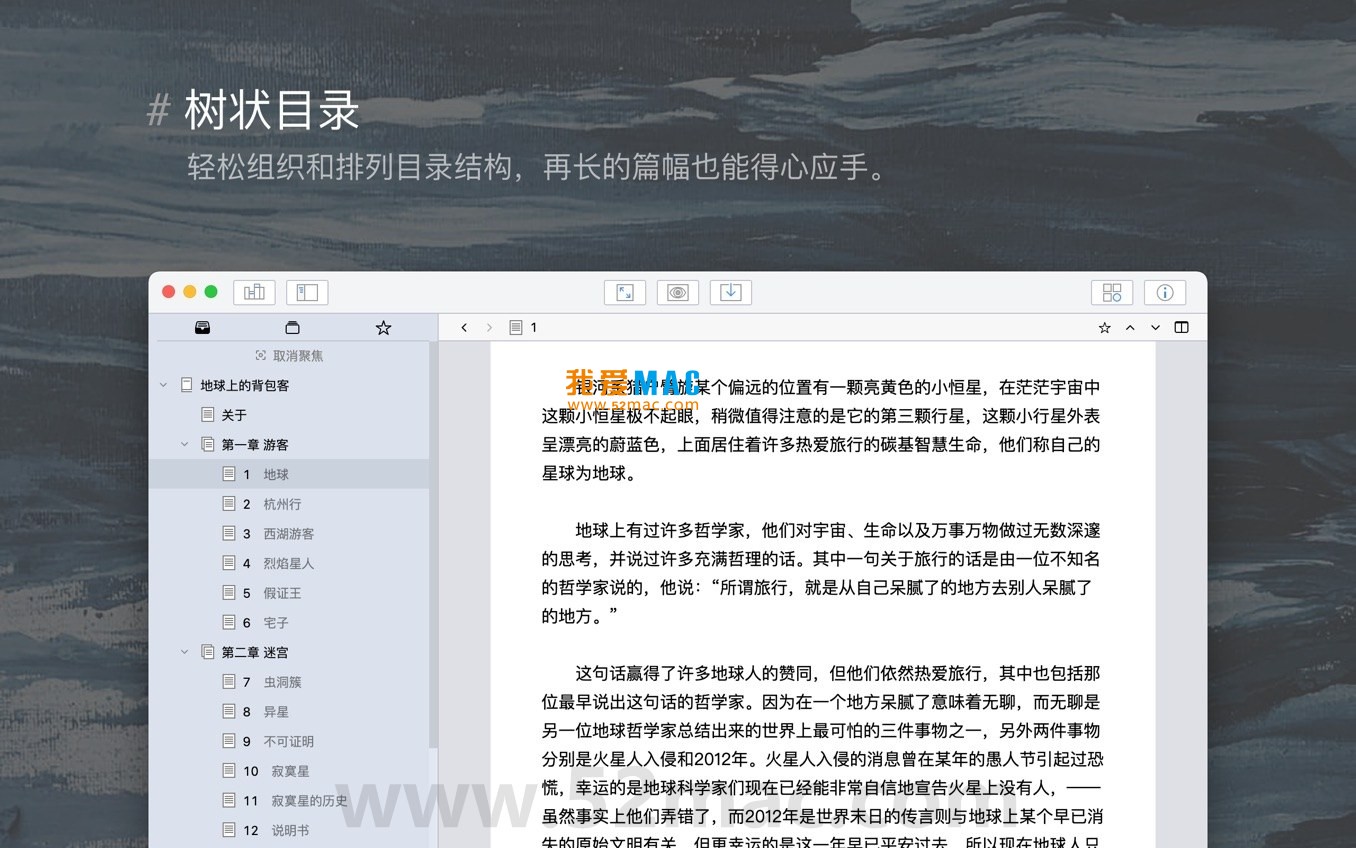
  • Tree-structured multi-level directory management: Supports drag-and-drop to freely adjust document order and nesting, making the structure of long works clear and intuitive.
  • Markdown editor: Built-in concise and efficient text editor with full Markdown syntax support, allowing writing and formatting simultaneously.
  • Full-screen focus mode: One-click switch to a distraction-free interface, helping you immerse in writing and improve productivity.
  • Multi-format export: Supports exporting documents to images, PDF, Word, HTML, and other common formats for easy sharing and publishing.
  • Whiteboard mode: Provides a free-layout canvas where you can add sticky notes, tables, kanban boards, etc., suitable for brainstorming, outlining, and idea collection.
  • Auto-save and backup: Documents are automatically saved in real time, with support for data backup and import/export to ensure writing content safety.
  • Document notes: Add notes to each document individually, convenient for recording creative ideas, reference materials, or revision suggestions.
  • Node focus: Focus on a specific node in the document tree, temporarily hiding other content to help concentrate on local structure.
  • Full-text search and replace: Provides quick full-text search and batch replace functions for easy revision of long texts.
  • Night mode: Supports interface theme switching to reduce visual fatigue during long writing sessions.

2. Version 2.0.3 Update Notes

This update mainly focuses on performance and stability optimization, including:

  1. Overall performance optimization: Improved software response speed and smoothness;
  2. Fixed settings reset issue: Fixed the issue where option settings were unexpectedly reset in some cases;
  3. Fixed compatibility issue: Fixed compatibility issues with the PopClip extension tool;
  4. Corrected display anomaly: Fixed the cursor display anomaly when line height is large;
  5. Fixed operation failure error: Fixed the error of document deletion failure in specific scenarios;
  6. Other improvements: Detail adjustments and user experience improvements.

3. Software Screenshots

Below are actual interface screenshots of WonderPen for Mac:

WonderPen for Mac main interface and document tree structure
WonderPen editor and Markdown support
WonderPen whiteboard mode and sticky notes
WonderPen full-screen focus mode interface
WonderPen night mode and export options

4. Detailed Installation Guide

Before installing WonderPen for Mac v2.0.3, please ensure your Mac is running macOS 10.13 or later. Here are the complete steps:

  1. Download the software: Click the download link provided on this page to get the WonderPen_2.0.3.dmg file. It is recommended to use Safari or Chrome to avoid interruptions.
  2. Open the DMG file: Double-click the downloaded .dmg file, and the system will automatically mount a virtual disk. You will see the “WonderPen” app icon and an Applications folder shortcut.
  3. Drag to install: Drag the “WonderPen” icon to the Applications folder on the right. This will copy the software to your Applications directory.
  4. First launch: Go to the “Applications” folder in Finder, find the “WonderPen” icon, and double-click to open. If the system prompts “cannot verify developer”, go to “System Preferences” > “Security & Privacy” > “General” and click “Open Anyway”.
  5. Complete activation: If it’s the activated version, the software will automatically recognize the license file. If not automatically activated, copy the provided activation code into the “Help” > “Activate” window and click confirm.
  6. Verify installation: After launching, you will see the main interface. Try creating a new document and check if the Markdown editor and tree directory functions work properly.

During installation, if you encounter permission issues, ensure your user account has administrator privileges. For macOS Ventura and later, you may need to enter your system password to authorize installation.

5. FAQ

We have compiled the most frequently asked questions from users to help you quickly resolve any confusion:

  • Q1: Does WonderPen support a Chinese interface?
    A: Yes, WonderPen v2.0.3 includes a Chinese language pack and automatically matches the system language after installation, no extra settings needed.
  • Q2: How to export to Word format?
    A: In the document editing interface, click “File” > “Export” in the menu bar and select “Word (.docx)”. It is recommended to preview the layout before exporting.
  • Q3: What to do if the software lags or crashes?
    A: First try restarting WonderPen. If the problem persists, check if too many document nodes are open. It is recommended to disable “Real-time syntax highlighting” in “WonderPen” > “Preferences” to improve performance.
  • Q4: How to back up my writing data?
    A: WonderPen documents are stored by default in ~/Library/Application Support/WonderPen/. You can manually copy this folder for backup, or use Time Machine for automatic backup.
  • Q5: What is the difference between the activated and free versions?
    A: The activated version unlocks all features, including unlimited document nodes, advanced export options (such as PDF bookmarks), and whiteboard mode. The free version is limited to creating 10 document nodes.
  • Q6: Can WonderPen sync with iCloud?
    A: Currently WonderPen does not support direct iCloud sync, but you can place the document library folder in iCloud Drive for manual sync. Future versions may add cloud sync support.
  • Q7: How to reset software settings?
    A: After closing WonderPen, open “Terminal”, type defaults delete com.wonderpen and press Enter to restore all settings to default. Note that this will clear your preference configuration.
  • Q8: Why are images not displayed in Markdown preview?
    A: Please ensure the image path is absolute or relative. If the image is outside the document library, it is recommended to copy the image to the images folder in the document library before referencing.
  • Q9: Does WonderPen support M1/M2/M3 chips?
    A: Fully supported. WonderPen v2.0.3 has been natively optimized for Apple Silicon, running more efficiently than Intel chips under Rosetta 2 translation.
  • Q10: How to contact technical support?
    A: You can contact us via the comment section on this page, or send an email to the support email provided on the official website. We usually reply within 24 hours.

6. Common Mac Shortcuts Table

The following table summarizes the most efficient shortcut combinations in WonderPen to help you improve writing speed. It is recommended to memorize these operations to reduce mouse dependency:

Shortcut Function Use Case
Cmd + N New Document Quickly create a new chapter or essay
Cmd + Shift + N New Folder Organize document tree structure
Cmd + Option + F Toggle Full-screen Focus Mode Enter distraction-free writing state
Cmd + B Bold Selected Text Quick formatting in Markdown writing
Cmd + I Italicize Selected Text Emphasize key content
Cmd + K

Download info

This resource requires login to download

Log in
Note: This resource is for informational purposes. By using this resource, you agree that you accept full responsibility to the copyright holder. For questions, please contact us.

Ratings & reviews

No rating

Let’s rate it.

  • 5 stars
  • 4 stars
  • 3 stars
  • 2 stars
  • 1 stars

You may also like

More
×
WonderPen for Mac v2.0.3 – Chinese Activated Version Download
iMac — One-stop Mac Software Download Platform
Social login
captcha
Social login