
DaVinci Resolve Studio for Mac v21.1.1 – DaVinci Color Grading Chinese Activated Version Download
DaVinci Resolve Studio is the world’s leading full-process film and video post-production platform, integrating professional editing, cinematic color grading, visual effects compositing, motion graphics design, and Fairlight audio production. It utilizes 32-bit floating-point color processing and patented YRGB color science, supporting content output from high-definition short videos to 8K and even 32K masters, making it an industrial-grade creative tool in Hollywood.
## 1. Full-scenario Professional Editing System
– **Dual-mode editing workflow**: The Cut page is designed for quick material organization and rough cuts, supporting intelligent material classification, automatic audio-video synchronization, and one-click rough cut to finished product; the Edit page provides a complete timeline editing system, covering all types of trim operations such as ripple, roll, slip, and slide. Dynamic trim mode allows real-time preview of editing effects, and trim editor operations can simultaneously affect all selected edit points. Mouse-based editing operations also support audio preview and can independently handle pure audio clip editing.
– **Professional multicam editing**: Supports synchronized editing of up to 64 cameras, automatically aligning materials based on timecode, audio waveforms, or in/out points; freely switch between single-viewer and multi-viewer modes. The synchronized bin multicam view can display recording timecode and frame numbers, suitable for efficient editing of large-scale documentaries, galas, and live broadcast projects.
– **Intelligent subtitles and text editing**: Built-in AI speech transcription function, supporting automatic subtitle generation, batch editing, and intelligent timeline alignment. It supports multi-layer subtitle tracks such as pure Text+, MultiText, etc., and can directly trim corresponding audio and video content based on subtitle clips. It fixes detailed issues such as vertical timeline subtitle cropping and material aspect ratio orientation adaptation.
– **Full-format media management**: Native support for over a hundred video, audio, image, and professional camera RAW formats. Built-in media pool, bins, and a complete metadata management system, supporting custom markers, color labels, and metadata burn-in. It can display source material feet and frame numbers in the output image, efficiently managing large project materials.
## 2. Cinematic Professional Color Grading System
– **32-bit floating-point color engine**: Adopts DaVinci Wide Gamut color space, supports full-process HDR production, compatible with mainstream HDR standards such as HDR10+ and Dolby Vision, accurately restoring cinematic color gradation and light-shadow details. It is a color grading standard tool widely adopted by global theatrical films.
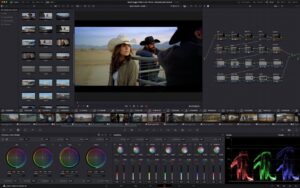
– **Full set of professional color grading tools**: Includes primary color wheels, custom curves, HSL qualifiers, Power Windows, trackers, and other core tools, enabling selective color grading, secondary color correction, and fine local light-shadow adjustments; built-in Film Look Creator for film texture generation, equipped with precise halation control, can simulate real film color response, grain, and optical characteristics.
– **AI intelligent color grading assistance**: Based on the DaVinci Neural Engine, Magic Mask intelligently identifies subjects and characters in the frame, generating high-precision masks with one click for independent color grading; facial recognition automatically detects faces and performs refined beautification adjustments for skin tones and facial features.
– **Native decoding of all RAW formats**: Native support for RAW formats from Canon CR3, Sony ARW, Nikon NEF, BMD RAW, ARRI Alexa, and other professional cameras. Supports in-camera metadata reading and fully non-destructive color grading, compatible with RAW file decoding for the latest models such as EOS R8 Mark II.
## 3. Fusion Visual Effects and Motion Graphics
– **Node-based professional compositing architecture**: Adopts a cinematic node-based effects workflow, supporting layered production and flexible adjustment of complex visual effects. Built-in hundreds of effects, filters, and compositing tools, allowing complete film effects production without switching software. Supports unified management of multiple Fusion effects stacked on a single clip.
– **3D compositing and motion graphics**: Built-in complete 3D space system, supporting 3D model import, camera reverse engineering, particle systems, vector graphics, and text animation production. It can achieve various creations such as title packaging, transition effects, green screen keying, and image restoration. New OGraf HTML graphics support allows importing and editing web-level vector graphics.
– **Advanced effects and tracking tools**: Equipped with professional tools such as planar tracking, 3D camera tracking, advanced keying, image blemish removal, and lens distortion correction. Supports transition effect production in foreground compositing mode, meeting the needs of advertising, MV, and cinematic effects production.
– **Seamless cross-page linkage**: Real-time linkage between editing, color grading, and effects pages. Timeline content can be synchronized to the Fusion page with one click, and parameter changes take effect immediately without repeated rendering and exporting, greatly improving creative efficiency.
## 4. Fairlight Professional Audio Workstation
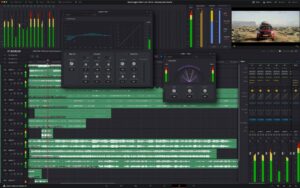
– **Fully functional audio post-production**: Built-in professional mixing console and a full set of audio processing plugins, supporting multi-track audio editing, dialogue editing, sound effect design, and mixing and mastering. Provides complete audio processing tools such as EQ, compression, reverb, and noise reduction.
– **Immersive audio production**: Supports 5.1, 7.1 surround sound, and Dolby Atmos production. Built-in loudness normalization tools meet audio specifications for theaters, broadcast television, and major streaming platforms.
– **AI audio enhancement tools**: Based on the neural network engine, supports intelligent functions such as AI vocal separation, dialogue isolation, music remixing, and automatic dialogue level alignment. Paired with ADR automatic dialogue replacement and Foley sound effect synchronization tools, it adapts to the entire workflow of professional film and television dubbing and sound effect production.
## 5. Team Collaboration and Delivery Workflow
– **Multi-user real-time collaboration**: Supports project library sharing and simultaneous collaboration across multiple roles. Editors, colorists, and sound designers can work in parallel on the same project. Built-in permission management and version control, optimized multi-user collaboration connection stability, greatly improving team production efficiency.
– **Flexible file handling rules**: When moving or copying files, you can customize the handling logic for files with the same name. Supports three modes: ask every time, automatically keep both, and replace directly. The pop-up window can remember operation preferences directly, eliminating the need for repeated settings.
– **Full-format rendering and delivery**: Supports almost all mainstream video and audio codecs and container formats. Supports batch rendering, queue output, and multi-GPU accelerated rendering. Can directly export standard delivery files suitable for theaters, TV stations, and major streaming platforms. Supports full-screen monitoring on a second monitor.
## 6. Studio Version Exclusive Core Capabilities
– **Neural network AI engine**: Unlocks all AI functions, including Magic Mask, speech-to-subtitle, SuperScale, facial beautification, frame rate conversion, image deflicker, AI spatial noise reduction, temporal noise reduction, and dozens of other intelligent tools.
– **Ultra-high-definition production support**: Supports up to 32K resolution and 120fps 10-bit professional video production. Supports multi-GPU parallel acceleration, achieving real-time playback and high-speed rendering of professional formats, far exceeding the performance limits of the free version.
– **Professional effects and plugin library**: Additionally provides 45+ professional Resolve FX effect plugins, including film grain, optical blur, lens flare, image dirt removal, depth map generation, object removal, and other advanced effects. Supports third-party plugin expansion.
– **Professional hardware ecosystem adaptation**: Compatible with DaVinci Resolve professional color grading panels, control panels, and other hardware devices, achieving tactile fine color grading and shortcut operations. Supports professional workflows such as remote color grading and network collaboration.
Version 21.1.1 Update Contents:
– Support for OGraf HTML graphics
– Trim editor viewer operations now affect all selected edit points
– Mouse-based editing operations in the trim editor now support audio preview
– Trim editor viewer now supports pure audio clip editing
– Support for Canon EOS R8 Mark II camera CR3 RAW format decoding
– Added data burn-in option to display source material feet and frame numbers
– Fixed an issue with stacking multiple Fusion effects on a single clip in the Inspector
– Fixed issues related to clip transitions in foreground compositing mode
– Fixed an abnormal issue with loop playback of selections in dynamic trim
– Fixed an issue where automatic subtitles were occasionally cropped in vertical timelines
– Fixed an issue where source material aspect ratio did not follow image orientation
– Fixed an abnormal issue when adding pure Text+ or MultiText to subtitle tracks
– The multicam view of the synchronized bin now displays recording timecode and frame numbers
– Multicam-related operations are now supported in single-viewer mode
– Fixed an occasional lag issue with Magic Mask in the Fusion page
– Fixed issues related to halation control in the Film Look Creator
– Fixed connectivity issues in multi-user collaboration
– Overall performance and stability optimizations
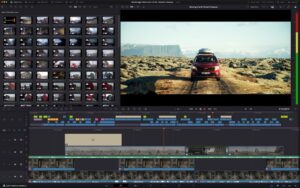
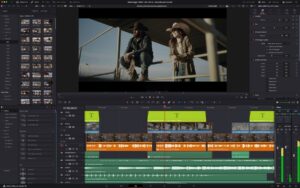
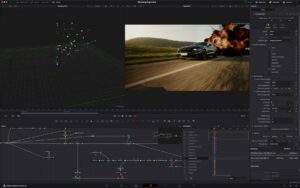
Software screenshots:

Final Cut Pro for Mac v12.2 FCPX Video Editing Software Chinese Activated Version Download
Downloads:3894 | 2026-10-18

Adobe Premiere 2026 for Mac v26.0.0 Latest Chinese Activated Version Download
Downloads:3047 | 2026-10-18

Adobe Prelude 2020 for Mac v9.0.1 Activated Version Chinese Activated Version Download
Downloads:1402 | 2026-10-18

Adobe After Effects 2020 for Mac v17.1.2 AE Activated Version Chinese Activated Version Download
Downloads:631 | 2026-10-18


Ratings & reviews
No rating
Let’s rate it.