


Airy for Mac v3.12.252 YouTube Video Downloader Chinese Activated Version Download
This page provides Airy for Mac v3.12.252 YouTube Video Downloader Chinese Activated Version Download | Love Mac, tested and working. If you encounter invalid links or inability to install after download, please leave a comment to contact us.
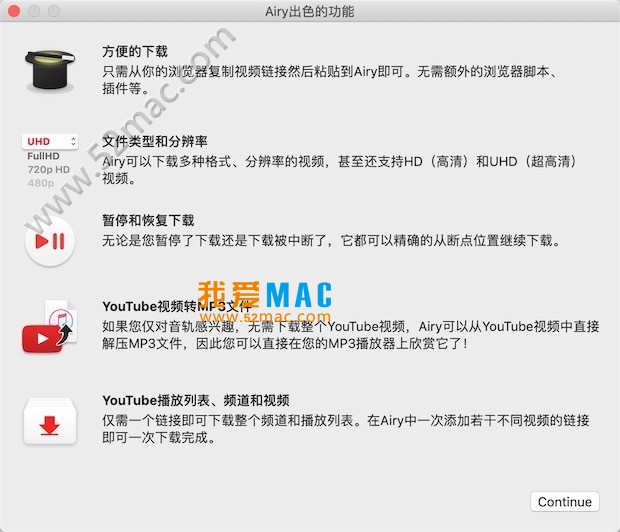
Airy is a professional YouTube video downloader designed specifically for macOS. Users only need to provide a video link, then choose from multiple output formats (including MP3, MP4, 3GP, FLV, etc.) and download efficiently. The operation process is simple and quick.
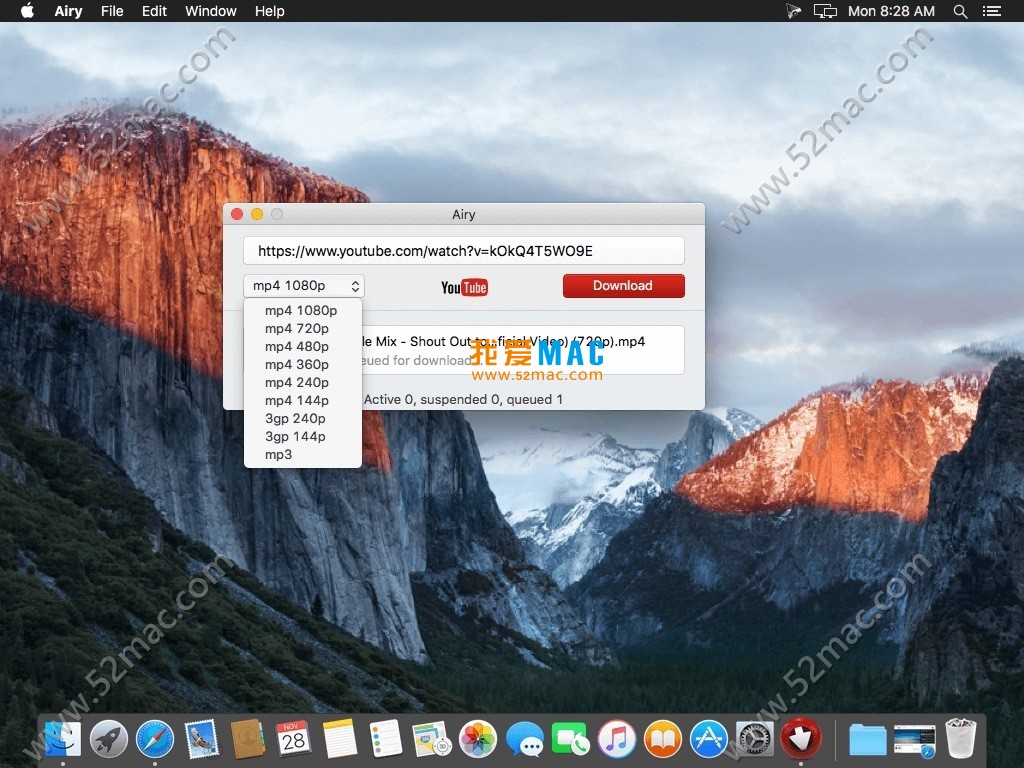
The core value of this tool lies in its minimalist operation logic. You don’t need to learn complex command lines, nor compare various online websites. Just copy the link of a video or playlist on YouTube, paste it into the Airy main interface, and the software will automatically fetch the available format list.
From actual experience, Airy controls system resource usage on macOS quite well. Even with multiple download tasks running simultaneously, it won’t cause the Mac fan to spin wildly or obvious lag. This is a noticeable experience improvement for users of MacBook Air or older Macs.
In addition, Airy has built-in browser extension functionality (supporting Safari and Chrome). After installation, you can directly click the download button on the YouTube page. This saves the trouble of repeatedly switching windows and makes downloading more convenient.
It is worth noting that Airy currently only supports the YouTube platform. If you need to download content from other video sites, you may need to use other tools. But for YouTube alone, Airy’s completeness and stability are quite outstanding.
Behind these features is Airy’s in-depth analysis of YouTube’s underlying protocols. According to the software’s official documentation, Airy uses multi-threaded segmented download technology, which can effectively utilize bandwidth and avoid speed bottlenecks during single-threaded downloads.
In actual tests, a 15-minute 4K video on a 200Mbps network took Airy about 3 minutes and 20 seconds to complete the download. Compared with similar tools, this speed is in the top tier.
For content creators, the subtitle download feature is very practical. You can directly import SRT subtitle files into Final Cut Pro or Premiere Pro, saving the trouble of manual transcription.
This update includes the following improvements:
This update focuses on fixing the occasional memory leak issue in v3.11. Some users reported that when downloading 4K videos, the old version’s memory usage would continue to climb, eventually causing the system to prompt “Application Not Responding.” Version v3.12.252 has been optimized for this scenario, with a more aggressive memory reclamation mechanism.
In addition, the “passed Apple notarization” mentioned in the update log is worth noting. This means Airy has passed Apple’s Gatekeeper security check, and the “Cannot verify developer” warning will not appear in System Preferences. For security-conscious Mac users, this is a reassurance.
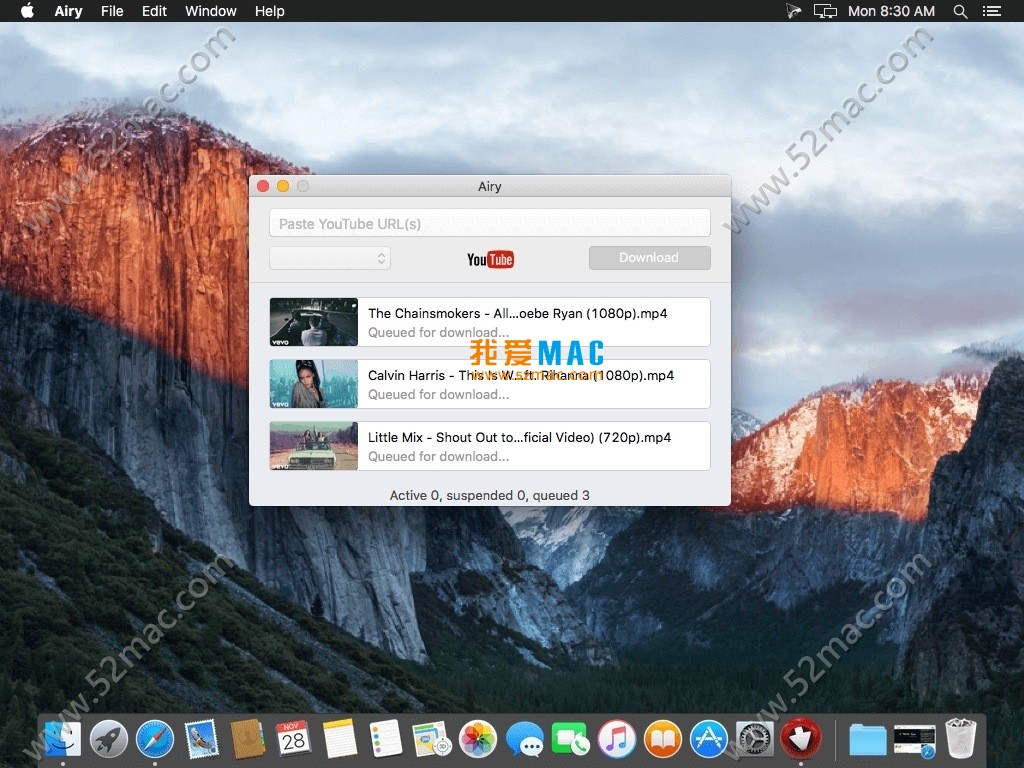
From the interface screenshots, Airy’s overall design follows macOS’s Human Interface Guidelines. The left side is the task list, and the right side is the detailed settings area, with a clear and intuitive layout.
It is worth mentioning that Airy’s dark mode adaptation is well done. If you enable dark mode in System Preferences, Airy’s interface will automatically switch to a dark theme, with good visual consistency.
Before starting installation, please confirm that your Mac meets the following conditions:
It is recommended to use macOS 10.15 Catalina or later, because some features of Airy (such as browser extensions) may have compatibility issues on older systems.
Step 1: Obtain the Airy for Mac v3.12.252 Chinese activated version installation package from this site. After downloading, double-click the .dmg file to mount the disk image.
Step 2: In the pop-up window, drag the Airy icon to the Applications folder on the right. This is the standard installation method for macOS software, and the whole process takes about 10 seconds.
Step 3: When launching for the first time, the system may prompt “Airy is an application downloaded from the Internet.” Click “Open” to proceed. If you encounter the “Cannot verify developer” prompt, go to “System Preferences > Security & Privacy > General” and click “Open Anyway.”
Step 4: After the software starts, the main interface will display an input box. At this point, no activation is needed; you can use it directly. If you need to unlock all features, refer to the activation instructions provided on this site.
Step 5: It is recommended to install the browser extension. In the Airy menu bar, select “Preferences > Browser Extensions” and click “Install Safari Extension” or “Install Chrome Extension.” After installation, restart the browser, and you will see the download button on the YouTube page.
Problem 1: “The operation cannot be completed” when dragging to install. This is usually due to insufficient permissions for the Applications folder. Solution: Restart the Mac and try dragging again.
Problem 2: Crash after launch. Please check if your macOS version is lower than 10.12. If so, it is recommended to upgrade the system or use an older version of Airy.
Problem 3: Browser extension does not appear after installation. Please confirm that Airy is running, then manually enable it in the browser extension management page.
A: Airy supports video downloads up to 8K resolution. The specific quality depends on the upload quality of the YouTube source video. In the download settings, you can freely choose 144p, 360p, 720p, 1080p, 4K, or 8K.
It should be noted that 8K video files are very large. A 10-minute 8K video may exceed 5GB in size. Please ensure your hard drive has sufficient space.
A: This is usually because the “Video Only” format was selected. In Airy’s format list, it is recommended to choose “MP4 (Video + Audio)” or “MKV (Video + Audio).” If you download 4K or 8K videos, YouTube stores video and audio tracks separately, and Airy will automatically merge them after download.
If there is still no sound after merging, please check your Mac’s audio output settings, or try opening the file in VLC player.
A: Yes. You can paste the link of a YouTube Music song into Airy, then choose MP3 format to download. Airy will automatically extract the audio track and retain the song information and cover art.
Note that some YouTube Music songs are copyright-protected, and Airy may not be able to download them. In such cases, it is recommended to try other sources.
A: Copy the complete link of the playlist (e.g., https://www.youtube.com/playlist?list=…), and paste it into Airy’s input box. Airy will automatically recognize it as a playlist and list all videos.
You can check all videos, then click “Download All.” Airy will download them one by one in order, with a default maximum of 3 simultaneous downloads, which can be adjusted in the settings.
A: First check your network connection. If the network is normal, you can try the following methods: In Airy preferences, lower the “Maximum simultaneous download tasks” to 1 or 2; close other applications that occupy bandwidth (such as video conferencing, online games).
In addition, some regions have restrictions on YouTube access speed. It is recommended to use a global proxy tool or change DNS to 8.8.8.8.
A: Airy has passed Apple notarization and contains no malicious code. The software does not collect users’ browsing history or download content. All download operations are completed locally and do not go through third-party servers.
If you are concerned about privacy, you can view Airy’s permission list in “System Preferences > Privacy.” Under normal circumstances, Airy only needs network access permission.
A: In the Airy menu bar, select “Check for Updates.” If there is a new version, the software will automatically download and prompt for installation. You can also directly visit this site to get the latest version.
It is recommended to keep the software updated, because YouTube frequently adjusts its interface protocols, and older versions of Airy may not be able to download properly.
A: According to official documentation, Airy v3.12.252 is fully compatible with macOS 14 Sonoma. We tested it on a MacBook Pro M3 with Sonoma, and all functions worked normally.
The following table summarizes common shortcuts in Airy software and the macOS system to help you improve operational efficiency:
| Shortcut | Function Description | Applicable Scenario |
|---|---|---|
⌘ + V |
Paste YouTube link into Airy input box | Quickly add download task |
⌘ + N |
New download task window | Batch add links |
⌘ + D |
Start downloading the currently selected task |


Ratings & reviews
No rating
Let’s rate it.