

Monitor WiFi Status for Mac v2.7.7 Activation Download
Airtool is a professional-grade Wi-Fi packet capture and wireless network diagnostic tool, resident in the system menu bar for lightweight operation, tailored for network engineers, WLAN maintenance personnel, and wireless security analysts. It significantly lowers the barrier to wireless packet capture, enabling efficient Wi-Fi connection fault diagnosis, roaming issue localization, network performance analysis, and configuration verification, serving as a core tool for WLAN maintenance and debugging.
Core Function Features:
1. **Full Type Wireless Packet Capture**
Supports single-channel and multi-channel modes for packet capture, capturing all types of Wi-Fi packets including management frames, control frames, and data frames; automatically enables wireless monitoring mode, requiring no complex command-line configuration, and initiating capture with a single click. Output files in standard PCAP and PCAPNG formats, with PCAPNG files automatically writing details such as device, interface, channel, frequency band, channel width, and capture settings, facilitating file tracing and archiving.
2. **Flexible Configurable Capture Rules**
Supports full frequency bands from 2.4GHz to 5GHz, allowing custom channel selection and channel width settings; includes built-in packet slicing functionality to selectively strip upper-layer data for file size reduction; supports capture file size limits and automatic rotation mechanisms, suitable for extended monitoring scenarios and flexible task matching.
3. **Remote Capture Expansion**
Compatible with remote sensors based on OpenWrt, enabling remote packet capture of distant wireless environments; supports expansion of capture traffic for Zigbee and BLE wireless protocols via compatible USB adapters, covering more wireless debugging scenarios.
4. **Professional Tool Ecosystem Integration**
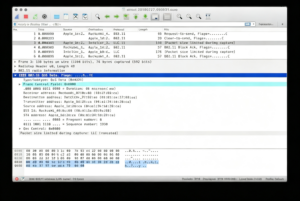
Supports instant invocation of Wireshark for real-time protocol analysis during capture, allowing dynamic channel switching during capture for enhanced fault localization efficiency; supports automatic or manual upload of capture files to cloud analysis platforms like CloudShark for team collaboration, file sharing, and online deep analysis.
5. **Convenient Wireless Status Management**
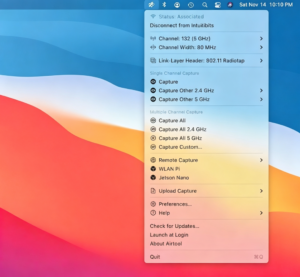
Quickly view Wi-Fi adapter connection status, current channel and frequency information via the menu bar; supports instant disconnection of current network connection, listing all supported channels and bandwidth specifications for intuitive understanding of wireless hardware capabilities.
6. **Continuously Optimized Stability Experience**
Continuously updates underlying support frameworks to enhance capture stability across various scenarios; adapts channel hopping and full capture capabilities to different devices, addressing details and ensuring smooth execution of packet capture tasks in diverse environments.
Version 2.7.7 Update Highlights:
– Added capture details to PCAPNG capture file annotations, including device, interface, channel, frequency band, channel width, and capture settings information.
– Reinstated the “Full Capture” option on MacBook Pro M5 Pro/Max, MacBook Air M5, and MacBook Neo devices.
– Updated underlying support frameworks.
– Improved support for remote sensors based on OpenWrt.
– Other minor fixes and experience enhancements.
Software Screenshot:
This resource requires login to download
Log in
Lite Media Browser for Mac v2.4.10 Chinese Activation Version Download
Downloads:0 | 2026-10-27

Multifunctional Image Browser: GraphicConverter 11 for Mac v11.3.3 Activation Download
Downloads:815 | 2026-10-21

Mac Desktop Stickers v2.74 Activation Download
Downloads:405 | 2026-10-20

Pocket Yoga for Mac v18.1.0 Activation Download
Downloads:1197 | 2026-10-20


Ratings & reviews
No rating
Let’s rate it.