| PDF Reader Pro is a comprehensive PDF reading and editing tool for Mac, iPad, and iPhone. It allows you to read, edit, annotate, convert, compress, sign, cipher, compare, and manage PDFs in a workflow.
Tip: AI features are not available, but other common PDF functions have been cracked.
AI Intelligent Assistant
– Summarize, translate, proofread, rewrite PDFs, and extract key information.
OCR and searchable PDF
– Convert scanned documents, images, and batch files into editable or searchable PDFs. Supports search, copy, highlight, and annotate text.
Annotations, editing, and signing
– Supports highlighting, underlining, strikethrough, drawing, text boxes, notes, shapes, signatures, stamps, links, and measuring.
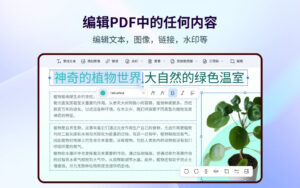
– Edit text and images, add watermarks, headers, footers, Bates codes, and backgrounds.
– Create, distribute, and track electronic signing tasks, and quickly add secure digital signatures.
Conversion and page management
– Export PDFs to Word, PPT, Excel, RTF, Text, HTML, Image, CSV, etc. Create PDFs from Office files, images, scanners, web pages, and cameras.
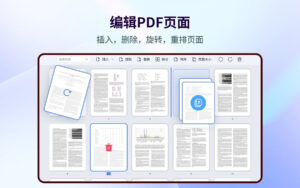
– Split, merge, insert, extract, rotate, copy, delete, replace, and crop pages.
Forms, reading, printing, and sharing
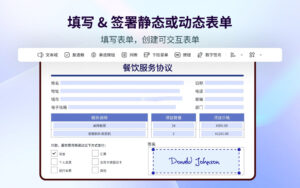
– Create and fill static or interactive forms. Supports single-page, double-page, full-screen, split-screen, slide show, night mode, and auto-scroll modes.
– Create, edit, and search outlines, add bookmarks; supports brochures, posters, multi-page printing, share flattened PDFs, and upload to Dropbox, iCloud Drive, etc.
Compression, security, and reading
– Customize PDF compression, permanently remove sensitive content, and set document permissions.
– Use text-to-speech to read large files, supporting 50+ languages.
OCR detailed features
– Supports enhanced and corrected scanned images, extracts selected content from pages using area OCR, and scans documents, receipts, forms, and notes into PDFs.
Annotations and editing details
– Supports custom text, images, and dynamic seals, edits or adds hyperlinks, and measures distances, perimeters, and areas in PDFs.
– Crops, rotates, flips, replaces, or exports images; supports editing watermarks, headers, footers, Bates codes, and backgrounds, and compares two PDF versions.
Signing, forms, and pages
– Supports creating, distributing, and tracking electronic signing tasks, including typed, handwritten, or image signatures and secure digital signatures.
– Supports creating forms with buttons, checkboxes, list boxes, and fields aligned for horizontal or vertical viewing, split-screen, slide show, outline, brochures, posters, and multi-page printing.
Compression and security
– Customize PDF compression based on image resolution or removing redundant items; supports password protection and editing, copying, modifying, and printing permissions.
Version 6.0.0 Update Content:
New workspace
– Redesigned homepage interface with a fresh operation interface, clearer page structure, lighter visual style, and smoother navigation experience.
– Optimized homepage layout and left navigation bar, making common PDF tasks more clear and efficient for file access and subsequent processing.
– Updated feature grouping and visual hierarchy, making common PDF workflows easier to start and more focused.
AI intelligent tasks
– Quickly generate reports by extracting key information from PDFs and organizing them into structured results.
– Extract document data from contracts, forms, and invoices, including important fields and key information.
– Translate document content to target languages.
– Detect sensitive information and potential compliance risks before sharing or processing documents.
– Highlight risk clauses, abnormal clauses, or potential issue clauses in contracts for review.
– Ask questions based on PDF content to get answers related to the document.
AI quick tools
– Add common PDF operations to quick tools in the AI workflow.
– Continue using conversion, OCR, image enhancement, compression, insertion, extraction, replacement, splitting, deletion, merging, and page size features after AI processing.
– Integrate AI’s understanding of documents with PDF editing, conversion, OCR, compression, and page management tools to streamline document processing.
Software Screenshot:
|




Ratings & reviews
No rating
Let’s rate it.