


Ultimate PDF for Mac v2.5.6: All-in-One PDF Processor with Chinese Activation Download
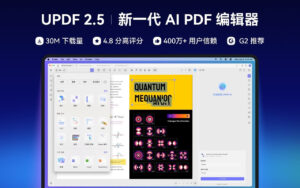
UPDF is a PDF editor driven by AI Agents, featuring AI, reading, editing, annotating, cloud synchronization, conversion, encryption, cropping, splitting, document comparison, and more. UPDF offers a youthful and visually appealing interface to provide a pleasant and easy experience for reading and working with documents.
### Features:
1. **Editing PDF:**
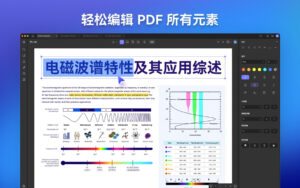
– Add or delete text, modify text attributes such as font, color, size, and alignment.
– Adjust text alignment to make the document look tidier.
– Crop, rotate, replace, extract, and delete images within the PDF.
– Drag and drop images to add or replace them.
– Add, delete, and edit watermarks, backgrounds, and headers/footers.
2. **AI Features:**
– Summarize single or multiple PDF documents.
– Translate PDF documents in full.
– Interpret, rewrite, or write PDF documents.
– Interact freely with UPDF AI.
– Ask questions about images.
– Generate mind maps from document summaries.
– Search for and create bibliographic networks for papers.
– Conduct deep research and summarize literature.
### New AI Agents Features:
– **PDF Copilot (AI Operation Assistant):** Edit PDFs using natural language, convert PDFs to Word, and compress files—no need to search through menus, just execute tasks.
– **AI Semantic Search:** Understands and searches for documents based on context and meaning, with a search accuracy of 95% and efficiency improvements of up to 5 times.
– **AI Bookmark Agent:** Automatically creates structured bookmarks and generates paragraph summaries, improving navigation efficiency by up to 92%.
– **AI Editing Tools:** Directly rewrite, adjust tone, or correct grammar within the PDF editor without switching applications.
– **AI Creative Generation:** Generate watermarks, stickers, backgrounds, and seals using prompts, with high-quality 1024×1024 images and 20+ styles, completed in 10 seconds.
– **AI Page Management:** Automatically detect and correct blank pages or rotated pages with a 98% accuracy rate.
3. **Annotating PDF:**
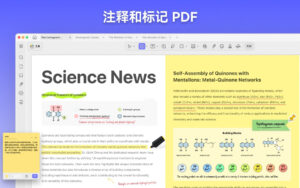
– Add annotations such as highlighting, underlining, strikethrough to emphasize important content.
– Use graphics and text boxes to annotate PDFs.
– Add sticky notes for notes or approvals.
– Add various stamps and stickers for annotations and comments.
– Create your own signature quickly.
– View and delete all annotations with a single click.
4. **OCR (Optical Character Recognition) (Available only via the official website download):**
– Convert scanned PDFs into searchable and editable PDFs.
– Supports 38 languages for detection.
– Convert searchable and editable PDFs into image-only PDFs.
5. **Converting PDF:**
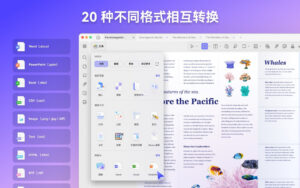
– Convert PDFs to Word, Excel, PowerPoint, Image, HTML, Text, CSV, XML, PDFIA, and other formats.
– Convert Word, Excel, PowerPoint, images, and CAJ files to PDF.
– Maintain the original document format after conversion.
6. **Cloud Synchronization:**
– Upload documents to UPDF Cloud for full-device synchronization between PC and mobile devices.
7. **Managing PDF Pages:**
– Rotate pages to adjust their orientation.
– Drag pages to reorder them.
– Extract or delete pages as needed.
– Add or import pages from other files.
– Quickly split a PDF into multiple documents based on page numbers.
– Customize page sizes according to your needs.
– AI-automated document review, detecting blank pages, rotated pages, or repeated pages with a 98% accuracy rate.
8. **Viewing and Locating PDF Documents:**
– Zoom in or out to view document content clearly.
– Add bookmarks to quickly locate specific pages.
– Open multiple PDF documents in the same window for easy access.
– Quickly search and locate text content.
– Rotate, delete, and print PDF pages using thumbnails.
– View PDF documents in slide show format.
9. **Protecting Documents:**
– Add document opening passwords to prevent unauthorized access.
– Set document function permissions to restrict printing, editing, or copying PDF documents.
– Compare two documents to highlight differences.
– Apply digital signatures to prevent file tampering.
– Use steganography (masks) to protect sensitive information.
10. **Creating PDF:**
– Create blank pages.
– Create PDFs from selections, windows, or screen captures.
11. **Flattening PDF:**
– Quickly flatten PDFs by removing layers from the document.
12. **Batch Processing:**
– Batch conversion, merging, OCR, compression, printing, creation, watermarking, page headers and footers, Bates coding, insertion, background, encryption, and deletion.
Version 2.5.6 Update Highlights:
– Added batch split functionality for double-sided printing across documents.
– Added default cursor tool settings.
– Fixed issues reported by some users to improve product stability.
Software Screenshots:
This resource requires login to download
Log in
Adobe Illustrator 2020 for Mac v24.1 Chinese Activation Version Download
Downloads:1117 | 2026-10-22

Soulver 3 for Mac v3.6 Calculator-Integrating Smart Notepad Chinese Activation Download
Downloads:227 | 2026-10-20

Tidy Up 5 for Mac v5.0.4 Find Duplicate Files and Organize Your Hard Drive Activated Version Download
Downloads:3131 | 2026-10-17

Chronicle for Mac v9.6.1 Bill Management Software Activated Version Download
Downloads:3303 | 2026-10-17


Ratings & reviews
No rating
Let’s rate it.