


OmniGraffle Pro for Mac v7.25.3 Chinese Activation Version Download
OmniGraffle Pro is a professional graphics design software designed specifically for Mac, supporting the creation of flowcharts, mind maps, prototype designs, and other visual content. It offers intelligent layout, vector drawing tools, a rich library of templates, and collaboration capabilities with software such as Sketch. It is suitable for designers, engineers, and teams to efficiently complete complex chart design.
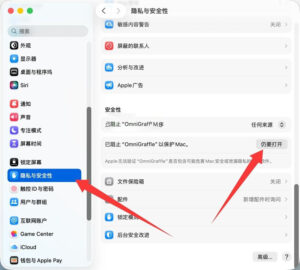
Note: If you encounter a “damaged” prompt when opening the software, please check the System Settings -> Privacy & Security -> Under Security, make sure the “Open Anyway” option is selected, as shown in the image below.
Installation and Activation Guide: Drag the software to your Applications folder, and after the first open, wait a few seconds for the software to activate. Then you can use the software normally.
Key Features:
– Unified toolbar: Achieve better interaction with objects, layers, and layouts in a newly arranged toolbar.
– Point Editor tool: Call each point immediately within shapes.
– New Output Panel: Export graphics at multiple resolutions with a few clicks. The output is organized logically, including batch export, setting dimensions, and preview.
– Infinite Layout: Automatically expand layouts in one, two, or all directions.
– Keyboard Shortcuts: Customize each menu bar with preferred shortcuts, or select from popular application shortcuts.
– SVG Import: Paste SVG code or directly import SVG files into OmniGraffle.
Professional Features:
– Visio Import/Export: Directly open Microsoft Visio documents (VSD or VDX), Visio templates (VSS), and Visio templates (VST) in OmniGraffle. Export to Visio XML documents (VDX).
– Shared Layers: Easily update common elements that need to be displayed across multiple layouts. Layers can now be switched between normal and shared.
– Non-destructive Shape Combinations: Create new shapes by combining existing shapes (through merging, intersecting, and subtracting). Shape combinations can now be broken down into their component shapes.
– Resolution-Independent Scaling: Match to Apple points, PostScript points, or screen pixels when zoomed to 100%.
– Photoshop Export Functionality: Support exporting OmniGraffle layers as Photoshop layers.
– Tables: Use group shapes to easily add new template rows or columns.
– Xcode Import: Generate class charts automatically from Xcode projects.
– Canvas Layers: Use canvas layers for advanced, exportable elements, or as a different method for laying out layouts.
– Convert Text to Shapes: Convert text to fine-tune character shapes, or add complex style settings.
– Convert Lines to Shapes: Convert line strokes into shapes using easily editable Bezier points.
Version 7.25.3 Update Highlights:
SVG Import: Fixed the crash issue when importing elements with negative scale factors. Text is imported, but not flipped because it does not support flipping.
This resource requires login to download
Log in
Blackmagic Fusion Studio 19 for Mac v19.1.2: Professional Video Post-Effect Compositing Tool – Download & Activation Version
Downloads:279 | 2026-10-24

Mac Video Converter Ultimate with Chinese Activation Download
Downloads:1966 | 2026-10-24

TurboMosaic for Mac v3.0.10 Serial Key Download
Downloads:1656 | 2026-10-22

Sketch for Mac v65: Mobile UI Design Software – Chinese Activation Version Download
Downloads:3678 | 2026-10-22


Ratings & reviews
No rating
Let’s rate it.