| Zipic is a local image compression tool tailored for macOS, emphasizing “high compression ratio, near-lossless quality, and easy operation” as its core advantages. It supports single-file/batch processing of multiple image formats, with all compression processes occurring locally, without the need for network uploads, balancing efficiency and privacy security.
Key Features:
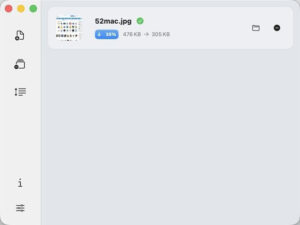
– **Save Space, Maintain Quality**: Achieves high compression ratios (e.g., 403KB image compressed to 108KB, 292KB image compressed to 98KB) while retaining near-lossless quality, making it difficult to discern differences and preserving the original resolution.
– **Simplified Compression, No Complex Operations**: Offers drag-and-drop, keyboard shortcuts, and right-click menu operations for easy batch processing.
– **Fast Response, Flexible Adaptability**: A native macOS application, running smoothly, and compatible with both Apple Silicon and Intel chips, automatically matching system light/dark themes.
– **Near-Lossless Quality**: Offers six levels of compression strength, with higher numbers resulting in greater compression rates, balancing file size and image quality.
– **Customizable Configurations, Precise Control**: Allows creation of scene-specific presets, enabling quick switching between different workflows (such as design drafts, blog images, PPT materials).
– **Version 1.9.7 Update Highlights**:
### New Features
1. **High Dynamic Range Encoding for JXL**: Utilizes a newly developed jxloptim engine to ensure accurate color fidelity when converting HDR images to the JXL format.
2. **Bidirectional Lossless Transfers for AVIF and JXL**: Enables seamless transfers between AVIF and JXL formats using high dynamic range gain maps.
3. **Revised Preset Manager**: The preset settings interface has been redesigned as a tabbed layout, allowing for quick creation, renaming, and copying of presets within the same panel.
4. **Three-State Output Paths**: Supports three modes for storing original folders, asking for each file individually, or using a fixed folder, with clear and unambiguous path selection.
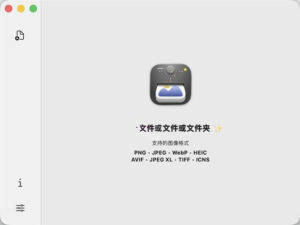
5. **Enhanced Multi-Preset Drag-and-Drop Guide**: A new shortcut prompt has been added to the welcome interface, allowing for the application of different preset compressions to individual files.
6. **Ability to Terminate Batch Compression Tasks**: Allows for the cancellation of ongoing batch compression tasks at any time without affecting other tasks.
### Bug Fixes
1. **Improved iCloud and Large Folder Monitoring**: Utilizes an event-driven monitoring mechanism to prevent performance issues with large libraries of files and iCloud subfolders.
2. **Immediate Effect of Folder Monitoring Levels**: Changes to folder monitoring levels take effect immediately without requiring reactivation of the monitoring function.
3. **Improved Thumbnail Loading Priority**: Ensures that thumbnail generation does not interfere with main interface operations.
4. **Optimized Long-Running Commands**: Utilizes a stream-based progress transfer protocol, preventing false failures for tasks lasting several hours and isolating multiple tasks from each other.
5. **Fixed Secondary Compression Quality**: Prevents degradation of image quality by restoring original files before changing compression levels.
6. **Complete Retention of HEIC Metadata**: Ensures that copyright information and custom namespaces, such as EXIF and XMP data, are retained.
7. **Preservation of Wide Color Gamut ICC Profiles**: Ensures that Display P3, HLG, and other wide color gamut color profiles are retained when converting from JXL/AVIF/HEIC to PNG.
8. **Compatibility of Metadata Across Formats**: Ensures that EXIF, XMP, and ICC configuration files are retained during format conversions.
Software Screenshots:
 |




Ratings & reviews
No rating
Let’s rate it.