


Mac File List Export v3.1: Metadata Export Tool Activation Download

  • Introduction
Download
Download now
Join VIP Free download

Description

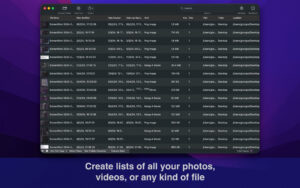
Just a few seconds, and any folder can be turned into a detailed and exportable file list. List every photo, video, document, or file on your Mac, and export to Excel, PDF, CSV, HTML, JSON, or Markdown. Make it easy to catalog, inventory, and record your files.

Select a folder— or drag files— to get a complete list of all files and folders ready for export. Choose whether to include all subfolders, preview and edit the list before saving, and immediately search or filter your records.

Need only specific file types? List specific file types—such as all audio files in your music library, or all PDF files in a document folder.

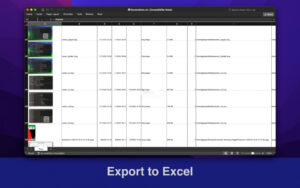
Export an Excel file with image thumbnails to get a visual index of all photos.

Export at any time

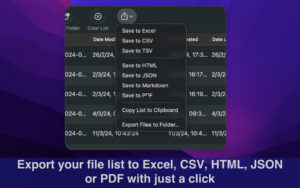
  • Excel (xlsx and xls)—with optional photo thumbnails
  • CSV and TSV
  • PDF—clean, paginated, printable table
  • HTML—interactive directory with real-time search, sortable columns, and clickable file links
  • JSON and Markdown—great for developers and automation
  • Copy to clipboard—paste into Excel, Numbers, or Google Sheets

Zoom in on every detail

Each file can include:

  • Basics—name, type, size, path, modification date, creation date, comment, tag, version, page
  • Audio—artist/performer, title, album, track number, type, year, duration, bitrate, sample rate, channel, encoder
  • Images—dimensions, pixel width and height, total pixels, DPI (width and height), color space, color profile, alpha channel, creator
  • Videos—bitrate, total bitrate, codec
  • Checksums—MD5 and SHA-256
  • Exif—camera brand and model, lens brand/model and serial number, owner’s name, serial number, copyright, software, shooting date, ISO, aperture, focal length, flash, orientation, GPS latitude/longitude and map link

Version 3.1 Update:

  • Find duplicate files: Find files with identical content, clearly see the space they occupy. Compare based on file content, not file name, and recognize renamed duplicates.
  • Securely clean redundant files: Keep the latest file, the earliest file, or the top-level directory file, and move the rest to the trash. Ensure that each group of duplicate files retains one file, and all files can be recovered.
  • Add a “Duplicate File Group” column, supporting sorting, filtering, and all export formats will retain this information.
  • Support direct printing of the list (keyboard shortcut Command-P), with printing effects identical to PDF export, and settings for page and printer selection.
  • Significantly improved scanning of large folders: Shortened the time to calculate folder size, making long list scrolling smoother.
  • Real-time display of the number of processed files, remaining files, and estimated remaining time during the scan process.
  • Fixed multiple memory leak issues.

Software Screenshot:

Download info

This resource requires login to download

Log in
Note: This resource is for informational purposes. By using this resource, you agree that you accept full responsibility to the copyright holder. For questions, please contact us.

Ratings & reviews

No rating

Let’s rate it.

  • 5 stars
  • 4 stars
  • 3 stars
  • 2 stars
  • 1 stars

You may also like

More
×
Mac File List Export v3.1: Metadata Export Tool Activation Download
iMac — One-stop Mac Software Download Platform
Social login
captcha
Social login