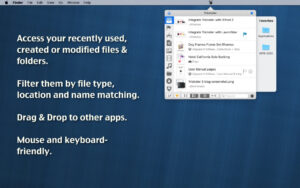
| Trickster is a professional productivity tool that resides in the Mac menu bar. Its core focus is on quick access to recently used files and frequently accessed resources. By automatically tracking all file operations across the system, combined with flexible filtering and collection mechanisms, users can access the required files, folders, and applications without having to search through folders, significantly enhancing file handling and daily workflow efficiency.
## One – Universal File Automatic Tracking
– **Full-scenario Automatic Inclusion**: Automatically records all files that have been opened, edited, downloaded, or synced, without the need for manual addition. All resources that have been operated on are automatically included in the list.
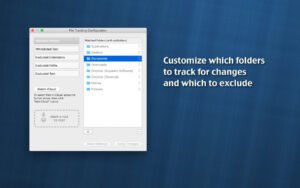
– **Custom Monitoring Paths**: Supports adding any folder as a “watched folder,” including the desktop, documents, downloads, and iCloud, to monitor for any new or changed files in real-time.
– **Cloud Storage Compatibility**: Native recognition of Google Drive paths and displays corresponding icons. Files that are synced across devices are automatically included in the tracking scope.
– **Third-Party Application Integration**: Supports tracking entries from professional applications like DEVONthink, allowing for unified management and access to file resources across applications.
– **Time Dimension Tracing**: Files are sorted in descending order by modification time, allowing for quick location of content from different time periods.
## Two – Multi-Dimensional Filtering and Searching
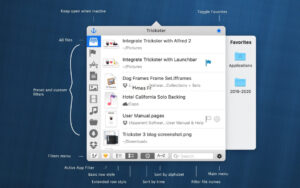
– **Built-in Preset Filters**: Provides multiple preset categories for images, audio, video, documents, applications, folders, and downloads, allowing for quick switching of filter targets.
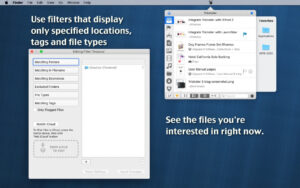
– **Custom Filter Rules**: Supports filtering based on file location, type, Finder tags, and name keywords, enabling the creation of custom filter rules.
– **Application Source Filtering**: Allows for quick filtering of files generated by specific applications, enabling precise location of content produced by a particular tool.
– **Interference Content Filtering**: Supports exclusion of specific paths, file formats, or applications, filtering out irrelevant content such as temporary files and system files, keeping the list clean.
– **Efficient Search Matching**: Includes a search box, allowing for quick matching of target files by entering keywords. Combined with filters, this enables precise location.
– **Synergy Optimization**: The “All Files” filter mode supports configuring skip applications and folders, deeply adapting to联动场景 with tools like Alfred and LaunchBar.
## Three – Collection and Quick Access
– **Side Collection Sidebar**: An independent sidebar for collection, allowing commonly used files, folders, and applications to be fixed and displayed at the side, ready for instant access.
– **Top-Positioned Frequent Resources**: Supports fixing the most frequently used content at the top of the list, creating a stable quick access entry.
– **Convenient Addition Methods**: Supports adding files directly by dragging them to the collection sidebar, with an operation logic that is consistent with Finder, requiring no learning.
## Four – Native-Level Interaction Experience
– **Universal Drag-and-Drop Support**: Allows direct dragging of files from Trickster window to Finder, email, chat windows, or web upload boxes, with an operation experience that is consistent with the system.
– **Quick Preview**: Selecting a file and pressing the spacebar allows for quick preview (Quick Look) of its contents without fully opening the file.
– **Multiple Ways to Open**: Supports opening files directly, launching applications, or using a single click to locate the file’s location in Finder.
– **Manual Addition Methods**: Provides multiple methods for manual inclusion, including the system service “Add to Trickster,” AppleScript calls, and dragging files to the menu bar icon or main window.
## Five – Full Keyboard Efficient Operation
– **Global Shortcut to Summon**: Supports custom global hotkeys, allowing for the summoning of Trickster panel with a single click, enabling file operations without leaving the keyboard.
– **Complete Keyboard Navigation**: Supports directional key navigation, enter key to open items, and shortcut triggers for filtering, allowing for all operations with full keyboard.
– **Custom Shortcut Keys**: Allows for customization of various operations’ shortcut keys, adapting to different workflows.
## Six – Flexible Automation and Configuration
– **AppleScript Support**: Complete support for AppleScript automation calls, allowing for deep integration with various workflow tools and scripts.
– **Tracking Scope Customization**: Allows for precise setting of the file monitoring scope and rules, tracking only the content of interest, avoiding information overload.
– **Customizable Interface and Sorting**: Allows for adjusting the list sorting methods (by modification time, name, etc.), interface display details, and number of entries.
Version 3.9.12 Update Content:
– Fixed the functionality of adding files through the “Add to Trickster” service, AppleScript, or dragging files to Trickster’s main window or menu bar icon.
– Fixed the AppleScript item filtering logic in the “All Files” category: when the corresponding setting is enabled, it automatically skips applications and folders.
– Optimized联动效果 with Alfred and LaunchBar.
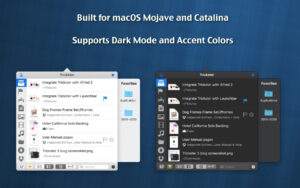
Software Screenshot:
|




Ratings & reviews
No rating
Let’s rate it.