






OmniFocus Pro 4 for Mac v4.8.11 GTD Task Management Tool Chinese Activation Version Download
OmniFocus Pro for Mac is a powerful task management software designed for busy professionals. With tools that help manage chaos, you can focus on the right tasks at the right time.
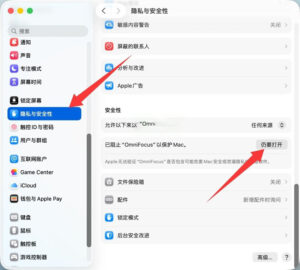
Note: If you encounter a prompt for a damaged software upon opening, check the System Settings -> Privacy & Security -> Right under Security, make sure to check the box “Open Anyway” as shown in the image below.
OmniFocus brings unparalleled power and flexibility to Mac, helping you manage your work in your own way.
OmniFocus keeps your busy life organized. Use projects to naturally organize tasks, then add tags to cross-project organization. Easily access tasks while on the go, using spare time to handle important tasks. The “Predict” view shows tasks and calendar events together, giving you a full view of your schedule. Use the “Check” perspective to keep projects and tasks on track.
Key Features:
– The inbox is where you quickly add tasks, saving them for later organization.
– End-to-end encryption is supported for data stored on our servers or yours, ensuring data security.
– Notes can be attached to tasks, providing all the information you need.
– Attachments – graphics, videos, audio, and all the content you want – add rich information to tasks.
– Use “View” options to customize each perspective, allowing you to decide what content to display and how tasks are filtered.
– The “Check” perspective lets you clearly see projects and tasks, keeping everything in order.
– OmniFocus Mail Drop adds tasks via email, and is compatible with IFTTT and Zapier (if using our free sync server).
– The “Today” widget shows the most important projects, allowing you to stay updated without switching to the app.
– Supports TaskPaper Text and omnifocus:///add and /paste, enabling automation via URLs.
PRO Features:
– Custom perspectives allow you to filter and group projects and tags to create new ways of viewing data. New: Filter rules are easier to use but more powerful, now allowing “All,” “Any,” and “None” combination rules. You can also choose to use any image as a custom perspective icon with a custom color.
– New: Today’s “Predict” can include projects with specific tags, allowing you to rearrange these tasks in a way that suits your planning.
– Customizable toolbars allow you to organize perspectives as you need for quick access.
– The “Today” widget displays the selected perspective in the Notification Center.
– AppleScript support allows you to use Apple’s Mac scripting language for various automations.
Version 4.8.11 Update Notes:
– Documentation: Updated the “Quick Collect Methods” reference manual chapter.
– Omni Automation: Fixed a recent issue where setting link styles in Omni Automation settings caused functionality degradation.
– Predict View: Now supports expanding the selected range of the Predict Sidebar using directional keys.
– Predict View: Fixed an issue with the大纲 interface displaying incorrectly when metadata is displayed in a multi-line format in the Predict View.
– Check View: When entering a date in the “Completion Time” field in the Check View, the date is not lost when switching to the “Discarded” field.
– Check View: Updated to support the new macOS, fixing an issue with a single rounded corner appearing.
– Stability: Fixed a crash issue that could occur when hovering the mouse over the edge of a full-screen window.
– Stability: Fixed a program crash issue that could occur during the animation of the View Options pop-up window.
Software Screenshots:
This resource requires login to download
Log in
Empire of Sin: A Crime-Themed Strategy Game for Mac – Download and Activate Version
Downloads:3023 | 2026-10-23

SpongeBob: Patty’s Pursuit for Mac
Downloads:949 | 2026-10-23

4K Image Compressor for Mac v1.5 Crack Download
Downloads:824 | 2026-10-20

Calendarique for Mac v4.1 Calendar Menu Reminder Software Activation Download
Downloads:1246 | 2026-10-20


Ratings & reviews
No rating
Let’s rate it.