


Microsoft Office 2024 for Mac v16.111 Chinese Activation Download
Microsoft Office for Mac is a comprehensive suite of professional office productivity tools that have evolved over decades, becoming industry-standard tools for personal office work, team collaboration, and enterprise digital office operations. The suite covers five core office scenarios: document creation, data processing, presentation design, email and calendar management, and digital note-taking, all while fully supporting the global standard Office file formats. It features core capabilities such as intelligent AI assistance, real-time collaboration among multiple users, and cloud data synchronization to efficiently meet various professional office needs.
## Core Component Features
### Word: Professional Document Creation and Layout
– Provides a full-featured text editor and professional layout system, supporting unified style management, automatic generation of multi-level tables of contents, custom headers and footers, multi-column layouts, and mail merge capabilities, to efficiently create and standardize the output of reports, papers, contracts, official documents, and other formal documents.
– Comes with a rich set of tools for mixed media composition, allowing the insertion of tables, charts, shapes, images, 3D models, and symbols and formulas, to precisely control the layout, alignment, and visual hierarchy of the page.
– Features a comprehensive system for document review and collaborative editing, including features such as multiple user annotations, revision history tracking, multi-document comparison, spelling and grammar checks, and word count statistics, to support team reviews, document circulation, and content proofreading scenarios.
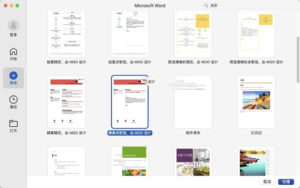
– Offers a vast library of official templates, covering resumes, proposals, posters, letters, and other practical scenarios, allowing users to quickly produce professional content without starting from scratch.
### Excel: Professional Data Processing and Analysis
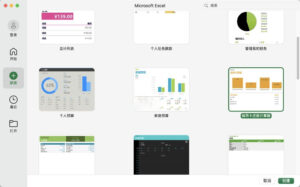
– Comes with a library of hundreds of function and formula options, covering all categories of calculation scenarios including logic, finance, statistics, text, and date functions, with advanced functions such as dynamic arrays and XLOOKUP to enable complex data operations and business modeling.
– Features a powerful data pivot table tool, allowing flexible dimension dragging, grouping calculations, field filtering, and value summarization, to quickly extract business conclusions from large datasets; the new #SPILL! error indicator mechanism clearly marks scenarios where data expansion is blocked, facilitating quick identification and resolution of issues.
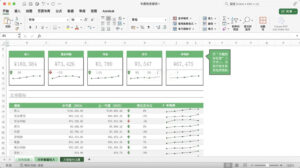
– Integrates Power Query data query tools, supporting multi-source data import, cleaning, integration, and automated refresh, to efficiently handle unstructured data; combined with conditional formatting, data validation, mini charts, and various types of charts, to achieve data visualization presentation.
– Deeply integrates Copilot intelligent analysis capabilities, supporting the upload of 30+ file formats including JSON, XML, code files, images, and compressed files, up to 50 MB in size, to generate formulas, create charts, summarize data patterns, and uncover business insights through natural language.
### PowerPoint: Professional Presentation Design and Delivery
– Provides professional-level slide design tools, supporting smooth transitions, custom animations, unified master layouts, and speaker view, to create high-quality presentations and interactive courseware.
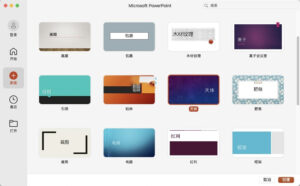
– Comes with a vast library of official design templates, icons, and font resources, and features an intelligent designer function to automatically generate optimized layout schemes based on page content, quickly enhancing visual quality.
– Supports embedding audio, 3D models, hyperlinks, interactive controls, and ink annotations, to create immersive presentation content, suitable for various scenarios including on-site speeches, online meetings, and training sessions.
– Offers features such as speaker notes, rehearsal timing, blackout transitions, and laser pointers, to support real-time annotation of key points during presentations, ensuring smooth delivery and information transmission efficiency.
### Outlook: Professional Email and Calendar Management
– Integrates core functions including email handling, calendar management, contact management, and task management, to streamline work communication and schedule management, enhancing task processing efficiency.
– Supports unified management of multiple email accounts, compatible with enterprise email and popular personal email services, providing advanced email features such as email categorization, automatic filtering, global quick search, blind carbon copies, and scheduled sending.
– Supports editing emails in the sent queue before they are sent, allowing users to modify content in the queue before sending, to avoid accidental sending and content omissions.
– Supports customizing the left navigation bar, allowing users to rearrange and fix modules according to their workflow habits; the calendar module supports meeting invitations, shared availability, repeat schedules, and reminder notifications, to efficiently coordinate team meeting schedules.
### OneNote: Professional Digital Note-taking and Knowledge Management
– Uses a flexible notebook architecture, supporting the entry of text, images, handwritten notes, audio, tables, and web clips, to flexibly build personal knowledge systems and team data libraries.
– Features functions such as tagging, global keyword search, and note-to-note link jumping, to quickly locate and retrieve note content, suitable for scenarios such as knowledge organization, meeting records, learning notes, and project document aggregation.
– Supports shared notebooks among multiple users, allowing team members to collaboratively edit and annotate note content, to facilitate knowledge accumulation and collaborative creation.
– Note content automatically syncs to the cloud, allowing users to access and update records across devices, ensuring information is always available.
## General Core Features
### AI-Powered Productivity
All components deeply integrate Microsoft Copilot intelligent assistant, supporting the use of natural language instructions for tasks such as document polishing, data modeling, presentation generation, email writing, and content summarization, significantly reducing professional operation barriers and markedly improving creation and analysis efficiency.
### Real-Time Collaborative Editing
Supports simultaneous editing of the same document, table, or presentation by multiple users, allowing real-time viewing of others’ editing progress, and online communication through annotations and comments, eliminating the need for repeated file version transfers and significantly enhancing team collaboration efficiency.
### Cloud Storage and Version Management
Deeply integrates with OneDrive cloud storage, allowing files to be automatically saved to the cloud, ensuring consistent data across multiple devices; supports complete version history, enabling viewing and reverting to any version at any time, to prevent data loss and accidental operation losses.
### Full-Format Compatibility and Interoperability
Native support for .docx/.xlsx/.pptx and other global standard Office formats, fully compatible with lower version Office files, allowing seamless opening, editing, and saving of various office documents, ensuring cross-platform, cross-version, and cross-device file interactions without obstacles.
### Extensive Template and Resource Ecosystem
All components come with official template libraries and resource collections, covering various scenarios including office work, learning, business, and design, allowing users to quickly produce standardized and professional office content without requiring specialized design skills, reducing creation costs.
Version 16.111 Update Content:
### Excel
Data Pivot Table #Overflow Error (#SPILL!): When data expansion is blocked, causing the data pivot table to shrink to a single cell and indicate a #SPILL! overflow error, making it easier to focus and resolve issues at your own pace.
Using Excel’s intelligent assistant Copilot for more analysis, including large files: Excel’s Copilot now supports 30+ file formats (JSON, XML, TSV, ZIP, MD, GIF, BMP, SVG, WEBP, HTML, LOOP, PY, CSS, C, CPP, JAVA, SQL, ASPX), you can upload code files, structured data, images, compressed files, and archived emails, accessing more business data; it also supports files up to 50 MB in size, enabling deep analysis of complex data sets, workbooks, and PDF documents. This allows you to conduct in-depth analysis and extract conclusions directly within Excel.
### Outlook
Email Features: Mac Outlook now supports editing emails in the sent queue before they are sent. Users can modify content in the queue before sending.
Navigation Bar: The left navigation bar now supports customization. Users can fix or unfix modules and rearrange them according to their usage habits.
## Bug Fixes
1. Excel: Optimized performance, improving software efficiency.
2. OneNote: Optimized performance, improving software efficiency.
3. Outlook: Optimized performance, improving software efficiency.
4. PowerPoint: Optimized performance, improving software efficiency.
5. Word: Optimized performance, improving software efficiency.
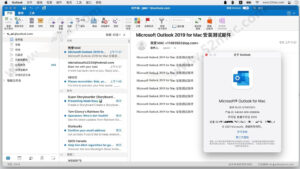
Software Screenshots:
This resource requires login to download
Log in
Essential Player for Mac v2.10.3 Chinese Activation Download
Downloads:3417 | 2026-10-24

Task Office for Mac v8.8 Todo List and Calendar Chinese Activation Version Download
Downloads:996 | 2026-10-19

RightFont for Mac v10.2.1 Professional Font Management Tool Activated Version Download
Downloads:0 | 2026-10-19

MenuBar Stats for Mac v3.6.1 – Menu Bar System Monitoring Software Activated Version Download
Downloads:1608 | 2026-10-17


Ratings & reviews
No rating
Let’s rate it.