

Essential Mac Cleaner & Uninstaller v9.3 Chinese Activation Download
App Cleaner & Uninstaller is a one-stop application management tool for macOS, which has won the Red Dot Design Award and has been certified by Apple. It transcends traditional uninstallers, offering features such as deep uninstallation, startup optimization, extension management, application updates, and security audits, helping users to thoroughly clean application residues, accelerate system startups, and manage software permissions, ensuring that macOS remains in a clean and efficient operating state.
Important Note: Make sure to enable the “Any Source” option in the Security & Privacy settings.
## One: Thoroughly Uninstalling Applications
– **Advanced Scanning Technology**: Automatically scans 12 or more directories in the system, precisely locating the application’s core and all associated cache, preferences, logs, support files, and temporary data, ensuring no corners are left unscanned.
– **Smart Association Recognition**: Automatically distinguishes shared components from dedicated files, avoiding the deletion of other applications’ shared resources, ensuring the safety of the uninstallation process.
– **Bulk Uninstallation**: Supports the simultaneous selection of multiple applications for removal in one go, freeing up several gigabytes of disk space in seconds, efficiently handling large numbers of software.
– **Drag-and-Click Uninstallation**: Allows applications to be dragged directly into the application window for automatic scanning and preparation for uninstallation, making the process intuitive and convenient.
– **Reset Application Function**: Allows the deletion of service files while retaining the main program, restoring the application to its initial state upon first launch, without the need for reinstallation.
## Two: Deep Cleanup of Remaining Files
– **Smart Recognition**: Identifies and cleans up isolated files, invalid configurations, and residual data that were left behind after applications were moved to the trash via the “Trash” method, categorizing them by application name and displaying their size and path.
– **One-Click Cleanup**: Removes all residual fragments, thoroughly releasing occupied disk space and addressing the issue of incomplete removals.
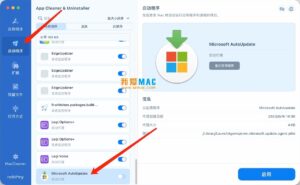
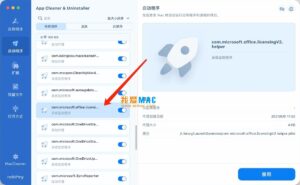
## Three: Management of Startup Items and Background Processes
– **Centralized Display**: Displays all automatically started applications, login items, launch agents, and system daemons at startup.
– **One-Click Management**: Allows the disabling or removal of unnecessary startup items, effectively shortening the time it takes for macOS to boot and reducing background resource usage, thereby improving system performance.
– **Three Views**: Offers a clear and efficient management interface, categorized by all, enabled, and disabled.
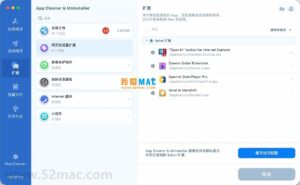
## Four: Management of System Extensions and Plugins
– **Unified Management**: Manages all six categories of extensions and plugins: browser extensions, screen savers, preference panes, internet plugins, widgets (widgets), and installation package files.
– **Quick Removal**: Allows the quick disabling or uninstallation of unnecessary extensions and plugins, reducing background processes and keeping the system clean and tidy.
## Five: One-Click Application Update Center
– **Unified Aggregation**: Aggregates all updates from the App Store and third-party developers, eliminating the need to individually open software or visit websites to check for updates.
– **One-Click Batch Updates**: Ensures that all applications are always up to date, enhancing system security and compatibility.
## Six: Application Security and Permission Audit
– **Apple Certification Verification**: Automatically detects whether an application has been certified by Apple, identifying untrusted software and reducing security risks.
– **Permission Audit Center**: Concentrates on viewing and managing all applications’ permissions for sensitive features such as camera, microphone, location, and full disk access, allowing for the revocation of permissions with a single click, protecting privacy.
– **AI Application Summaries**: Generates a summary of an application’s functions, helping users quickly identify unfamiliar or forgotten software and assist in making decisions about retention and deletion.
## Seven: Additional Practical Features
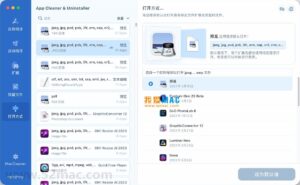
– **Default Application Settings**: Easily modifies the default associations for various file formats, customizing personalized file opening rules.
– **Skip List Protection**: Allows important applications to be added to a whitelist, preventing accidental uninstallation or cleaning, ensuring the safety of core software.
– **Expert Mode**: Enables users to view detailed file information and selectively delete items, catering to advanced users’ needs for fine-grained management.
– **Removal Reminder Protection**: Automatically prompts users when they drag applications to the trash, guiding them through a complete uninstallation process and preventing residual files from being created.
Version 9.3 Update Highlights:
App Cleaner & Uninstaller now employs an improved mechanism to locate and categorize application service files, supporting more applications in the search and installation process.
The removal of system extensions associated with the applications has also been improved.
Application icons now support the macOS tinted style, enhancing stability.
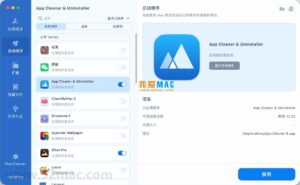
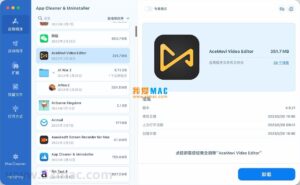
Software Screenshots:
This resource requires login to download
Log in
SideNotes for Mac v1.2.5: Sticky Notes Software Activation Download
Downloads:2921 | 2026-10-27

DaVinci Resolve Studio for Mac v18.5.1 Chinese Activation Edition Download
Downloads:3436 | 2026-10-24

Djay Pro for Mac v5.2.2 Chinese Activation Version Download
Downloads:3512 | 2026-10-24

Adobe Photoshop 2021 for Mac v22.0 PS Crack with Chinese Activation Download
Downloads:319 | 2026-10-23


Ratings & reviews
No rating
Let’s rate it.