
Warning: Attempt to read property "slug" on null in /www/wwwroot/www_23mac_com/wp-includes/taxonomy.php on line 4763

Easy New File for Mac v6.0 Right-Click Quick New Document Chinese Activation Download

  • Introduction
Download
Download now
Join VIP Free download

Description

Easy New File is a lightweight Finder extension tool designed for macOS. It perfectly addresses the pain point of the native right-click menu in Mac systems, which cannot directly create various files. As a Finder extension, it seamlessly integrates common file management functions into the system’s right-click menu, allowing Mac users to enjoy a similar right-click file creation experience as Windows, significantly enhancing daily file management and office efficiency.

### Features:

1. **Quick File Creation via Right-Click**
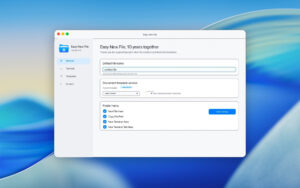
This is the core feature of the software. Users can create the desired file format directly by right-clicking anywhere in Finder or on the desktop, selecting “Easy New File” sub-menu, without needing to open the corresponding application and save to the target path first. It supports creating files in any directory, including the desktop, system folders, and external storage devices.

2. **Instant File Path Copy**
Select any file or folder, and use the right-click menu to immediately copy its complete absolute path to the clipboard. This feature is particularly useful for programmers, designers, and office personnel who frequently need to reference file paths, saving the tedious process of manually inputting or using the terminal to obtain the path.

3. **Quick Terminal Access**
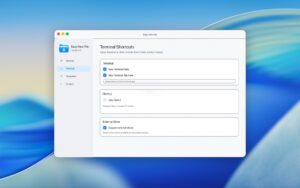
Right-click on the current folder and choose “New Terminal Here” or “New Terminal Tab Here” to directly open the system terminal or terminal tab within the directory.

4. **Custom File Templates**
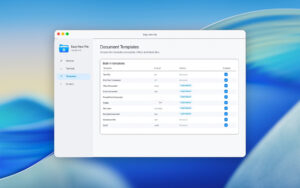
In addition to the built-in multiple file templates, Easy New File also allows users to add their own custom file templates. Users can create personalized templates based on their workflow, such as specific format code files, company-standard document templates, etc., further improving their efficiency.

5. **External Storage Support**
The software supports creating new files directly on external hard drives, USB drives, SD cards, etc., which is a feature not commonly found in many similar software. This is very convenient for users who often work with mobile storage devices.

### Supported File Formats:

– **Text Files**: Plain text files (.txt), Rich Text Format files (.rtf), Markdown files (.md)
– **Office Documents**: Microsoft Word (.docx), Excel (.xlsx), PowerPoint (.pptx)
– **Apple Office Documents**: Pages, Numbers, Keynote
– **Web and Markup Languages**: HTML, XML, CSS, JavaScript
– **Programming Scripts**: Shell scripts (.sh), Python scripts (.py), Swift scripts (.swift), PHP, Ruby, Perl, etc.
– **Other**: JSON files, CSV files, etc.

Version 6.0 Update Content:

– New design for the preference settings window, more in line with the modern macOS minimalist style.
– Added the option to choose template versions, with the default using the latest format template.
– Refreshed the built-in templates, with new files using the current creation and modification dates.
– Updated the instructions for enabling Finder extensions in the new macOS system settings.

Software Screenshots:


Download info

This resource requires login to download

Log in
Note: This resource is for informational purposes. By using this resource, you agree that you accept full responsibility to the copyright holder. For questions, please contact us.

Ratings & reviews

No rating

Let’s rate it.

  • 5 stars
  • 4 stars
  • 3 stars
  • 2 stars
  • 1 stars

You may also like

More
×
Easy New File for Mac v6.0 Right-Click Quick New Document Chinese Activation Download
iMac — One-stop Mac Software Download Platform
Social login
captcha
Social login