
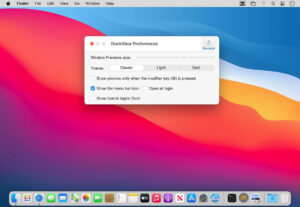

DockView 2 for Mac v2.1.7 Serial Number
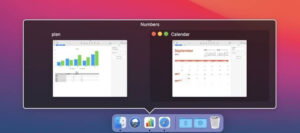
DockView is a utility tool that adds window preview functionality to the macOS Dock. Hovering the mouse over any application icon in the Dock will instantly display a real-time thumbnail of all open windows for that application, along with their titles. Clicking on the thumbnail will quickly switch to the desired window without needing to activate it, making multi-window management intuitive and efficient.
Key Features:
**1. Real-time Window Preview**
Hovering over an application icon in the Dock will display a real-time thumbnail of all open windows, along with their titles. The preview will continuously refresh, allowing you to monitor content changes without activating the window, such as terminal output, download progress, and video playback.
**2. Instant Window Switching**
Clicking on the thumbnail will immediately switch to the desired window and place it on the frontmost desktop space (Space). This eliminates the need to use Cmd+Tab to guess which window, or to open the Mission Control for a global search. The window is always visible where the cursor is hovering.
**3. Direct Window Management**
The preview thumbnails allow direct manipulation of windows:
– Close the window
– Minimize the window
– Restore (unminimize) the window
– Move the window to the front
No need to activate the window first, making management more efficient.
**4. Minimized Window Preview (Unique Feature)**
Unlike other similar tools, which only support previewing application icons, DockView further extends this feature by displaying a preview of minimized window icons in the Dock. This means that even if a window is minimized and placed in the Dock’s right side, you can still see its content without having to restore it individually.
**5. Support for Multiple Desktops and Scenarios**
– Supports Frontmost Manager (Stage Manager)
– Supports multi-monitor environments, allowing you to manage windows on different screens
– Supports full-screen applications and desktop spaces (Spaces)
– Supports Dock auto-hide mode, ensuring the preview remains accurately above the icon
**6. Differentiated Positioning from Mission Control**
Mission Control displays all windows for all applications, which can be overwhelming with too much information. In contrast, DockView focuses on a single application, displaying its windows only when you hover over its icon. This makes it more precise and dedicated, reducing the burden of context switching.
This resource requires login to download
Log in
PDF Squeezer: PDF Toolbox for Mac Activation Version Download
Downloads:1373 | 2026-10-27

Brightly Pro for Mac v2.1.4: Photo and Video Brightness Adjustment Activation Download
Downloads:2552 | 2026-10-22

AdGuard for Mac v2.1.4 Chinese Activation Version Download
Downloads:158 | 2026-10-20

AI Transcription for Mac v2.10: Chinese Activation Download for Audio and Video Text Conversion
Downloads:2928 | 2026-10-20


Ratings & reviews
No rating
Let’s rate it.