

Bartender 6 for Mac v6.6.2 Chinese Activation Download
Bartender is the most professional menu bar management tool for macOS, solving issues such as刘海屏遮挡 and crowded icons. It supports custom hiding/sorting/grouping, automation triggers, and deep style beautification. The latest Pro version transforms the刘海 into a multifunctional efficiency console, with excellent performance and perfect system compatibility.
### Features:
#### 1. Precise Icon Display and Hide Control
– **Three-Level Display Mode**: Set icons to “Always Show”, “On Demand”, or “Always Hide”.
– **Quickly Access**: Click the Bartender icon or hover over the menu bar to display hidden icons.
– **Option Key Shortcut**: Hold the Option key and click the Bartender icon to view “Always Hide” or “All Hide” items.
– **Smart Space Allocation**: When space is insufficient, icons will automatically display on the left side of the visible area, replacing the last displayed item (can be disabled).
#### 2. Complete Custom Layout
– **Drag and Sort**: Drag and reorder all icons, including system icons and third-party app icons.
– **Project Swap Function** (reintroduced in version 6.5.1): Enable “Swap Displayed Projects When Space is Insufficient” in advanced settings to solve space issues on the刘海 screen.
– **Optimized Layout**: Moving a single icon automatically takes effect, without needing to manually click “Sort”, and the menu bar is always organized.
– **Multiple Presets Support**: Create multiple layout presets for different work scenarios (e.g., office, entertainment, meeting).
#### 3. Powerful Group Management
– **Independent Grouping Area**: Grouped icons have their own “Grouped Projects” area in the layout interface, separated from the hidden list.
– **Free Editing**: Click a group to rename, delete, or reorder icons within the group.
– **Bulk Operations**: Set display/hide rules for an entire group at once.
#### 4. Automation Trigger System (Exclusive Core Advantage)
– **Multiple Conditions Trigger**: Supports automatic display/hide of icons or switching of presets based on the following conditions:
– Battery status (percentage, charging/discharging)
– Wi-Fi connection (specific network, connected/disconnected)
– System Focus Mode
– Time/Calendar
– Application startup/shutdown
– Custom AppleScript scripts
– **Image Trigger**: Recognize changes in specific icon states and execute actions (e.g., automatically displaying icons when a WeChat message arrives).
#### 5. Deep Style Customization
– **System Style Compatibility**: Perfectly supports the Liquid Glass glass effect of macOS Tahoe, and can revert to the classic Sequoia style.
– **Personalized Customization**: Customize menu bar color, gradient, border, shadow, and corner radius.
– **Icon Spacing Adjustment**: Precisely control the spacing between icons to address issues with default spacing being too large or too small.
– **Hidden System Elements**: Hide menu bar separators, system icon backgrounds, etc.
#### 6. Practical Auxiliary Features
– **Quick Search**: Global search for menu bar items, with a single click to open or hide.
– **Customizable Shortcuts**: Assign global shortcuts to any menu bar item or feature.
– **Customizable Widgets (Beta)**: Create your own menu bar items without coding, supporting display of system status and execution of quick actions.
– **Real-Time Activity Compatibility**: Compatible with system real-time activity, not interfering with灵动岛 or notifications.
Version 6.6.2 Update Highlights:
This update focuses on two major improvements: stability in the Real-Time Mode and overall performance optimization. The official team rewrote the layout page to fix issues like missing icons and disappearing projects during movement. Despite increased workload in managing the menu bar on macOS Tahoe, this version achieved the lowest memory and CPU usage in history.
Fixes:
– Memory usage no longer continues to climb for users who enable triggers.
– The “Update” behavior of triggers is more reliable.
– Memory usage does not continue to be high when the layout page is kept open.
– No longer experience “Icon Disappearance” issues when moving projects or keeping applications open for extended periods.
– Overall CPU usage is reduced, especially in Real-Time Mode.
– Real-Time Mode is more stable, with fewer operations needed to achieve correct sorting.
– Overall battery consumption is reduced; enabling “Battery Low Power Mode” can further save power, but some real-time updates may be slightly delayed (not noticeable unless frequent updates are made).
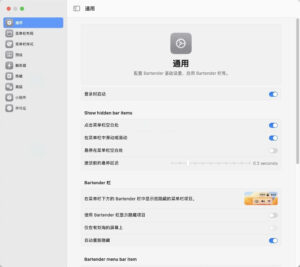
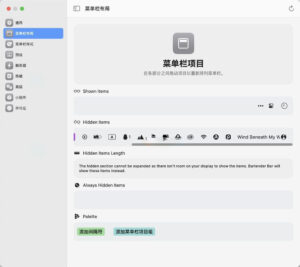
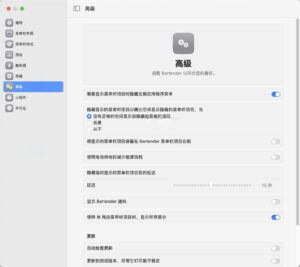
Software Screenshots:
This resource requires login to download
Log in
NetWorker Pro for Mac v12.1.0 网络监控工具 中文激活版下载
Downloads:1624 | 2026-10-30

Geekbench 6 for Mac v6.7.1 System Performance Testing Tool Activation Version Download
Downloads:2 | 2026-10-27

Disk Drill Enterprise for Mac v6. 0 Data Recovery Software Chinese Activation Version Download
Downloads:2092 | 2026-10-18

FE File Explorer Pro for Mac v3.4.2 FE File Manager Chinese Activated Version Download
Downloads:1898 | 2026-10-17


Ratings & reviews
No rating
Let’s rate it.