

Enhanced Clipboard Tool: PopClip for Mac v2026.8 Chinese Activation Version Download
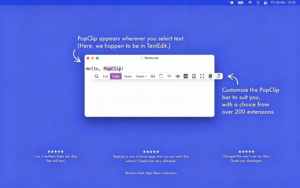
PopClip is a renowned global clipboard efficiency tool for macOS, instantly displaying a floating operation panel above the cursor when you select text within any application, eliminating the need for right-click menus and saving the hassle of switching windows. It allows you to perform text operations simply by selecting and clicking, making it an essential productivity software for text workers, developers, and researchers.
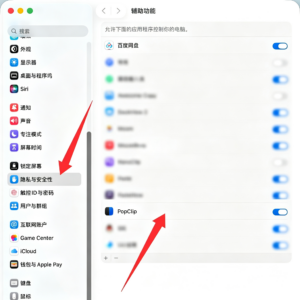
According to the software’s instructions, before using the software for the first time, please select Accessibility in the “System Settings” -> “Privacy & Security” window and check PopClip.
Core Functionality Features:
1. **Smart Word Selection Triggering**
– Automatically triggers the operation panel by dragging the mouse over selected text.
– Long-pressing the touchpad or mouse button allows for direct panel display without selecting text, enabling paste operations.
– Supports setting up a blacklist to disable the panel in specific applications, preventing unnecessary interruptions.
2. **Native Built-in Basic Operations**
– Includes basic operations such as cut, copy, paste, spelling check, dictionary lookup, and web search.
– Automatically recognizes text links, email addresses, and file paths, allowing for direct opening.
– Supports pasting with Option key held down to paste plain text without formatting.
3. **Context-Sensitive Intelligent Recognition**
– Dynamically displays relevant functions based on the selected content.
– Automatically displays open buttons for links, provides spelling corrections for error words, and simplifies the menu without redundancy.
## New Features in Version 2026.8
**Unlimited Customization of System Operations**
– No longer limits the number of operations; supports creating multiple instances of the same extension, each with its own name, icon, parameters, and position.
– Supports creating folders and separators to organize functions, with folders displayed as sub-menus in the floating bar.
– Allows renaming any operation and freely switching between icon/text display modes.
– Features a new icon selector, supporting searching for open-source icons, creating custom text icons, and importing SVG/PNG custom icons.
– Supports dragging, copying, cutting, and pasting to adjust sorting, and includes features like undo, redo, and quick search using ⌘F to browse all operations.
**Enhanced Extension Management**
– Official extension library plugins now support automatic updates.
– Adds an extension information panel and unified extension management list, allowing viewing of extension source code and signature information, facilitating debugging of custom extensions.
– Extensive improvements to the settings panel, including support for multi-line text input boxes, password display, clickable link explanations, and customizable options with “None” selections, adapting to various APIs and prompt configurations.
## Strong Extension Ecosystem (Core Highlights)
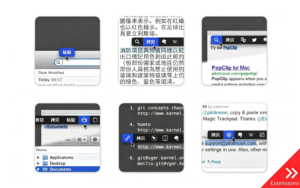
– Extensive free extensions cover all scenarios, including text processing (uppercase/lowercase conversion, simplification/complexification, removal of extra spaces, text sorting, encoding conversion, camel case conversion), translation tools (DeepL, Google Translate, Bing Translate, Oxford Dictionary), office integration (push text to Notion, Evernote, Notes, To-Do lists), developer tools (Base64 encoding/decoding, Dash document search, URL encoding, viewing Bundle ID), utility tools (text-to-speech, generating short links, unit conversion, QR code generation, searching and selecting text), and custom extension support for users to create their own workflows.
## Detailed Improvements and Experience Enhancements
– The floating panel width adjusts automatically to fit the screen.
– Overflow buttons display pagination prompts.
– Hover animations for buttons are smooth.
– After pasting, the clipboard content is automatically restored.
– Supports freely deleting and restoring built-in operations, and allows buttons to be dragged and reordered.
– The built-in search tool supports custom search engines, with Option held down to automatically add double quotes around keywords for precise search.
Version 2026.8 Update Highlights:
# New Features
– Function keys (F1, F2, etc.) can now be used as standalone shortcuts to trigger PopClip.
– The “View Source Code” command now opens a source code viewing window, which includes “Export…” and “Copy Code Snippet” buttons.
– A “Cancelled” prompt appears after canceling an operation successfully.
– If a PopClip operation was previously rejected due to automation permissions, it now prompts users with a solution.
– Swedish localization support is added.
# Changes
– When a new browser tab is created, it will now appear next to the current tab, not at the end of the tab bar.
– When pasting text, the original “Keep Clipboard Content” logic is restored.
– The “View Source Code” command now opens a source code viewing window, which includes “Export…” and “Copy Code Snippet” buttons.
– The “View Source Code” command now opens a source code viewing window, which includes “Export…” and “Copy Code Snippet” buttons.
# Fixes
– Fixed the issue where the program would freeze when opening a browser tab.
– Fixed the issue where, in browsers based on Chromium, opening a background tab with Shift would briefly bring the page to the foreground.
– Fixed the issue where a shortcut would unexpectedly trigger PopClip before an operation was completed.
– Fixed the issue where the PopClip bar could not be centered when the toolbar did not include copy and paste buttons (a regression from version 2026.7).
– Fixed the issue where button highlights were delayed in the keyboard operation mode.
– Fixed the issue where the PopClip window would retain incorrect content in the clipboard when the shortcut ⌘C was pressed before the operation was completed.
– Fixed the issue where the settings panel would not automatically close after selecting a copy version.
– Fixed the issue where some extensions appeared installed but were not added to the operation list.
– Fixed the issue where some extensions displayed incorrect icons in the settings.
– Fixed the issue where the adjustment panel for the icon selector was abnormally high in some languages.
– Fixed compatibility issues with FilePane.
– Numerous other issues are fixed.
Software Screenshots:
This resource requires login to download
Log in
FSNotes for Mac v4.5.7 Serial Key Download
Downloads:2579 | 2026-10-27

OmniOutliner Pro 5 for Mac v5.8.5 Chinese Activation Version Download
Downloads:2849 | 2026-10-27

Pixelmator Pro for Mac v1.6.4 Professional Image Editor Chinese Activation Version Download
Downloads:3144 | 2026-10-22

Path Finder for Mac v26.1.9 File Management Tool Chinese Activated Version Download
Downloads:0 | 2026-10-19


Ratings & reviews
No rating
Let’s rate it.