

Default Folder X for Mac v6.2.8: Finder Enhancer Activation Download
Default Folder X is a veteran system-level file dialog enhancement tool for the Mac platform, having been in development for over two decades. It significantly improves the “Open/Save” interaction experience by leveraging intelligent memory, quick navigation, and deep integration with the Finder. It addresses the tedious and inefficient file selection issues native to macOS, making it an essential tool for all Mac users.
### Core Functionality Features:
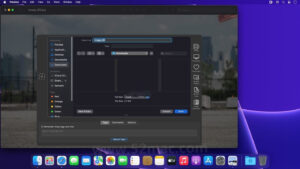
1. **Enhanced Open/Save Dialogs**
– Adds a dedicated toolbar to the right of all native Mac applications’ “Open” and “Save” dialogs, providing a one-stop file navigation experience:
– Instantly access the **Recent Folders**, **Favorites**, and **Current Open Finder Windows**.
– Supports hierarchical pop-up menus, allowing subfolders to be expanded with a single mouse hover.
– Automatically reselects the last opened file, avoiding repetitive searches.
– Extends the file name input field to address the native dialog’s insufficient input space.
2. **Smart Path Memory and Application-Specific Defaults**
– **Application-Specific Default Folders**: Set dedicated save/open paths for different software (e.g., Word for Documents/Work, Photoshop for Images/Design, Browser for Downloads).
– **Dynamic Path Learning**: Smartly identifies frequently used folders and automatically sets them as temporary default paths.
– **Global History Record**: Records all file operations for easy recall to any visited location.
3. **Deep Finder Seamless Integration**
– **Instant Finder Window Sync**: Clicking any open Finder window within the dialog instantly navigates to that path.
– **Complete File Management Within Dialog**: Perform operations like **Copy, Rename, Delete, Get Info** directly within the dialog without needing to switch back to Finder.
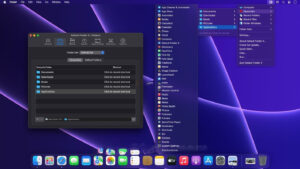
– **Drag-and-Drop Enhancements**: Supports dragging files to the DFX icon in the menu bar, allowing quick movement to target folders via the menu.
4. **Global Quick Search and Shortcuts**
– **Global Quick Search**: Default shortcut Command+Shift+Space, quickly locates files, folders, and applications with a few letters.
– **Customizable Search Scope**: Supports searching files, folders, applications, or using Spotlight for global searches.
– **Custom Shortcuts**: Assigns custom shortcuts to frequently used folders for instant navigation.
5. **Advanced File Tags and Metadata Management**
– Add **Finder Tags**, **Spotlight Keywords**, and **File Annotations** directly within the save dialog.
– Displays a list of recently used tags, allowing quick selection.
– Supports batch tagging and editing for efficient file categorization.
6. **Automated Save Actions (Added in Version 6.2.8)**
– Automatically executes preset actions after saving files: open immediately, attach to email, move to a specified folder.
– Supports creating custom workflows using **AppleScript**, **Automator**, and **Quick Actions**.
– Sets different automation rules for different applications or folders.
7. **Customizable Menu Bar and Interface**
– Customizes the menu bar completely, allowing adding, removing, and rearranging menu items.
– Supports automatic switching between dark and light modes, perfectly aligning with system appearance.
– Offers multiple interface themes and display options to meet different user preferences.
Version 6.2.8 Update Content:
1. The Click-Through feature now supports Path Finder 26.
2. When the Bloom software’s “Precise Location Detection” option is enabled, the Click-Through feature can distinguish between different panels within the Bloom window.
3. Fixes a system vulnerability in macOS Tahoe where the file popup in list view cannot scroll right to display the current folder.
4. Resolves the issue where Default Folder X incorrectly identifies when quickly opening and closing file pop-ups.
5. Fixes the issue where the Recent Projects cannot display files and folders from the business version of OneDrive.
6. Resolves the issue where the save dialog requires double-clicking twice to open a folder.
7. Improves the rebound positioning feature to correctly remember the last selected file in list view.
8. Fixes the program crash issue when opening projects in the Finder sidebar.
9. Resolves the occasional program crash when generating hierarchical menus for large folders.
10. Fixes the program crash issue where the Default Folder X accessory component cannot be properly invoked within a program package.
11. Adds Calibre to the software block list due to its inability to properly adapt to macOS accessibility features, leading to crashes (this is a Calibre internal issue).
12. Due to frequent crashes of video and audio players in macOS 13.4 and above, the open pop-up’s ability to preview audio and video files has been disabled by default. To re-enable, hold down the Option key and click the Default Folder X menu bar settings, then check the “Show Preview for Playable Audio/Video Files” option.
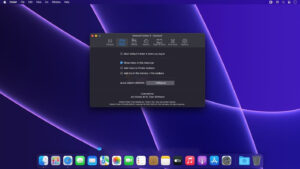
Software Screenshot:
This resource requires login to download
Log in
Final Cut Pro X for Mac v10.4.6 Chinese Activation Version Download
Downloads:3503 | 2026-10-24

Rhinoceros for Mac v6.30 3D Modeling Software Chinese Activation Version Download
Downloads:329 | 2026-10-23

Capture One Pro for Mac v16.5.7.8 Chinese Activation Version Download
Downloads:1464 | 2026-10-21

Project Office for Mac v10.2 Gantt Chart Activator Download
Downloads:2619 | 2026-10-20


Ratings & reviews
No rating
Let’s rate it.