

SoundSource for Mac v6.1.5 Audio Control Software Activated Version Download
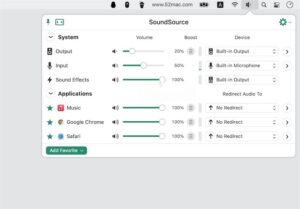
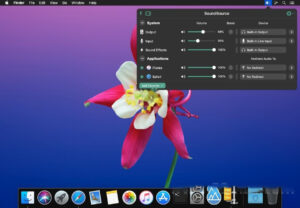
SoundSource is a lightweight and efficient menu bar audio control tool that covers both system-wide and per-app dimensions, providing full-scenario volume adjustment, audio routing, sound effect tuning, and device management capabilities. With no complex configuration required, it enables refined and personalized desktop audio control.
## Independent Per-App Audio Control
– Supports adjusting the volume of each running app individually, with independent mute and separate gain (volume can exceed the system’s 100% limit). Volume levels of different apps do not interfere with each other, making it suitable for office and entertainment scenarios with multiple programs running in parallel.
– Supports per-app audio output redirection, allowing sounds from different apps to be routed to different audio devices. For example, music apps can output to external speakers while communication apps output to headphones, achieving split audio playback.
– Supports mounting audio effects for individual apps separately without affecting system-wide or other programs’ sound effects, meeting the differentiated listening needs of different apps.
## One-Stop Management of Global Audio Devices
– One-click quick switching of system output, input, and alert sound devices from the menu bar, with no need to go through multiple layers in System Settings. Compatible with all wired, Bluetooth, and virtual audio devices.
– Built-in professional audio device management panel allows adjusting device volume, left/right channel balance, input gain, and viewing technical parameters such as sample rate and bit depth. Supports custom device names and icons, and can hide unused devices to keep the list tidy.
– Supports output grouping, allowing multiple audio devices (including AirPlay wireless devices) to be customized into a group. Selecting the group outputs audio to multiple devices simultaneously, enabling synchronized multi-room playback.
– Supports priority device ordering and automatic switching. You can set device priorities so that when a new device is connected, audio routing switches automatically, and when a device is disconnected, it automatically falls back to the default output.
## Professional Audio Effect Tuning
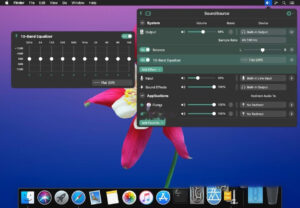
– Built-in 10-band equalizer with multiple scenario-based preset sound effects. Supports custom saving of EQ parameters, with fine adjustment for bass, vocals, treble, and other frequency bands, adapting to different listening needs for music, movies, and voice.
– Fully compatible with Audio Units (AU) standard audio plugins, allowing loading of third-party professional effects for advanced audio processing such as reverb, noise reduction, and loudness normalization.
– Supports loading effects globally or per-app, with flexible control over the scope of effects, balancing overall system sound with app-specific sound effect configurations.
## Scenario-Based Configuration and Efficient Operation
– Supports quick configuration, allowing saving multiple complete audio setups (including all settings such as devices, volume, and effects) and one-click switching between different scenarios like home office, media entertainment, and live streaming meetings.
– Full support for custom global shortcuts, which can be bound to operations such as device switching, volume up/down, mute toggle, and configuration switching, enabling blind operation without clicking the menu bar.
– A lightweight control panel resides in the menu bar. Click to expand all audio control items, with support for displaying real-time volume levels, making status clear at a glance and operation efficient and intuitive.
– Deep support for Shortcuts automation, providing rich audio action interfaces for automated operations such as getting audio status, adjusting parameters, and toggling effects, adapting to complex workflows.
## Advanced Practical Features
– Native support for AirPlay audio streaming, allowing global or individual app audio to be wirelessly streamed to AirPlay devices such as HomePod and Sonos, with support for synchronized playback on multiple devices.
– Provides a global one-click microphone mute function, with customizable shortcuts to quickly toggle microphone input, suitable for online meetings, live recording, and other scenarios.
– Supports maximum volume limiting, allowing you to set an upper limit for system output volume to prevent sudden volume spikes from damaging hearing and ensure safe use.
– Supports lock settings to prevent communication apps from arbitrarily changing microphone input volume, keeping audio parameters stable.
Version 6.1.5 Update Contents:
New “Control Center” special audio source
In macOS 27 (Golden Gate) and later, the new “Control Center” special audio source can capture audio received by the Mac via AirPlay as well as volume adjustment alert sounds. Due to changes in the Golden Gate system, this source replaces the previous “AirPlay Receiver” special audio source. For more details about special audio sources, please refer to this support article.
The ARK plugin, which powers SoundSource’s audio processing, has been updated to version 13.5.5, significantly reducing audio latency and bringing several other improvements.
Improved AirPlay stability on macOS 27 (Golden Gate), fixing connection failures and latency issues.
SoundSource no longer displays “ghost” AirPlay devices (an issue that previously occurred with certain device combinations). Notably, this fixes an issue introduced by tvOS 27: SoundSource can now correctly identify the name of an Apple TV paired with a HomePod or HomePod mini again, instead of incorrectly identifying it as “Home Theater”.
Bluetooth battery levels now also display correctly for devices connected after the app launches.
SoundSource now handles corrupted data files better; previously such files could cause certain devices to not appear properly in the device selection list.
Improved support for IK Multimedia Audio Units, fixing an issue where these effects stopped responding to mouse events in menus.
The generic Audio Unit interface now refreshes correctly when the parameter list changes.
Fixed an issue with duplicate capture of app helper processes. In rare cases (e.g., Microsoft Teams), this previously caused the main app to be unable to be muted or otherwise controlled.
Reverb tails no longer carry over to the next playback when app audio stops and restarts.
On macOS 27 (Golden Gate), Audio Units no longer crash when popping up menus. Also fixed a crash that could occur when scanning Audio Units at launch.
Dragging the mouse over the menu bar status icon no longer causes the SoundSource window to flicker on and off.
The “Maximum Volume” slider in the “Devices” window now updates correctly when dragged again. Additionally, volume changes now take effect without restarting SoundSource.
Software Screenshots:

Multitouch for Mac v1.17.9: Additions to Multi-Touch Gestures Activation Version Download
Downloads:2568 | 2026-10-19

Geekbench 5 for Mac v5.2.2 System Performance Testing Tool Activation Version Download
Downloads:403 | 2026-10-19

SoundSource for Mac v5.8.9 Audio Control Software Activation Version Download
Downloads:658 | 2026-10-18

MouseBoost Pro for Mac v4.0.2 Right-Click Assistant Professional Edition Chinese Activation Download
Downloads:931 | 2026-10-18


Ratings & reviews
No rating
Let’s rate it.