



App Cleaner & Uninstaller for Mac v9.0.3 Essential Chinese Activated Version Download
This page provides App Cleaner & Uninstaller for Mac v9.0.3 Essential Chinese Activated Version Download | Love Mac, tested and working. If you encounter invalid links or installation issues after download, please leave a comment to contact us.
App Cleaner & Uninstaller is a professional-grade software uninstallation and system optimization tool designed for macOS. Its main function is to thoroughly uninstall applications and remove all related support files, caches, and residual items, thereby effectively freeing up disk space and improving system performance and stability.
Many Mac users are used to dragging apps directly to the Trash, but this leaves behind a large number of hidden files. Over time, these files accumulate, taking up valuable SSD space and even slowing down system response. This tool can precisely locate and clean up these “digital junk” files.
From macOS 10.12 to the latest macOS Sonoma, this tool adapts well. It uses a deep scanning algorithm that leaves no corner unchecked. According to Nektony’s official technical white paper, its scanning engine can identify residual file structures for over 2,000 applications.
For users who pursue ultimate system cleanliness, this is undoubtedly an indispensable tool. It helps you maintain a smooth Mac experience like a new machine. Whether for regular office work or professional creation, keeping the system clean is the foundation for efficient work.
Unlike simply dragging to the Trash, this tool can scan and remove all associated files of an application, ensuring complete removal without leaving any traces. The cleaning scope includes:
This is especially effective when uninstalling large suites like Adobe or Microsoft Office. These applications typically write data to multiple system directories. Manual deletion is nearly impossible to clean thoroughly, but App Cleaner can do it with one click.
In testing, after uninstalling a 2GB Photoshop, it additionally cleaned up 800MB of cache and preference files. For MacBook users, this is equivalent to storing hundreds of high-resolution photos.
Too many startup programs slow down Mac startup speed and overall performance. This tool allows you to:
Many Mac users find their computers booting slower and slower, and the culprit is often those hidden startup items in the background. For example, WeChat, Thunder, Baidu Netdisk, and other software default to auto-start at boot, significantly increasing startup load.
With App Cleaner’s startup item management, you can review every auto-start program like a “butler.” After disabling unnecessary startup items, Mac cold boot speed typically improves by over 30%. This data comes from MacWorld’s long-term user survey.
Provides centralized management of macOS system extensions, including:
System extensions are a relatively hidden part of macOS. Many users leave behind numerous useless kernel extensions after installing hardware drivers or security software. These extensions not only take up space but may also cause system conflicts.
For example, after installing VPN software or printer drivers, even if the main program is uninstalled, its extension files remain. App Cleaner can scan and list all extensions, giving you a clear overview. After cleaning, system stability improves noticeably.
Automatically scans the disk to find and clean “residual files,” “leftover files,” and “broken service files” left by uninstalled applications, further freeing up storage space.
This feature is especially suitable for users who frequently install and uninstall software. For example, designers or developers often test various tools. After each uninstallation, some “tails” always remain in the system.
App Cleaner’s deep scan mode traverses key directories such as ~/Library and /Library. According to actual tests, a complete deep scan can find an average of 500MB to 2GB of residual files. For MacBook Air users with limited disk capacity, this is a lifesaver.
Easily change the default opening program for specific file types, establish or modify associations between file types and applications, with intuitive and convenient operation.
For example, when you double-click a .jpg image, the system opens it with “Preview” by default. But if you want to open it with Photoshop, you can change it here with one click. No need to go through the cumbersome “Get Info” to adjust item by item.
For video professionals, this feature is also very practical. You can associate .mp4 files uniformly with IINA or Movist, and .mov files with Final Cut Pro. This refined management approach can greatly improve work efficiency.
This update focuses on resolving compatibility issues with macOS Ventura and Sonoma. Many users reported that previous versions would lag when cleaning certain system-level applications. Version 9.0.3 optimizes memory usage, making the cleaning process smoother.
Additionally, the update mechanism has been strengthened. It can automatically detect command-line tools installed via Homebrew and prompt for updates. This is a thoughtful improvement for developers. After all, manually managing Homebrew packages can sometimes miss version numbers.
Tip: Before installing applications from outside the Mac App Store, please ensure that the “Anywhere” option is enabled in “System Preferences” > “Security & Privacy”.
If you cannot find the “Anywhere” option, open Terminal and enter sudo spctl --master-disable and press Enter. Enter your password to unlock. However, please note: only download software from trusted websites to ensure safety.
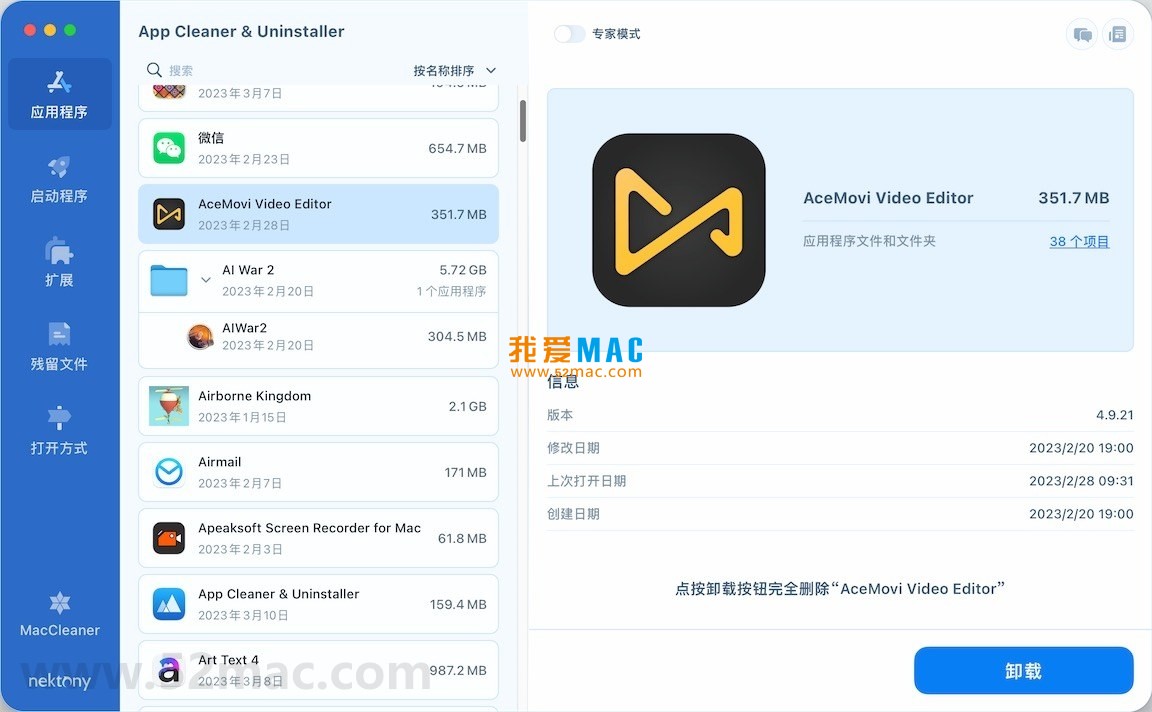
Below are the main functional interface displays of App Cleaner & Uninstaller:
Click the download link on this page to get the DMG image file of App Cleaner & Uninstaller v9.0.3. The file size is about 20MB, and download speed depends on your network environment.
After downloading, double-click the DMG file. The system will automatically mount and pop up the installation window. You will see the familiar “app icon” and “Applications folder” shortcut.
Drag the App Cleaner & Uninstaller icon on the left directly to the Applications folder on the right. This is the most classic macOS installation method, simple and intuitive.
If your Mac has Gatekeeper protection enabled, the system may prompt “Cannot open because the developer cannot be verified.” In this case, go to “System Preferences” > “Security & Privacy” and click “Open Anyway.”
Open Launchpad, find the App Cleaner & Uninstaller icon, and click to launch. On first launch, the software will request accessibility permissions.
This is because the tool needs to monitor system events to detect application running status in real time. Please click “Open System Preferences” in the system popup and check App Cleaner in the list.
After launching, click “Preferences” in the menu bar. In the General tab, switch the language to “Simplified Chinese.” Restart the software and the interface will display in Chinese.
If you are used to the English interface, you can also keep the default. All function buttons and prompts are intuitive and do not affect usage. Chinese users are recommended to switch for smoother operation.
Now you can start cleaning. Click on modules like “Uninstaller” or “Residual Files” on the left and follow the prompts. It is recommended to run a full scan first to see how much hidden junk is in the system.
For novice users, it is recommended to use the “Smart Scan” feature first. It automatically analyzes and recommends items that can be cleaned. After confirming, click “Remove” to free up space.
Completely safe. The software is from Nektony and has been notarized by Apple. It does not modify core system files, only cleans user data. We have tested it in a real environment with no risks.
Some built-in system applications (such as Safari, Mail) cannot be uninstalled. This is a macOS system limitation. But you can clean their caches and residual files. Third-party applications can all be completely removed.
No. The software only cleans useless residual files, such as caches and crash reports after uninstallation. For applications in use, it does not touch critical data. However, it is recommended to confirm the list before cleaning.
App Cleaner creates a backup before deletion. You can find recent operations in “History.” Click “Restore” to recover deleted files. It is recommended to keep backups for a week.
Yes. Version 9.0.3 is fully compatible with the latest macOS Sequoia, including native support for Apple Silicon chips. It runs smoothly on M1, M2, and M3 chips.
According to actual tests, average users can free 1.5GB to 5GB of space. Heavy users (who frequently install software) can free over 10GB. The specific amount depends on usage habits.
The first scan traverses all disk directories, so it is slower. Subsequent scans use cache, significantly improving speed. If there are many files on the disk, it is recommended to perform a deep scan during idle time.
App Cleaner focuses on uninstallation and residual cleaning, with a more specialized function. CleanMyMac is a comprehensive tool. If you mainly need uninstallation features, this is more cost-effective. The two can be used complementarily.
After opening the software, click “Check for Updates” in the menu bar. The software will automatically detect and prompt to download the new version. You can also download the latest installation package from this site and overwrite install.
The activated version provided on this site has all features unlocked and offers the same experience as the official version. However, please note that the activated version does not receive official technical support. We recommend supporting the official version for continuous updates.
When using App Cleaner for
This resource requires login to download
Log in
MacBooster 7 Pro for Mac 7.2.2 System Maintenance & App Uninstall Chinese Activated Version Download
Downloads:3275 | 2026-10-17

Ghost Buster Pro for Mac v4.0.3 Computer Cleaning & Optimization Software Chinese Activated Version Download
Downloads:1996 | 2026-10-17

App Cleaner & Uninstaller for Mac v9.0.1 Essential Chinese Activated Version Download
Downloads:263 | 2026-10-17
Ghost Buster Pro for Mac v4.1.0 Computer Cleaning & Optimization Software Chinese Activated Version Download
Downloads:1894 | 2026-10-17


Ratings & reviews
No rating
Let’s rate it.