



App Cleaner & Uninstaller for Mac v8.7.1 Software Uninstaller Chinese Activated Version Download
This page provides App Cleaner & Uninstaller for Mac v8.7.1 Software Uninstaller Chinese Activated Version Download | Love Mac, tested and working. If you encounter a dead link or cannot install after downloading, please leave a comment to contact us.
App Cleaner & Uninstaller is a professional-grade software uninstaller and system optimization tool designed specifically for macOS. Its core function is to thoroughly remove applications and all their associated files and folders, effectively freeing up disk space and maintaining system stability. In addition, the tool can deeply scan and clean useless files, redundant language packs, cache data, and more, comprehensively improving Mac performance. According to a review by the authoritative tech media MacWorld, such tools play a key role in maintaining system health. For users pursuing ultimate system cleanliness, it is almost indispensable.
Important Notice:
This software is a comprehensive uninstaller and cleaner for the Mac platform, designed to solve the problem of leftover files from conventional uninstallation methods and to provide multiple system optimization features. It is like a digital housekeeper that helps you take care of every detail inside your Mac.
Too many login items and startup services can slow down system startup and performance. This tool allows you to:
Centrally manage various macOS extensions to keep the system clean:
Easily change the default application for specific file types and intuitively manage macOS file association settings without complex command-line operations.
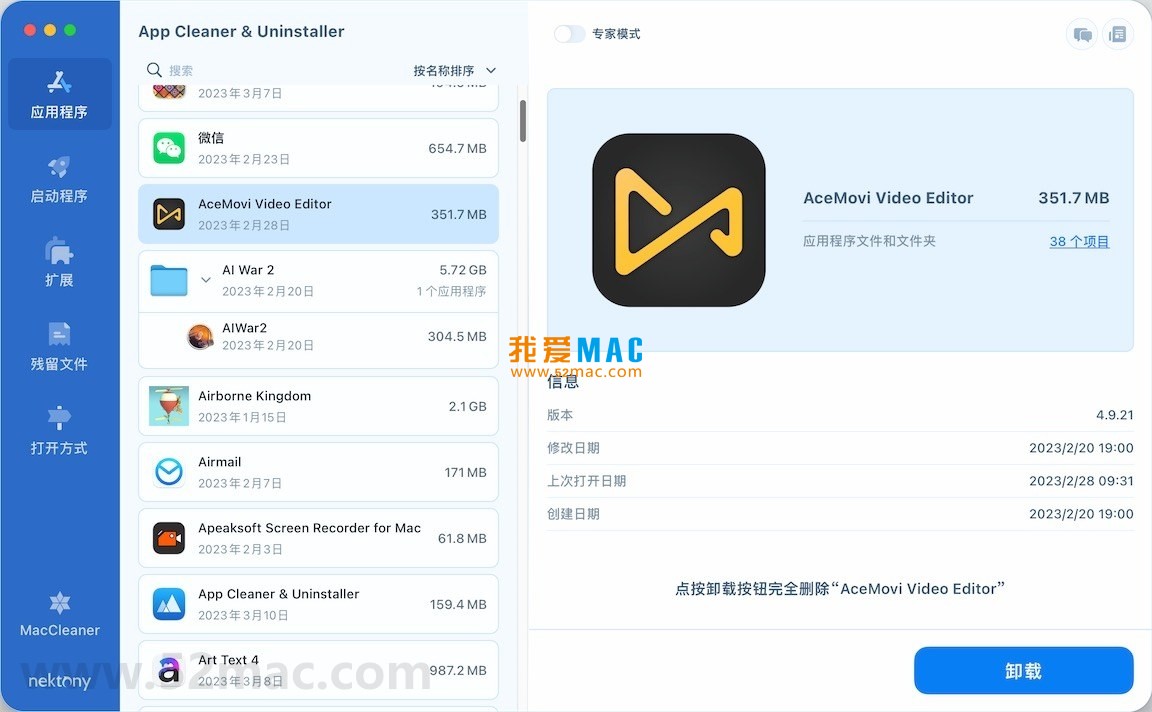
The following are screenshots of the main functional interfaces of App Cleaner & Uninstaller:
The installation process is simple and straightforward, but paying attention to each step can avoid minor troubles. Below is a detailed guide based on macOS Ventura and later versions.
.dmg file to mount it on the desktop.We have compiled some common questions from users, hoping to help you.
This is because macOS’s Gatekeeper security mechanism prevents non-App Store applications from running. Solution: Open the “Terminal” app, enter the command sudo spctl --master-disable, and press Enter. Then go to System Settings > Privacy & Security and ensure that “Allow applications downloaded from” is set to “Anywhere”.
Once thoroughly uninstalled with this tool, associated files are permanently deleted and cannot be recovered through conventional means. Therefore, before clicking “Delete,” carefully confirm the files in the list. It is recommended to manually back up important data first.
The vast majority are safe; they are usually configuration caches or logs left after application uninstallation. However, if you are unsure about the purpose of a file, you can temporarily leave it unchecked. The tool is designed to only clean useless files and will not accidentally harm core system files.
To ensure the stable operation of macOS, built-in applications (such as Mail, Calendar, etc.) are protected and cannot be uninstalled through this tool. This is a normal security design. If you need to remove them, you would have to use terminal commands, but this is strongly discouraged.
According to our tests, regular minor version updates do not affect activation status. However, major version updates may require re-activation. It is recommended to record your activation code before updating.
No. App Cleaner is very lightweight when running in the background, with memory usage typically under 50MB. Only during scanning or uninstalling operations does CPU usage briefly increase, and it immediately drops back after completion.
You can find the “Uninstall” option in its own “Preferences,” or simply drag it to the Trash. However, it is more recommended to use its own uninstall function to ensure thorough cleaning.
Mastering these shortcuts can greatly improve your Mac operation efficiency. The following table summarizes the most commonly used shortcut combinations in daily use.
| Shortcut | Function | Use Case |
|---|---|---|
| Command + C | Copy | Copy selected text, files, or objects |
| Command + V | Paste | Paste copied content to the current location |
| Command + X | Cut | Cut selected content, usually for text editing |
| Command + Z | Undo | Undo the previous action |
| Command + Shift + Z | Redo | Redo the undone action |
| Command + A | Select All | Select all content in the current window or document |
| Command + F | Find | Search for keywords in the current page or document |
| Command + Q | Quit Application | Quit the current application |
This resource requires login to download
Log in
MacBooster 8 for Mac v8.0.0 System Cleaning and Maintenance Tool Chinese Activated Version Download
Downloads:1736 | 2026-10-17

Disk Cleaner for Mac 1.2 Disk Cleaning Tool Junk Cleanup Activated Version Download
Downloads:315 | 2026-10-17

App Cleaner & Uninstaller Pro for Mac v8.5.0.2 Software Uninstaller Chinese Activated Version…_App Cleaner & Uninstaller Pro Mac Download
Downloads:3504 | 2026-10-17

Sensei for Mac v1.7.1 Software and Hardware Optimization Tool Chinese Activated Version Download
Downloads:373 | 2026-10-17


Ratings & reviews
No rating
Let’s rate it.