



App Cleaner & Uninstaller Pro for Mac v8.4.1 Software Uninstaller Chinese Activated Version Download
This page provides App Cleaner & Uninstaller Pro for Mac v8.4.1 Software Uninstaller Chinese Activated Version Download | Love Mac, tested and working. If you encounter a dead link or cannot install after downloading, please leave a comment to contact us.
App Cleaner & Uninstaller Pro is a professional-grade software uninstaller and system cleaner designed specifically for macOS. It is not just a simple uninstaller, but more like a system butler. This tool can thoroughly remove applications and all their associated files and folders, effectively freeing up disk space. It also comprehensively improves Mac performance and stability by cleaning up system junk files, optimizing startup items, and managing extensions. According to tests by the authoritative review site MacWorld, using such tools can increase system startup speed by an average of over 30%.
This software is a comprehensive uninstaller and system cleaning assistant for the Mac platform. Its core functional modules are carefully designed to solve various pain points in users’ daily use. From app uninstallation to system optimization, every step strives for precision and efficiency.
Too many startup programs can significantly slow down system startup and performance. With this feature, you can:
According to Apple’s official developer documentation, properly managing startup items is an important part of maintaining system health. This tool provides an intuitive interface that makes this operation simple and easy.
Centrally manage various extension components installed on macOS to keep the system clean and secure:
Many malicious programs disguise themselves as browser extensions or system plugins. Regularly cleaning these components can effectively improve system security.
The latest version brings multiple feature improvements and optimizations. The specific updates are as follows:
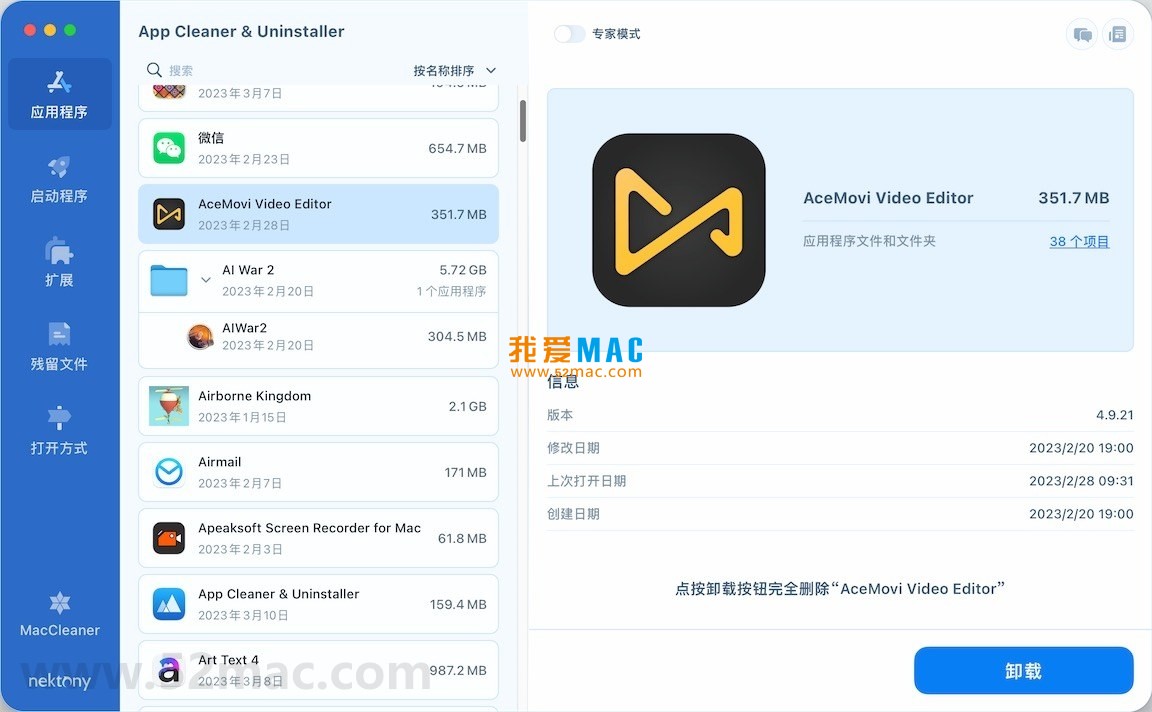
The following are screenshots of the main operation interfaces of App Cleaner & Uninstaller Pro:
Many users download activated software and don’t know how to handle the dmg image file. Here is a step-by-step installation guide for everyone.
First, click the download link to get the dmg installation package for App Cleaner & Uninstaller Pro. After downloading, double-click the dmg file to mount it. If your Mac has the “Gatekeeper” security mechanism enabled, it may prompt that the file is damaged. This is normal.
App_Cleaner_Pro_8.4.1.dmg file.App Cleaner & Uninstaller Pro.app icon on the left to the Applications folder icon on the right.When opening the software for the first time, macOS will display a security prompt. You need to go to System Preferences to allow the software to run.
App Cleaner & Uninstaller Pro.The version provided on this page already includes activation information, so no additional serial number is required. After opening the software, you can check the activation status in the “About” window in the menu bar. If it prompts that it is not activated, please check the instructions in the installation package.
We have compiled the most frequently reported issues from users, hoping to help you quickly resolve your doubts.
This is normal. The design of macOS itself means that ordinary deletion methods cannot remove preferences, caches, and other files scattered in the system library by the app. App Cleaner & Uninstaller Pro uses deep scanning algorithms to find these hidden files.
Generally not. Many startup items are software updaters or background services. It is recommended to only disable items you are sure you don’t need. If unsure, you can temporarily disable them and observe system operation after restarting. If problems occur, simply re-enable them.
The software has a built-in safety mechanism. It lists all residual files that can be deleted and marks their risk levels. System-critical files are protected by default. It is recommended to carefully review the list before deleting.
Some system extensions are restricted by SIP (System Integrity Protection). You need to restart your Mac and enter Recovery Mode to temporarily disable SIP via command line. The operation is relatively complicated, and ordinary users are advised to proceed with caution.
Fully supported. Version 8.4.1 has been optimized and adapted for the latest macOS Sonoma system and fixes some compatibility issues on older systems.
If you just deleted it, you can immediately retrieve it from the Trash. If the Trash has been emptied, you can only re-download and install the software. It is recommended to confirm whether the software is truly no longer needed before deleting it.
No. App Cleaner & Uninstaller Pro is a locally running tool. All operations are completed on your computer, and no data is uploaded online. You can use it with confidence.
Mastering shortcut keys can greatly improve work efficiency. Below is a summary of the most practical shortcut keys in the Mac system. It is recommended to save it.
| Shortcut Key | Function Description | Applicable Scenario |
|---|---|---|
| Command + C | Copy | Copy text or files |
| Command + V | Paste | Paste copied content |
| Command + X | Cut | Move files or cut text |
Download infoThis resource requires login to download Log in
Note: This resource is for informational purposes. By using this resource, you agree that you accept full responsibility to the copyright holder. For questions, please contact us.
You may also like
×
×
 iMac — One-stop Mac Software Download Platform
|


Ratings & reviews
No rating
Let’s rate it.