

uBar for Mac v4.2.4 Taskbar Enhancer Chinese Activation Version Download
uBar is a desktop taskbar enhancement tool that centers on the classic taskbar interaction logic to replace the native dock function, offering more efficient application window management, richer customization options, and more intuitive display of system information, to create a more efficient and personalized desktop interaction experience.
## 一、应用与窗口高效管理
1. **All applications are visually displayed in full form on the taskbar, clearly showing the number of open windows for each application. Clicking on a single-window application directly switches to it; for multi-window applications, clicking on them expands the window list, allowing precise positioning and switching to the target window.**
2. **Flexible window grouping rules are provided, including always group, never group, and automatic group modes, allowing users to configure according to their habits, making the management of similar windows orderly and organized.**
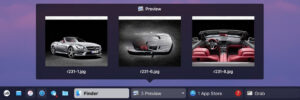
3. **Hover preview of windows**
– Hovering over an application icon displays a real-time visual preview of the corresponding window, allowing quick viewing of the window content without switching to the application, enhancing efficiency in handling multiple tasks.**
4. **Real-time application status awareness**
– Real-time recognition and identification of application states, such as running, unresponsive, and recoverable, are presented through icon states; when an application requires user attention, the icon will flash in the active area to alert the user.**
5. **Media progress embedded display**
– Supports music, Spotify, VLC, and other mainstream media applications, displaying the playback progress bar directly on the taskbar icon, allowing users to grasp the playback status without opening the application interface.
## 二、高度可定制的外观与布局
1. **Full-screen position adaptation**
– Supports placing the taskbar at any edge of the screen, bottom, left, right, or top, to adapt to different desktop layout habits and usage scenarios.**
2. **Fixed and floating dual mode**
– Supports fixing the taskbar at any corner of the screen; or, by removing all directional fixations, switching to a floating mode, to flexibly adapt to desktop space.**
3. **Expandable taskbar height**
– Dragging the edge of the taskbar allows for free adjustment of height, up to a maximum of 5 rows, accommodating more application icons and functional content.**
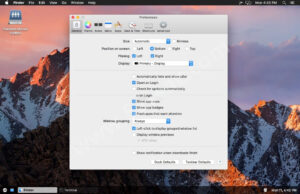
4. **Customizable appearance configuration**
– Provides a variety of appearance customization options, allowing for free adjustment of taskbar color, transparency, size, and style parameters, both to fit the overall desktop style and to create a personalized visual effect.**
5. **Clear application notification badges**
– Application notification badges display clear and readable numbers, intuitively showing the number of unread messages and pending tasks, enhancing information acquisition efficiency.
## 三、快捷启动与收藏功能
1. **Customized collection area**
– Supports adding commonly used applications, folders, and files to a dedicated collection area, enabling quick launch with a single click; also includes built-in entry points for the desktop and trash.**
2. **Drag-and-drop file opening**
– Supports dragging folders and files directly onto the taskbar application icons to open them with the corresponding application, a simple and efficient workflow.**
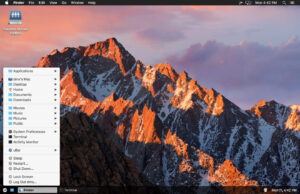
3. **Integrated start menu**
– Includes a start menu-like feature, integrating a comprehensive list of applications, system settings, and supports custom additions of applications and folders, for quick access to various system resources.
## 四、系统信息与效率工具
1. **Real-time resource monitoring**
– Activating the active monitoring mode by holding the Control key displays the CPU usage and memory consumption of each running application in real-time, without the need to open system monitoring tools.**
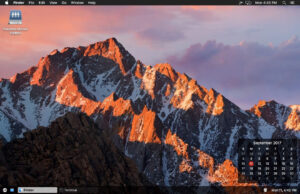
2. **Clock and calendar integration**
– The taskbar includes a clock area, displaying the day, date, and time; hovering over the clock area reveals a complete calendar panel for quick date and schedule viewing.**
3. **Customized clock panel extensions**
– Supports adding either built-in or custom clock panels above the calendar panel, balancing the practicality of time viewing with the personalization of the desktop.
## 五、多场景兼容能力
1. **Support for multiple monitors**
– Supports displaying the taskbar on any monitor, or setting it to display across all monitors, maintaining consistent operation experiences in multi-monitor office scenarios.**
2. **Quick operation support**
– Supports mouse wheel switching between windows and custom keyboard shortcuts, adapting to different operating habits to enhance daily usage efficiency.**
3. **System function quick entry**
– Includes built-in entries for sleep, restart, and shutdown, as well as quick access to common system tools such as the terminal and activity monitor.
Version 4.2.4 Update Content:
– Added: Support for localizing to Traditional Chinese
– Optimized: Updated localization translations for French, Hebrew, Norwegian, Polish, Swedish, and Turkish
– Optimized: Loading of user avatars in the uBar menu bar and settings panel no longer slows down the program bar response speed
– Fixed: Resolved issues of program crashes caused by the generation of application menus or system settings menus
– Fixed: Occasional anomalies where applications remained on the program bar after exiting
Software Screenshot:
This resource requires login to download
Log in
OmniGraffle Pro for Mac v7.26 Mind Mapping Software Chinese Activation Version Download
Downloads:0 | 2026-10-27
Reeder for Mac v2026.6 Content Aggregator Reader Activation Download
Downloads:0 | 2026-10-27

Artstudio Pro for Mac v5.2.6 Download and Activation Software
Downloads:879 | 2026-10-21

Artpaper for Mac v3.0.5 Chinese Activation Edition Download
Downloads:3630 | 2026-10-18


Ratings & reviews
No rating
Let’s rate it.