

Mac Video Converter Ultimate with Chinese Activation Download v3.14.8
Permute is a professional media format conversion tool designed specifically for macOS. It is developed by the same company as Downie, a renowned video downloader. Permute is distinguished by its simple drag-and-drop operation, exceptional conversion speed, and comprehensive format support, making it an essential tool for Mac users to handle video, audio, and image files.
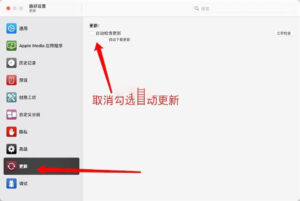
Note: Do not update or upgrade the cracked version, nor enable its automatic updates. Go to Permute 3 > Preferences > Updates and uncheck the box for automatic updates.
Core Features:
### 1. Comprehensive Media Format Coverage, Supporting Almost All Mainstream Formats
– Supports conversion between **video, audio, and image media formats**, making it “one tool to rule them all.”
– Video Formats: MP4, MOV, MKV, AVI, WMV, FLV, WEBM, HEVC (H.265), AV1, ProRes, VVC, etc., totaling 20+ mainstream and professional formats.
– Audio Formats: MP3, AAC, FLAC, WAV, M4A, OGG, AIFF, PCM, etc., supporting 32-bit high-sample-rate professional audio conversion.
– Image Formats: JPEG, PNG, HEIC, WebP, AVIF, TIFF, GIF, BMP, JPEG XL (Apple Silicon exclusive), etc.
– Special Features: Supports merging multiple images into a single PDF file and converting videos into image sequences.
### 2. Superfast Conversion, Hardware Acceleration Maximizes Performance
– Deep native optimization for **Apple Silicon chips (M1/M2/M3/M4)**, utilizing dedicated media engines for encoding and decoding.
– Supports hardware acceleration for H.264, HEVC, and AV1 formats, with HEVC conversion speed up to three times faster than traditional software.
– Utilizes multi-threaded parallel processing, allowing simultaneous conversion of multiple files to fully utilize Mac’s multi-core performance.
– Defaults to the CRF (Constant Quality) encoding mode, ensuring smaller file sizes while maintaining the same quality.
### 3. Minimal Drag-and-Drop Operations, Zero Barrier for Beginners
– Follows the same operation logic as Downie: **drag files → select presets →一键转换** (one-click conversion), completing all operations in three steps.
– No complex parameter configurations are required; hundreds of optimized presets are included, meeting most daily needs.
– Supports quick access to the menu bar for menu bar quick access, without opening the main window to add conversion tasks.
– Allows conversion processes to run in the background, not affecting other foreground tasks.
### 4. Device-Specific Presets, Automatic Optimization of Output Parameters
– Includes **Apple’s full series of device-specific presets**: iPhone, iPad, Apple TV, Mac, AirPods, HomePod, etc.
– Automatically matches the best resolution, bitrate, and encoding format for each device, ensuring perfect playback of the converted files.
– Supports device-specific presets for Android phones, PS5/Xbox game consoles, smart TVs, and car systems, etc.
– Supports creating and saving custom presets for repeated use.
### 5. Advanced Batch Processing Capabilities
– Supports dragging multiple files or entire folders at once, automatically maintaining the original file directory structure.
– Smart queue management allows pausing, resuming, or adjusting task order at any time.
– Supports batch renaming of output files, including custom variables like resolution, date, and title.
– Allows setting the deletion or moving of original files after conversion.
### 6. Advanced Editing Features
– Video Processing: Supports cropping, splitting, merging video clips, adjusting resolution, frame rate, and bitrate.
– Audio Processing: Supports extracting pure audio from videos and adjusting volume and audio level.
– Subtitle Processing: Automatically identifies and embeds video subtitles, supporting SRT, ASS, and other subtitle formats.
– Metadata Editing: Allows modifying video and audio files’ titles, artists, album covers, and other metadata.
### 7. Deep Integration with Downie for Seamless Download and Conversion Workflow
– One of Permute’s most distinctive features: Seamless integration with Downie, a video downloader from the same company.
– In Downie, you can set “automatically send files to Permute for conversion” after download.
– Supports customizing conversion rules for different websites, automatically applying different preset settings.
– No manual copying and pasting of files required; the “download → conversion” workflow is fully automated.
### 8. Other Useful Features
– Supports putting the computer into sleep mode after conversion to save power.
– Provides “replace original files” option, automatically overwriting original files after conversion.
– Supports custom Shell scripts for advanced automation after conversion.
– Perfectly compatible with macOS Dark Mode, ensuring a beautiful and unified interface with the system.
– Supports iCloud synchronization of conversion history across multiple Mac devices.
Update 3.14.8:
This is the final version of Permute 3. Permute 4 will soon replace it.
This resource requires login to download
Log in
SoundSource for Mac v6.1.0 Audio Control Software License
Downloads:0 | 2026-10-27

DJ Mix Pads 2 for Mac v16.0.8 Chinese Activation Version Download
Downloads:2706 | 2026-10-24

Girl Genius: Adventures in Castle Heterodyne for Mac
Downloads:3397 | 2026-10-23

Professional Font Manager for Mac v6.3 Activation Download
Downloads:3488 | 2026-10-20


Ratings & reviews
No rating
Let’s rate it.