
Powerful Image Editor Software: Pixelmator Pro for Mac v3.5.7 Chinese Activation Download
Description
Pixelmator Pro for Mac is a professional-grade image editing software designed for users who seek to combine powerful image processing capabilities with an intuitive user interface. It excels in image editing, graphic design, and photo post-processing, making it a valuable tool for creative work among Mac users.
One, Core Features and Professional Tools
Pixelmator Pro offers a comprehensive set of advanced image editing tools designed to meet various needs, from basic adjustments to complex creations.
- Comprehensive Image Editing: Provides a complete set of tools to enhance existing images or create new works from scratch.
- No-Destructive Editing: Supports adjusting or undoing individual editing steps at any time, ensuring the integrity of the original image data.
- Flexible Object Control: Easily move, resize, and arrange multiple objects to create complex visual compositions.
- Advanced Color Adjustment: Utilizes lossless color adjustment tools to precisely control the color and tone of images.
- Machine Learning Enhancement: ML-enhanced features based on Core ML automatically analyze and optimize photos to the best state.
- Native RAW File Support: No conversion is required; the software can directly edit various camera-generated RAW format images.
- Professional Brush System: Offers a series of handmade, fully customizable brushes that perfectly complement digital painting and simulate traditional painting.
- Rich Effects Library: Includes a variety of artistic and special effects to help realize unlimited creative imagination.
- Customization and Sharing: Adjustments, effects, and layer style combinations can be saved as presets for reuse in different projects or sharing with others.
- Advanced Correction Tools: Smartly removes imperfections or objects, seamlessly clones image regions, and precisely adjusts local brightness with a full suite of tools.
- Reshape Tools: Easily change the shape of any object or region within an image, suitable for artistic creation or portrait retouching.
- Vector Graphics: Features a high-quality, customizable vector graphics library designed by the Pixelmator team, and supports creating custom vector graphics using the “Pen Tool.”
- Professional Typography Tools: Provides a full suite of text design tools to create beautiful layouts and text effects.
- Web-Optimized Output: Uses advanced compression algorithms to optimize image size while maintaining quality, enhancing web usage.
- Bulk Processing: Includes five Automator workflows for automating batch processing of large image sets.
Two, Machine Learning-Enhanced Image Editing
The software integrates advanced machine learning technologies to significantly enhance editing efficiency and intelligence.
- Smart Photo Enhancement: Utilizes algorithms trained on millions of professional photos to automatically optimize photo quality.
- Layer Auto-Naming: Automatically generates descriptive layer names for new additions, improving layer management efficiency.
- Smart Cropping Assistance: The cropping tool features horizontal line detection to intelligently straighten tilted images.
- Smart Object Removal: The repair tool can intelligently remove unnecessary objects and fill the background with remarkable realism.
- Fast and Precise Selection: The quick selection tool can easily and accurately select complex image regions.
Three, Extensive Compatibility and Integration
Pixelmator Pro boasts robust file format support and deep integration with the macOS ecosystem.
- Multi-Format Support: Supports opening and editing JPEG, TIFF, PNG, PSD, HEIF, SVG, PDF, GIF, BMP, TGA, JPEG-2000, and other mainstream image formats.
- PSD File Compatibility: Fully supports opening and editing Adobe Photoshop (PSD) files containing layers.
- SVG Vector Editing: Supports opening and editing SVG vector graphics files.
- Integration with “Photos” App: Can directly launch editing from the macOS “Photos” app and save the edited results back to the original photo library.
- Convenient Sharing: After editing, images can be directly shared to photos, email, AirDrop, and other applications.
Four, Key Updates in Version 3.5.7
Pixelmator Pro 3.5.7 introduces important feature enhancements and performance improvements:
- Support for Photomator Files Browser: Now fully supports the new Photomator Files browser on Mac.
- Enhanced Workflow Integration: Users can now send photos from the Photomator app to Pixelmator Pro for deep editing, and easily save the edited results back to Photomator.
- Improved AI File Support: Enhanced compatibility with the Adobe Illustrator (AI) file format.
- Performance Improvements: On Mac devices with Apple Silicon chips, handling complex composites with multiple adjustment layers now sees significant performance improvements.
Five, Software Interface Screenshots
Here are screenshots of the Pixelmator Pro for Mac v3.5.7 user interface, showcasing its professional layout and powerful features.
Screenshot 1: Main Workspace and Tool Panel
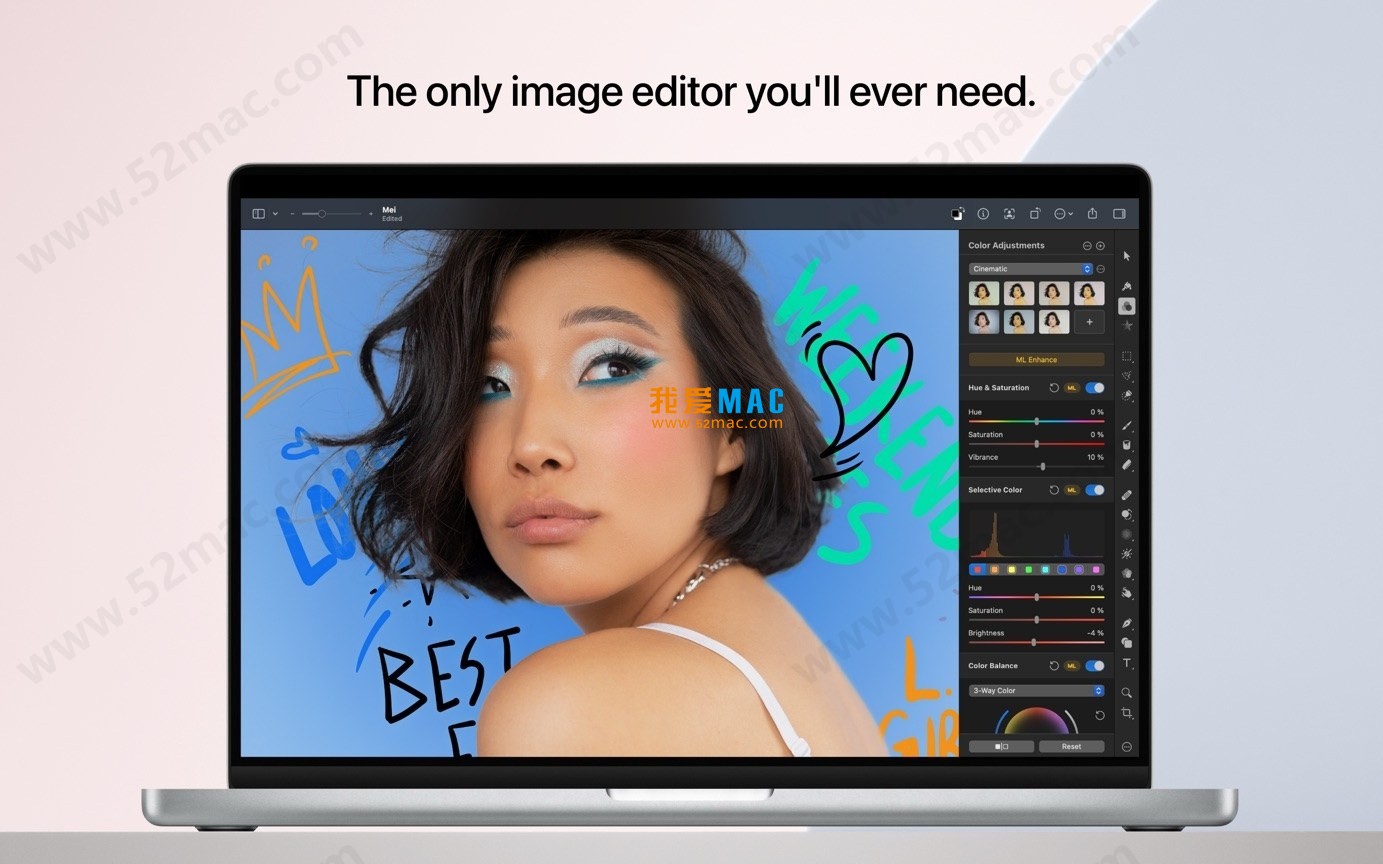
Screen Shot 2: Color Adjustment and ML Enhancement Features

Screen Shot 3: Vector Graphics and Layout Tools

Screen Shot 4: Effect Library and Layer Styles

Screen Shot 5: RAW File Editing and Correction Tools

Screen Shot 6: Batch Processing and Output Settings

Note: This article aims to introduce the features and characteristics of Pixelmator Pro for Mac software. Software access should be through official or legitimate authorized channels, supporting the development of正版 software.




Ratings & reviews
4.9
(Maximum 5 ratings, total 42 user reviews)
Let’s rate it.