



Valentina Studio for Mac v11.3 Database Management Tool Activated Version Download
This page provides Valentina Studio for Mac v11.3 Database Management Tool Activated Version Download | Love Mac, tested and working. If you encounter invalid links or inability to install after download, please leave a message to contact us.
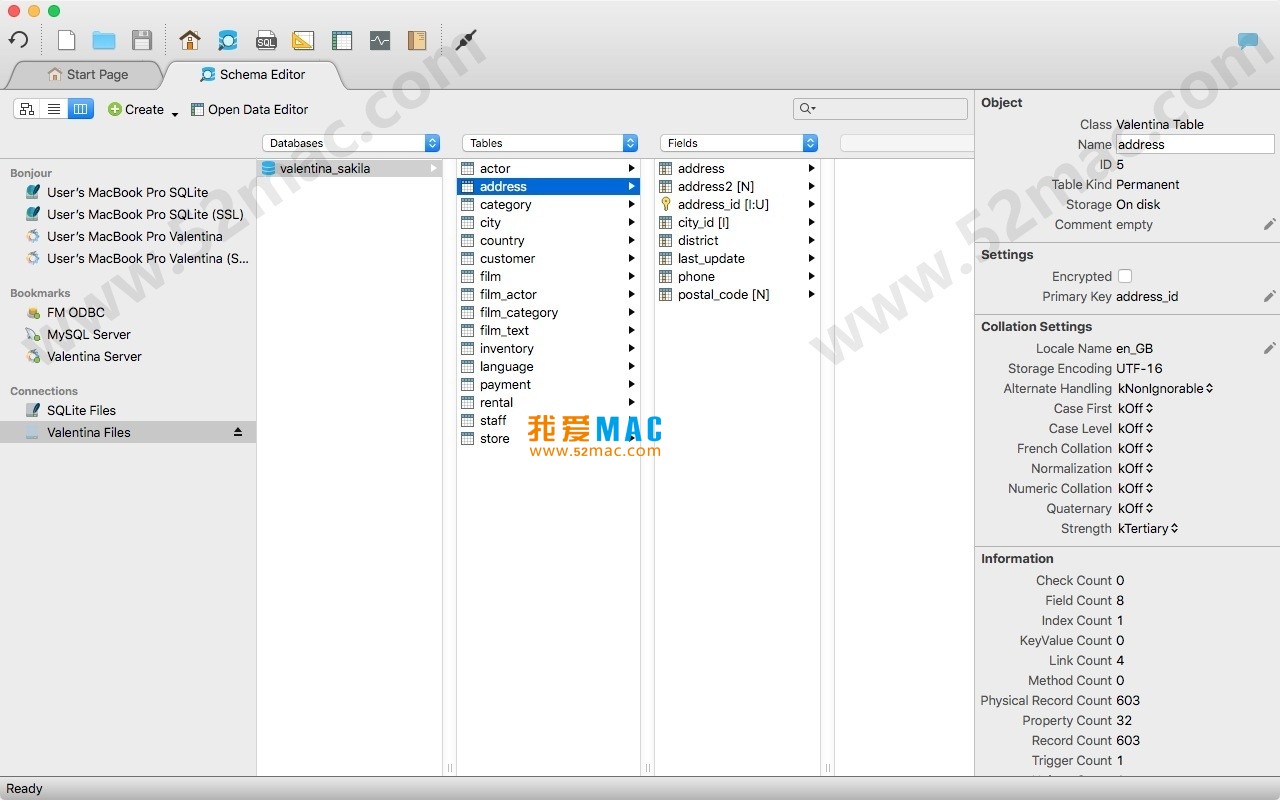
Valentina Studio for Mac is a comprehensive cross-platform database tool designed for database architects, developers, database administrators (DBAs), and even end users. It is compatible with a variety of mainstream relational database management systems (RDBMS), including MySQL, PostgreSQL, SQLite, SQL Server, and ValentinaDB. The tool integrates data modeling, database schema management, SQL development, and server management, providing an efficient and visual database operation experience. As a professional Mac database management software, it has an excellent reputation in the developer community and is recommended by many technical blogs as a strong alternative to Navicat. According to the Stack Overflow 2023 Developer Survey, PostgreSQL and MySQL remain the most popular databases, and Valentina Studio’s deep support for both is its core competitiveness.
Valentina Studio offers a series of powerful visual editors covering the entire database development and management workflow:
Users can open multiple editors simultaneously in a tabbed panel, each corresponding to a different database or server connection. Additionally, the tool provides a range of database utilities, including data import/export, dump, diagnostics, cloning, reindexing, etc. In practice, a DBA can open three tabs at once: one connected to a production PostgreSQL, one to a test MySQL database, and another for writing SQL scripts, ensuring a smooth workflow.
For professional users, Valentina Studio also offers the following advanced features:
These advanced features make Valentina Studio more than just a query tool; it is a powerful assistant for enterprise-level database management. For example, the SQLDiff feature is extremely useful in team collaboration, allowing developers to quickly compare schema differences between two environments and generate migration scripts with one click, avoiding human omissions.
These fixes reflect the development team’s attention to detail. In particular, the crash when closing a tab with CMD+W is critical in intensive coding scenarios, preventing work loss due to accidental operations.
Installing Valentina Studio for Mac is not complicated, but there are a few key steps to note. Below is a detailed illustrated installation guide to ensure you activate and use it smoothly.
Get the download link from this page and click to download. The downloaded file is usually a .dmg disk image. Double-click the .dmg file, and the system will automatically mount and open a window containing the application icon. If you encounter a “cannot verify developer” prompt, go to “System Preferences” -> “Security & Privacy” -> “General” and click “Open Anyway”.
Drag the Valentina Studio icon to the adjacent Applications folder. This step copies the program to your Mac hard drive. Wait for the progress bar to complete, usually just a few seconds. After dragging, you can find Valentina Studio in Launchpad or the Applications folder.
Open Valentina Studio, and an activation window will pop up. Enter the activation code we provide (usually in a .txt file in the download attachment). Click the “Activate” button, and the software will verify the activation information. After successful activation, restart the application to use all professional features. If activation fails, check your network connection or confirm that the activation code is copied completely.
After launching, click the “New Connection” button in the upper left corner. Select your database type, such as MySQL or PostgreSQL. Enter the host address, port, username, and password. Click “Test Connection” to test the connection, and save after success. It is recommended to set up a local test database first and familiarize yourself with the interface before connecting to a production environment.
Based on user feedback, we have compiled the following 10 common questions and answers to help you quickly resolve doubts during use.
A: First, confirm that the activation code is copied completely without extra spaces. If it is still invalid, check whether your system time is synchronized with network time. Valentina Studio’s activation mechanism relies on timestamp verification. If the problem persists, please contact our customer service email with proof of purchase, and we will replace the activation code for you.
A: This is macOS’s security mechanism. Go to “System Preferences” -> “Security & Privacy” -> “General” and select “Anywhere” under “Allow applications downloaded from”. If you cannot find this option, run the command in Terminal: sudo spctl --master-disable. Then reopen the application.
A: After closing the software, open Finder, press CMD+Shift+G, enter ~/Library/Preferences, find the file named com.paradigma-software.valentinastudio.plist, and delete it. After restarting the software, preferences will be restored to default. This is very effective when encountering interface lag or configuration errors.
A: This is usually because MySQL 8.0 and above use the caching_sha2_password plugin. The solution is to check “Use old password protocol” in Valentina Studio’s advanced settings when connecting. Alternatively, change the MySQL user authentication method to mysql_native_password.
A: In the connection settings, find the “Encoding” option and set it to UTF-8. Also, ensure that your database and table character sets are UTF-8. At the top of the SQL Editor, you can also manually switch the encoding format. Garbled characters usually stem from character set mismatches.
A: After executing a query, click the “Export” button in the lower right corner of the results panel. Select “CS
This resource requires login to download
Log in
Dash for Mac v6.0.0 API Documentation and Code Snippet Manager Activated Version Download
Downloads:2359 | 2026-10-17

UltraEdit for Mac v20.00.0.32 Powerful Text Editor UE Download Activated Version
Downloads:223 | 2026-10-17

Sparkle Pro for Mac 2.5.3 Visual Website Builder Chinese Activated Version Download
Downloads:427 | 2026-10-17

Postico for Mac v1.5.8 Modern Database Application Software Activated Version Download
Downloads:177 | 2026-10-17


Ratings & reviews
No rating
Let’s rate it.