| Little Snitch is the leading personal application firewall and network monitoring tool for the Mac platform. With over 20 years of expertise in network privacy protection, it provides a comprehensive view of all network activity within the system, giving users complete control over every data transmission permission and effectively preventing privacy leaks, malicious programs from connecting to the internet, and background data theft.
Installation and cracking method (install offline):
Before installation, please disconnect from the network. After installation is complete, reconnect to the network.
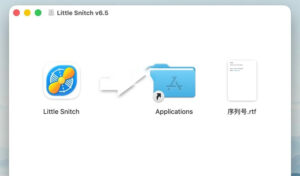
1. After the software download is complete, open the software package as shown above and drag Little Snitch to Applications to install.
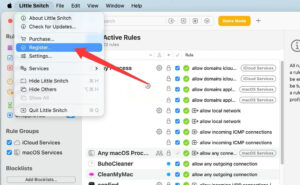
2. Once complete, open Little Snitch, set the permissions as prompted, then click the menu bar in the upper left corner: Little Snitch -> Register…
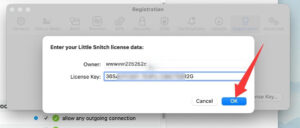
3. Open the serial number file in the software package and enter the serial number inside, as shown below.
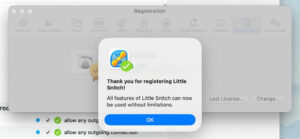
4. A registration success message will appear, as shown below.
5. Under the Update option next to Register, disable automatic software updates.
Installation and cracking are complete. You can now use it and reconnect to the network.
—————————————————————–[Divider]———————————————————————–
## I. Real-Time Network Monitoring and Global Visualization
– **Full-process network activity tracking**: Monitors outbound and inbound network connections of all applications, processes, system services, and extension components on the Mac in real time, accurate down to the individual process level, displaying every network link without omission.
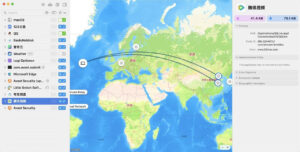
– **Global traffic map visualization**: Intuitively presents the geographic locations of all connected target servers through an interactive world map. Line thickness corresponds to data transmission volume, with support for zooming, positioning, and filtering, giving you the data flow distribution at a glance.
– **Multi-dimensional hierarchical display**: Supports hierarchical grouping of connections by application, domain/server, and country, clearly presenting the complete link relationship of “which application connects to which domain, located in which country.”
– **Real-time bandwidth and traffic statistics**: Each connection includes a real-time bandwidth waveform chart, allowing you to view traffic history for the past 5 minutes; the global summary panel displays core data such as total traffic, connection count, and active application rankings.
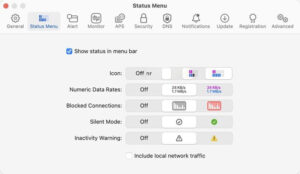
– **Status bar quick preview**: A menu bar icon is always present, allowing quick viewing of the current network activity overview and recent denied connection records, with support for two display styles: real-time traffic meter or 5-minute history thumbnail.
## II. Connection Alerts and Access Control
– **Real-time connection pop-up alerts**: When an application without configured rules attempts to establish a network connection, an alert notification pops up immediately, clearly displaying the application name, target domain, port, and protocol, letting the user decide whether to allow or deny.
– **Multi-dimensional permission control**: Supports allowing/blocking for a single domain, an entire domain system, a specific port/protocol, or all connections. Without user consent, no data will be transmitted externally.
– **Time-limited rule settings**: Allow rules to be set as permanently effective, valid once, or valid for a specified duration, flexibly accommodating temporary networking needs.
– **One-click batch control**: In the network monitoring panel, you can directly click to toggle the allow/deny status of a single connection and batch-manage multiple links under the same application.
## III. Fine-Grained Rule Management System
– **Fine-grained rule engine**: Supports creating highly precise control rules that can specify multiple conditions such as application, target domain/IP, port, protocol, network environment, and time period, achieving precise control at the level of “a specific application on a specific network can only access a specific port of a specified domain.”
– **Local rule group management**: Supports creating custom rule groups, managing rules by topic category, and enabling/disabling entire groups with one click for easy batch adjustment of network policies.
– **Rule notes feature**: When creating rules, you can directly add notes to record the purpose and context of the rule, facilitating subsequent maintenance and troubleshooting.
– **Process-level identity verification**: Identity verification is based on the application’s code signature rather than merely the file path. Even if the application is moved, renamed, or replaced, the rules remain accurately effective, preventing malicious programs from disguising their identity to connect to the internet.
– **Rule priority adjustment**: Supports manually adjusting the priority of individual rules to resolve rule conflicts and ensure core policies are executed first.
## IV. Multi-Environment Profiles
– **Scenario-based rule sets**: Supports creating multiple independent rule configuration profiles, corresponding to different network environments such as home, office, and public Wi-Fi.
– **Automatic scenario switching**: Profiles can be bound to specific networks. When the Mac connects to the corresponding network, the matching rule set is automatically switched without manual adjustment.
– **Multi-user support**: Supports multi-user system scenarios, where each user can have independent rule configurations without interference.
## V. Built-in Blocklists
– **Thematic preset blocklist library**: Includes multiple professional blocklists maintained by the community, covering categories such as ad blocking, privacy tracking blocking, mining script blocking, and malicious site protection, which can be enabled with one click.
– **Daily automatic updates**: Blocklists are automatically updated daily to ensure blocking rules remain accurate and effective, continuously addressing new tracking and threats.
– **IP-level blocking support**: Supports both domain-based and IP address-based blocking rules, covering more comprehensive blocking scenarios.
## VI. Built-in DNS Encryption Protection
– **Encrypted DNS request transmission**: Natively supports DNS-over-HTTPS (DoH) and DNS-over-TLS (DoT) protocols, encrypting all DNS query requests to prevent ISPs and public network service providers from snooping on browsing behavior and domain access records.
– **System-level DNS takeover**: No additional tools are required. Encrypted DNS can be enabled and managed directly within the application, ensuring privacy security from the domain resolution stage.
## VII. Silent Mode and Distraction-Free Experience
– **Silent Mode**: When enabled, new connection requests are automatically and temporarily allowed without pop-up alerts interrupting your current work. Users can review and process all connection records at their convenience and create rules in batches.
– **Two silent strategies**: Supports two default strategies, “Silent Allow” and “Silent Deny,” which can be flexibly selected according to usage scenarios.
– **Low-interference background operation**: Core services run persistently in the background with extremely low resource usage and no redundant pop-ups, without affecting the normal user experience.
## VIII. Security and Protection Enhancements
– **Application integrity monitoring**: Monitors application package integrity in real time. If application components are detected to be tampered with during operation, a warning is issued immediately to prevent injection attacks and malicious replacement.
– **Password lock protection**: Supports setting password protection for rule configurations to prevent unauthorized personnel from modifying firewall policies.
– **Malicious behavior detection**: Can detect hidden network connections of malicious programs such as viruses, trojans, and spyware, promptly blocking data leakage.
## IX. Advanced Diagnostics and Professional Tools
– **PCAP traffic capture**: Supports exporting network traffic data in standard PCAP format for in-depth analysis and troubleshooting.
– **Powerful search and filtering**: Supports quick search and filtering of connection records by keywords such as application name, domain, IP, and port, accurately locating target links.
– **Command-line tools**: Includes a complete set of command-line tools, supporting remote management, rule backup, batch configuration, and automated operations.
– **Automatic geolocation database updates**: Includes a built-in IP geolocation database that updates automatically to ensure the accuracy and reliability of location determination.
|






Ratings & reviews
No rating
Let’s rate it.