

A Better Finder Rename 12 for Mac v12.36 Batch Rename Tool Activated Version Download
A Better Finder Rename is a classic professional-grade batch file renaming tool for Mac, continuously iterated and optimized since 1996. It covers naming needs for all scenarios from daily file organization to professional asset archiving, and is a core file management efficiency tool for photographers, audio professionals, content creators, and office users.
## 1. Comprehensive Renaming Rule System
The software includes 15 major categories and hundreds of renaming rules, fully covering basic operations such as text find and replace, adding/removing prefixes and suffixes, character position adjustment, case conversion, content truncation, and batch modification of extensions. It supports custom sequence number generation, date/time formatting, and filename sanitization, and can be flexibly combined to meet various routine naming needs. It also fully supports regular expression matching for precise find and replace of complex patterns, suitable for advanced customized naming scenarios.
## 2. Professional Metadata-Driven Naming
It provides deep metadata reading capabilities for users in different industries, and can directly use built-in file information to generate standardized filenames:
– **Photography asset scenarios**: Supports reading EXIF metadata from JPEG, HEIC, and all mainstream RAW format photos, and can extract shooting date/time, camera model, lens parameters, and other information to generate filenames. It supports processing same-second burst photos, is compatible with time zone conversion, and can synchronize naming of paired files such as RAW+JPG.
– **Audio file scenarios**: Supports reading ID3 tags from MP3, AAC, FLAC, OGG, and other formats, is compatible with Broadcast Wave (BWF) broadcast-grade audio metadata, and can extract professional fields such as scene, take, track name, and producer for naming. It also supports using general parameters such as audio format, channel count, and bit depth.
– **Video and document scenarios**: Can extract metadata from video and document files, supports building naming rules based on file attributes and content tags, and adapts to batch archiving needs for video project assets and office documents.
## 3. Visual and Safe Operation Mechanism
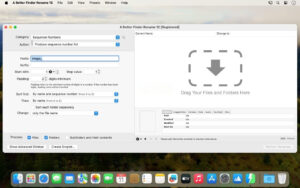
It uses a real-time preview mechanism: when adjusting naming rules, the modification results for all files are displayed synchronously, with changes highlighted, completely eliminating the trial-and-error cost of batch renaming. It supports drag-and-drop file import and free adjustment of file order; a built-in automatic filename conflict handling mechanism ensures stable execution of renaming operations. It supports multi-step renaming combinations, allowing multiple basic rules to be chained into a complete processing workflow so complex naming logic can be executed in one pass.
## 4. Efficient and Reusable Workflows
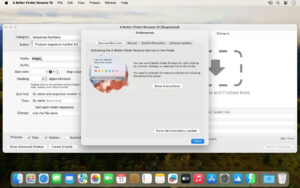
It supports saving commonly used naming schemes as dedicated presets for one-click reuse, and supports preset import/export for cross-device configuration synchronization. It can be quickly invoked from the Finder context menu to complete batch naming without opening the main application. It also supports advanced features such as Droplet automation applets and importing naming lists from text/spreadsheets, adapting to enterprise-level and batch-automated file management needs.
Version 12.36 Update Contents:
New version highlights:
Regular expression error messages: A short error message is now displayed below the regular expression pattern input field, explaining why the pattern cannot be compiled (for example: unmatched parentheses, trailing backslash, or a quantifier with no preceding repeatable character, etc.).
Significantly improved preview performance: Regular expression patterns are now compiled “once per preview” instead of “once per file”. Preview speed is much faster when processing tens of thousands of files.
Improvements and fixes:
Fixed an issue since version 12.34 where the “Regular Expression Replace” operation mistakenly treated backslash escapes as capture groups. Backslashes now correctly function as escapes again. For example, using 1002 for replacement now correctly inserts two zeros instead of inserting the entire match result twice.
Fixed an issue in the tag library where double-clicking an already selected row occasionally displayed an incorrect tag name.
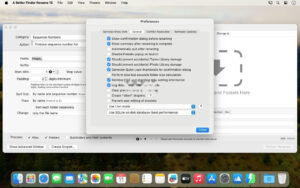
Software screenshots:

RightFont for Mac v10.2.1 Professional Font Management Tool Activated Version Download
Downloads:0 | 2026-10-19

Unfold for Mac v2.8.2 – Quick Look Code Preview Activated Version Download
Downloads:0 | 2026-10-19

Desktop Stickers for Mac v2.97 Desktop Sticky Notes Tool Activated Version Download
Downloads:0 | 2026-10-19


Ratings & reviews
No rating
Let’s rate it.