


iMazing for Mac v3.5.5 iOS Device Manager Chinese Edition Download
| iMazing provides leading-edge iOS/iPadOS device local backup solutions, supporting scheduled automatic backups via Wi-Fi or USB connections, and storing backup files on any local storage medium, including external hard drives and network-attached storage (NAS). The exclusive device snapshot feature is similar to Time Machine, allowing retention of multiple backup histories over time, optimizing disk usage while preserving dozens of backup archives.
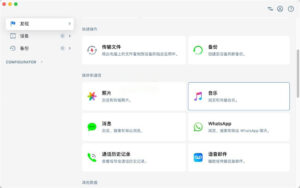
Supports independent management of backup histories per device, allowing for tagging, locking to prevent accidental deletion, and backup location migration and export. Recovery options are flexible, supporting full-device restoration or selective restoration of specific files, specific app data, or restoration to historical backup states. Supports reading and exporting backup files created by Finder and iTunes, compatible with all iOS devices and system versions. ## Quick File Transfer Supports bidirectional file transfer, allowing for copying of various documents, compressed files, audio and video files between devices and computers without relying on iCloud sync. Supports batch file transfer and provides real-time progress feedback, ensuring uninterrupted transfer tasks even when devices are unplugged. ## Photo Management Supports viewing content from iCloud Photo Library, even if the original images are stored in the cloud, allowing for thumbnail previews and selective export. Supports batch export, format conversion, and metadata retention, enabling photo migration and backup without syncing. ## Music Management Supports exporting music libraries from classic iPods, minis, nanos, and shuffles. Allows management of playlists on the device, adding or removing individual songs, and preserving song covers, lyrics, and metadata information. ## Messaging and Chat Management Supports extracting individual attachments from messages, allowing chat records to be exported in various generic formats for archiving or legal compliance purposes. Supports exporting call logs and voicemail recordings, preserving the device’s communication history. ## Application Management Supports individual backup and restore of specific application data, enabling game save file replacement, application configuration migration, and other advanced operations. Supports automatic allocation of enterprise-level VPP licenses, allowing for bulk deployment of applications. ## File System Access Supports exporting raw data, enabling direct export of backup data in file and folder structures for analysis and forensic purposes. Provides preview functionality, allowing viewing of backup contents without needing to restore. ## Advanced iOS Device Management Supports installation, editing, and removal of configuration profiles, with an embedded configuration profile editor for creating and signing custom profiles. Supports blueprint workflows, allowing for batch configuration and deployment of multiple devices, simplifying MDM registration processes. Provides command-line interface (CLI), enabling automation of complex device management tasks through terminal scripts, suitable for enterprise and development scenarios. Supports iOS system updates and recovery, compatible with recovery mode and DFU mode operations. ## Comprehensive Data Management Supports monitoring of device battery health, allowing for detailed battery diagnostics and export of diagnostic reports. Supports screen recording functionality, enabling USB mirroring and recording of the device screen, outputting high-resolution video.
|
This resource requires login to download
Log in
JPEGmini Pro for Mac v2.2.3: JPG Image Optimization and Compression Software Activation Download
Downloads:1181 | 2026-10-22

Boxy SVG for Mac v4.71.1 SVG Vector Graphics Editor License
Downloads:1004 | 2026-10-21

Extract Resources from Various Files on Mac v4.106 Activation Download
Downloads:2158 | 2026-10-20

WonderPen for Mac v2.0.5 Writing Software Chinese Activated Version Download
Downloads:225 | 2026-10-17


Ratings & reviews
No rating
Let’s rate it.