

Filepane for Mac v2.0.12 – Extended Drag-and-Drop File Management, Chinese Activated Version Download
Filepane for Mac is an efficient file management tool centered on drag-and-drop interaction, deeply extending the capabilities of desktop drag-and-drop operations. It automatically matches quick actions based on file type, includes over 30 practical file processing functions, and optimizes daily office workflows with a minimalist, lightweight experience—making file handling a one-step process.
## Core Drag-and-Drop Interaction
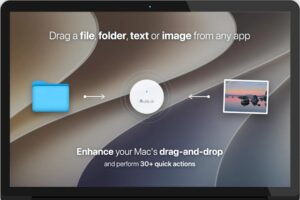
Filepane uses drag-and-drop as its core operation path. It supports dragging files, folders, images, and text content directly onto the software panel; the system automatically identifies the content type and displays the corresponding quick action entries. The interface is simple and restrained, free of redundant distractions, and focuses on completing high-frequency file operations in one step—greatly reducing operation costs and adapting to the pace of efficient office work.
## Full-Chain Image and PDF Processing
### Multi-Format Conversion
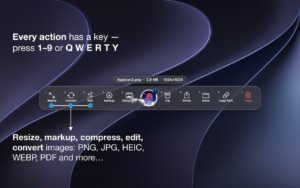
Supports bidirectional conversion among PNG, JPEG, TIFF, BMP, WEBP, HEIC, PDF, and other formats; it also supports batch export of PDF files to image formats such as PNG, JPEG, TIFF, and BMP, meeting diverse needs for format adaptation and asset reuse.
### Editing and Compression
Built-in image cropping, resizing, rotation, and freehand annotation features allow quick marking and modification of images and screenshots; image compression is provided to reduce file size as needed, suitable for web publishing, online transfer, storage reduction, and similar scenarios.
### PDF Processing
Supports annotation of PDF documents and one-click conversion of images and text documents to PDF format, quickly generating standardized, shareable documents.
## Efficient File Management and Transfer
### Custom Quick Target Folders
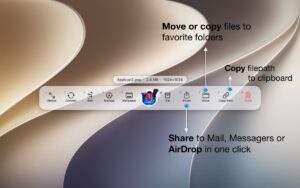
Allows users to preset a list of frequently used target folders; after dragging a file, one click completes copy or move operations. Quickly organize scattered desktop files and say goodbye to the tedious process of repeatedly opening nested folders—desktop cleanup efficiency is greatly improved.
### Quick File Information Retrieval
One-click copy of file size and full path to the clipboard, meeting office needs such as file information labeling, path retrieval, and file archiving registration.
### Quick File Creation
Create folders, RTF/TXT text documents, Word documents, and Excel spreadsheets directly in a specified location—no need for multi-level right-click menus, making the creation process more efficient.
## Dedicated Text and Document Tools
### Text Statistics
Built-in professional word and character count tool; drag selected text to quickly view statistics such as word count and character count, suitable for copy verification, content layout, and similar scenarios.
### Document Format Conversion
Supports one-click conversion of RTF and TXT text documents to PDF format, quickly generating standardized output documents without opening professional software.
### Multiple Export Options
Provides multiple export options for selected highlighted text, flexibly adapting to different needs for content reuse and asset organization.
## More Practical Quick Capabilities
– **Quick Desktop Wallpaper Setting**: Directly set dragged images as desktop wallpapers; also supports storing frequently used wallpaper assets for easier wallpaper switching.
– **One-Click Multi-Channel Sharing**: Built-in sharing channels such as email, social platforms, and AirDrop; drag content to quickly initiate sharing without switching to the corresponding app.
– Full-Scenario Coverage: Over 30 quick file operations in total, covering high-frequency file processing scenarios in daily desktop office work. Through minimalist drag-and-drop interaction, desktop file processing efficiency is comprehensively improved.
Version 2.0.12 Update Details:
New “Action Chains” feature (beta)
Now you can string multiple steps into a “chain” (e.g., resize to 1600 › convert to WebP › move). After dragging in a file, press one key to complete it all.
How to use: After enabling a matching chain, a = icon appears in the action bar. Press = then the corresponding number to run it.
Management: Create and adjust the order in “Settings – Chains”.
Flexible settings: Chain operations can be differentiated by file type and can specify output locations (next to the source file, the Shelf, or a specified fixed folder).
Sharing: Supports exporting/importing action chain files in .filepane format, all within the same tab.
Mini-Shelf
If the file shelf is not yet displayed, a mini drag-and-drop area now appears directly near the “Drag here” area. You can adjust this behavior in “Settings – General – Shelf”.
Rename Action
In “Settings – Actions bar” (or right-click the action bar > Visible Actions), you can enable the rename function for individual files. Because renaming is independent of file type, it has been moved to the right side of the action bar and supports direct triggering by pressing the Y key on the keyboard.
PDF Compression Optimization
A fine-tuning slider has been added between the “Light/Medium/Strong” levels for smoother transitions. In addition, “Light” mode now compresses more gently.
Software Screenshots:

FSNotes for Mac v7.3.4 Modern Note Management App Chinese Activated Download
Downloads:0 | 2026-10-19

PDF Squeezer 4 for Mac v4.9 Lightweight PDF Compression Tool Chinese Activated Version Download
Downloads:0 | 2026-10-19

Keep It for Mac v2.9.3 Notebook and Document Organizer Activated Version Download
Downloads:1024 | 2026-10-19

Microsoft Office 2024 for Mac v16.107.4 Office Suite Chinese Activated Version Download
Downloads:3797 | 2026-10-18


Ratings & reviews
No rating
Let’s rate it.