

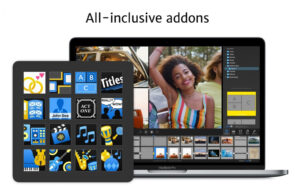
FotoMagico 6 for Mac v6.11 Professional Slideshow Creation Tool Activated Version Download
FotoMagico is a professional-grade multimedia slideshow creation and presentation tool, focused on transforming static photos and video materials into dynamic narrative works with a cinematic feel. It balances efficient creation and fine polishing, allowing real-time preview at full resolution without waiting for rendering. With a layered editing system, professional camera animations, a multi-track audio system, and rich preset components, it can quickly produce exquisite digital photo albums and also meet the high-standard needs of professional scenarios such as business presentations and live performances.
Core Features:
### Dual-mode Creation Workflow
– **Storyboard Mode**: Centered on drag-and-drop slide arrangement, quickly organize material order and build a story framework. Suitable for early creative planning and overall structure adjustment, with intuitive and efficient operation.
– **Timeline Mode**: Supports frame-by-frame fine-tuning of individual slide duration, transition rhythm, and audio synchronization. Tracks can be expanded/collapsed to fit different screen sizes, suitable for later detail polishing and precise timing control.
– **Chapter Management**: Supports splitting slides into multiple logical chapters, with color marking for chapters, facilitating quick navigation and structure management in long projects.
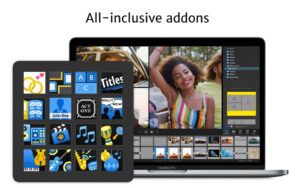
– **Preset Snippets**: Built-in reusable preset components such as intros, transitions, and layouts. Insert with one click to quickly generate professional effects, greatly improving creation efficiency.
### Multi-layer Visual Creation System
– **6-layer Track Editing**: A single slide supports up to 6 layers of materials, allowing free combination of images, videos, text, maps, and other elements to achieve rich visual layering and creative expression.
– **Masks and Transparency**: Supports layer masking, allowing free control of partial transparency effects on layers, achieving advanced visual effects such as image blending and irregular cropping.
– **Image Color Optimization**: Built-in high-quality image effects such as color correction, black and white, sepia, and vignette, unifying the color tone style and enhancing the final output quality.
– **Professional Text System**: Supports multi-format text layers, customizable fonts, styles, layout, and animation effects, and supports reading image metadata to automatically fill text information.
### Cinematic Animation and Transitions
– **Ken Burns Camera Effects**: Classic pan and zoom camera animations, customizable motion paths, zoom rhythm, and speed curves, giving static photos a smooth cinematic camera movement feel.
– **Custom Keyframe Animation**: Supports setting keyframes for layer properties such as position, scale, rotation, and opacity, combined with speed curve adjustment, achieving delicate custom animation effects.
– **Rich Transition Effects**: Built-in multiple professional transition effects, applicable between slides with one click, supporting custom transition duration for natural and smooth connections.
– **Real-time Render-free Preview**: Full-resolution real-time playback preview throughout, with instant presentation of modifications, no need to wait for rendering output, suitable for on-site temporary adjustments.
### Three-track Audio Processing System
– **Multi-track Audio Editing**: Independent background music, sound effects, and voiceover audio tracks, each with manageable duration, volume, and playback rhythm. Audio can continue playing across multiple slides.
– **Rich Audio Materials**: Supports importing audio from local music libraries, and includes built-in royalty-free music clips that can be directly paired with slides as background music.
– **Precise Audio-Visual Synchronization**: In timeline mode, audio and visual nodes can be intuitively aligned, achieving precise matching of voiceover, sound effects, and visual animations.
### All-format Material Compatibility Management
– **Diverse Media Support**: Fully compatible with mainstream image formats such as JPEG, PNG, TIFF, HEIC, and RAW, and supports importing various video materials, allowing flexible editing of video clips like images.
– **Integrated Media Browser**: Built-in media browser for direct access to local photo libraries, local storage, iCloud, Google Drive, and other sources, with drag-and-drop without switching windows.
– **Smart Material Adaptation**: Imported materials automatically adapt to slide size and frame rate, without manual parameter adjustment, maintaining consistent visual presentation.
### Immersive Live Presentation
– **Full-resolution Real-time Playback**: One-click full-screen presentation mode, smooth playback at native full resolution, no compression, no rendering wait, presenting the best image quality.
– **Multi-screen Output Support**: Presentation can be output to external monitors, projectors, and other devices via wired connection or AirPlay, suitable for live performances, conference reports, and other scenarios.
– **Interactive Playback Control**: Supports free jumping, pausing, and page switching during playback, flexibly responding to on-site rhythm for interactive presentations.
### Full-scenario Export and Sharing
– **Ultra HD Output**: Supports export at HD, 4K, and even 8K ultra-high resolutions, limited only by hardware performance, meeting image quality requirements of different platforms.
– **Multi-format Export**: Can export to multiple mainstream video formats, adapting to different needs such as video platform uploads and offline distribution.
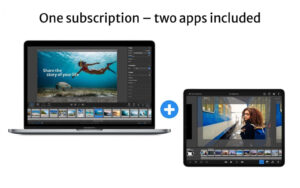
– **Cross-device Project Interoperability**: Project files can be migrated and edited across multiple devices, with seamless creation progress, suitable for multi-device collaborative work scenarios.
### Efficient Creation Auxiliary Tools
– **Animation Assistant**: Built-in animation auxiliary tool to quickly generate standardized camera movement effects, lowering the threshold for professional animation production.
– **Missing Resource Alerts**: Automatically detects missing fonts and missing materials when opening projects and provides prompts, facilitating project migration and material completion.
– **Size Optimization Management**: Automatically cleans redundant cache files, controls project size, and reduces disk space usage.
Version 6.11 Updates:
– Shared slide variants are now more reliable when excluded chapters contain audio tracks that end just before the next included chapter begins.
– Sharing slide variants containing audio tracks that span across “excluded” and “included” chapters is now also more stable and reliable.
– Fixed an issue that could cause a crash when rendering audio waveforms in timeline view.
– Fixed a crash that could occur when using the media browser.
– Dragging media files that have been removed from the cloud from the browser to the storyboard now shows a useful download progress bar.
– Various stability improvements.
Software Screenshots:
This resource requires login to download
Log in
Filepane for Mac v2.0.12 – Extended Drag-and-Drop File Management, Chinese Activated Version Download
Downloads:0 | 2026-10-19

FSNotes for Mac v7.3.4 Modern Note Management App Chinese Activated Download
Downloads:0 | 2026-10-19
Keep It for Mac v2.9.3 Notebook and Document Organizer Activated Version Download
Downloads:1024 | 2026-10-19

Microsoft Office 2024 for Mac v16.107.4 Office Suite Chinese Activated Version Download
Downloads:3797 | 2026-10-18


Ratings & reviews
No rating
Let’s rate it.